Preview

Description
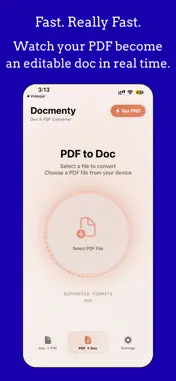
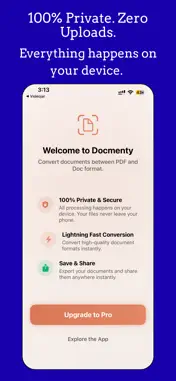
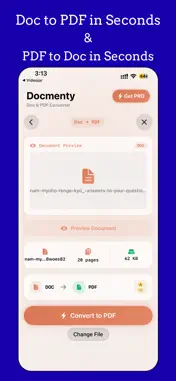
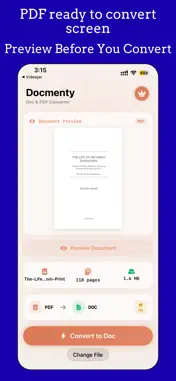
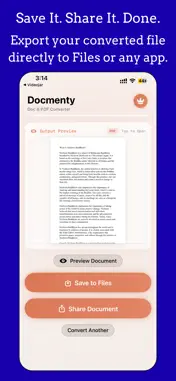
Docmenty is the private Word and PDF converter built for iPhone. Convert documents on this device—no cloud upload, no account required to start converting and previewing your files. CONVERT WORD TO PDF Turn DOC, DOCX, RTF, and TXT into clean, share-ready PDFs. Ideal for contracts, resumes, reports, school papers, and client documents you need as a universal PDF. CONVERT PDF TO WORD Open PDFs and create editable Word documents on your iPhone. Scanned PDFs use Apple Vision Neural OCR on-device so text can be extracted and reconstructed without sending pages to a server. PREVIEW BEFORE YOU COMMIT Convert, then open a secure in-app preview. Check layout, pages, and output quality before you unlock save or share. Try the result first—Pro unlocks export when you’re ready. 100% ON-DEVICE PRIVACY Your files stay on your iPhone. Docmenty is built for confidential work: legal forms, HR paperwork, medical notes, business proposals, and personal documents you do not want uploaded. PRO: SAVE, SHARE & EXPORT When the conversion looks right, Pro unlocks: • Save to Files and iCloud Drive • Share via AirDrop, Mail, Messages, and more • Export finished PDFs and Word docs anywhere you need them Preview stays available so you can verify quality. Save, share, and export require a Pro subscription. BUILT FOR REAL WORKFLOWS • Word → PDF and PDF → Word in one focused app • High-quality conversion on Apple silicon • Neural OCR for scanned and image-based PDFs • Document thumbnails and full in-app preview • Conversion history kept on this device • Run longer jobs in the background • Light, Dark, and System appearance WHO IT’S FOR Students, freelancers, lawyers, recruiters, and anyone who needs a fast PDF converter or Word converter without giving up privacy. If you search for PDF to Word, Word to PDF, DOCX to PDF, scan to Word, or private document converter—Docmenty is built for that job. WHY DOCMENTY Authority you can feel: Apple Vision and on-device processing—not a mystery web server. Reciprocity you can try: convert and preview first, then unlock Pro when the file is worth keeping. Social proof of the formats people actually use: PDF, DOC, DOCX for work that has to look right. Commitment without risk: check the output in preview before you save or share. Scarcity of trust: once a confidential file leaves your phone, you can’t take it back—Docmenty keeps conversion local. SUBSCRIPTION (PRO) Pro unlocks save, share, and export. Plans may include Weekly and Annual options, billed through your Apple ID. Manage or cancel anytime in Settings → Apple ID → Subscriptions. Payment is charged to your Apple ID at confirmation. Auto-renewal can be turned off at least 24 hours before the period ends. Privacy Policy: https://1kbapps.com/docmenty/ Terms of Use (EULA): https://www.apple.com/legal/internet-services/itunes/dev/stdeula/ Download Docmenty and convert Word and PDF privately on your iPhone—preview with confidence, then go Pro to save, share, and export.
What's New
Version 4.0 2026-08-15
Docmenty 5.0 — a clearer, faster private converter. • Refined Word ↔ PDF conversion flow • Smoother on-device Neural OCR for scanned PDFs • Improved document p...Docmenty 5.0 — a clearer, faster private converter. • Refined Word ↔ PDF conversion flow • Smoother on-device Neural OCR for scanned PDFs • Improved document preview and result screens • Polished history, settings, and navigation • Performance and stability improvements throughout Convert and preview on your iPhone. Pro unlocks save, share, and export. Thank you for using Docmenty. Technical Analysis
Package Overview Basic metadata
Bundle ID
com.1kbapps.pdfwordpdf Current Version 4.0
Minimum iOS 17.0
Package Size App Store Size
Package Metadata 0 / 6 version records
Detailed binary, privacy manifest, framework, and Info.plist results have not been indexed for this package yet. The verified App Store and archive metadata above remains available.
Developer Information
Known Version Records
0 version records with stored package metadata • 6 known version records
Stored metadata does not guarantee a package is currently available to download.
| Details | Version / IDs | Version date | Action |
|---|---|---|---|
| Not archived | App Store ID: 889802079 | Unknown | Request Version |
| Not archived | App Store ID: 883330991 | Unknown | Request Version |
| Not archived | App Store ID: 882193779 | Unknown | Request Version |
| Not archived | App Store ID: 881972062 | Unknown | Request Version |
| Not archived | App Store ID: 881284910 | Unknown | Request Version |
| Not archived | App Store ID: 881024443 | Unknown | Request Version |