
Preview






Description
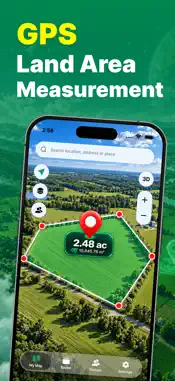
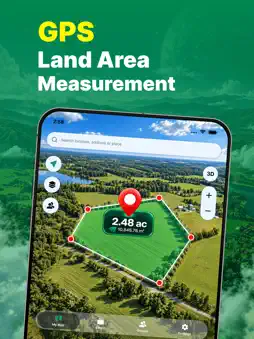
GPS Area Measure – Land & Distance Measure land, fields, property, distance, radius, and locations directly on the map with GPS Area Measure. GPS Area Measure is a simple and practical mapping tool designed to help you measure areas and distances using an interactive map. Whether you are working with farmland, property, construction sites, outdoor spaces, routes, or personal projects, you can create measurements and keep them organized in one place.
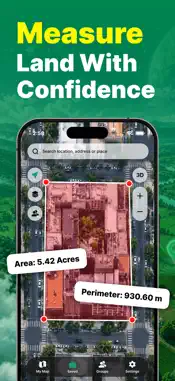
MEASURE LAND & FIELD AREA Mark multiple points around a field, plot, property, or outdoor space to calculate its area and perimeter. Adjust measurement points directly on the map and view the calculated results instantly. Choose from multiple area units, including: - Square Meters - Square Feet - Square Yards - Square Kilometers - Square Miles - Acres - Hectares Select the unit that works best for your land or project.
DISTANCE MEASUREMENT Measure the distance between multiple points on the map. Add points along a route, path, field boundary, or property line and view the total measured distance. You can also review individual segments between measurement points, making it useful for routes, boundaries, outdoor planning, and property measurements.
RADIUS MEASUREMENT Select a location and create a circular measurement around it. Adjust the radius directly on the map and view useful information such as: - Radius - Circumference - Area This provides a simple way to measure circular spaces and surrounding areas.
DROP LOCATION MARKERS Place markers on the map to save important locations. View latitude and longitude coordinates for selected points and easily copy coordinates when needed. Use markers for fields, properties, project sites, saved locations, or other places you want to remember.
MULTIPLE MAP MODES View locations using different map styles: - Standard - Satellite - Hybrid - Terrain Switch between map modes to get the view that works best for the area you are measuring.
GPS LOCATION Use your device's location to quickly find your current position on the map and begin measuring nearby areas. You can also search for a location, address, or place to start measurements in another area.
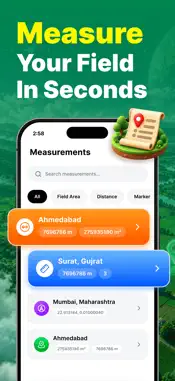
SAVE YOUR MEASUREMENTS Save your measurements and access them again whenever needed. Add useful information to each measurement, including: - Custom Name - Color - Notes - Photos - Group Review saved measurements along with their calculated details, points, coordinates, and other information.
ORGANIZE WITH GROUPS Create custom groups to keep measurements organized. Groups can be used for different projects or purposes such as Farms & Fields, Property Surveys, Construction Sites, Saved Locations, or your own custom categories. Choose a group name and color to make important measurements easier to find.
SEARCH, FILTER & SORT Quickly search your saved measurements and filter them by measurement type. Sort measurements by newest, oldest, largest, smallest, or name to easily find the information you need.
DETAILED MEASUREMENT RESULTS Open saved measurements to review detailed information such as: - Area & Perimeter - Total Distance - Distance Segments - Radius & Circumference - Latitude & Longitude - Measurement Points - Notes & Photos - Created Date
SIMPLE MEASUREMENT WORKFLOW Start measuring in just a few steps: 1. Tap New Measurement 2. Choose Field Area, Distance, Marker, or Radius 3. Position measurement points on the map 4. Review the calculated result 5. Add a name, notes, photos, or group 6. Save your measurement
Measure areas, calculate distances, save locations, and organize your projects with GPS Area Measure. Subscription Plans Monthly: $9.99/month Yearly: $49.99/year Special Yearly Offer: $24.99/year Choose the plan that works best for you and enjoy full access to the app’s features. Privacy Policy: https://sites.google.com/view/gpsareameasure/home Terms of Use: https://www.apple.com/legal/internet-services/itunes/dev/stdeula/
What's New
Version 1.0.2 2026-10-28
- Improved app performance Technical Analysis
Package Overview Basic metadata
Bundle ID
com.gpsmasurment.areameasure.mapditantace Current Version 1.0.2
Minimum iOS 15
Package Size App Store Size
Package Metadata 0 / 2 version records
Detailed binary, privacy manifest, framework, and Info.plist results have not been indexed for this package yet. The verified App Store and archive metadata above remains available.
Developer Information
Known Version Records
0 version records with stored package metadata • 2 known version records
Stored metadata does not guarantee a package is currently available to download.
| Details | Version / IDs | Version date | Action |
|---|---|---|---|
| Not archived | App Store ID: 893994470 | Unknown | Request Version |
| Not archived | App Store ID: 891905147 | Unknown | Request Version |