
Preview






Description
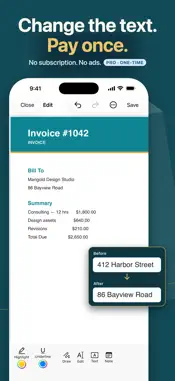
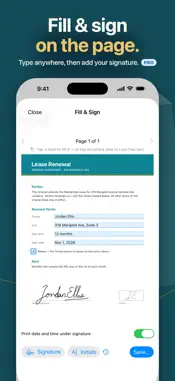
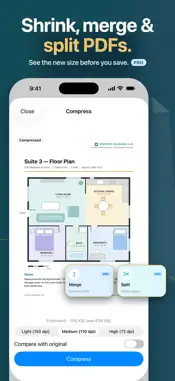
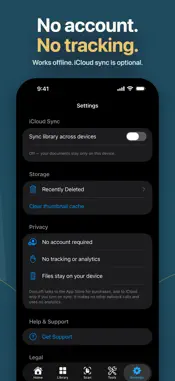
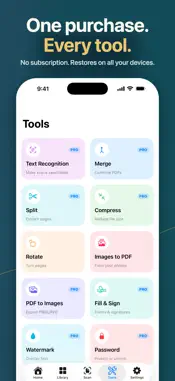
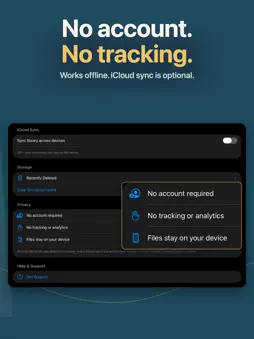
Scan paper into clean PDFs, change words that are already on the page, fill and sign forms, and redact what others shouldn't see. Unlock it all with one purchase: no subscription, no account, no ads. SCAN PAPER INTO CLEAN PDFS • Automatic edge detection with the built-in document camera • Enhanced, Grayscale and Black & White modes, with shadow removal for real-world lighting • Capture many pages into one document, then reorder or remove pages before you save • Turn photos into upright, page-sized PDFs at full resolution FIND ANY WORD, EVEN IN A SCAN • On-device text recognition makes scans searchable and selectable • Recognized text keeps its reading order, and you can correct it before saving • Search highlights line up with the words on the page • Search document titles and text from the Home tab: a new scan's first 3 pages right away, and its full text after Text Recognition CHANGE THE TEXT ON THE PAGE • Select a word or number and type a replacement, drawn in a closely matching font and color • The original text stays in the file's hidden text layer; use Redact when it must be gone • Highlight, underline, draw with Apple Pencil or your finger, and add text boxes, notes and images • Insert, reorder, rotate and delete pages • Undo and redo your changes FILL & SIGN • Fill form fields right on the page, or type anywhere on a flat scan • Draw your signature or take a photo of it, and add initials • Signatures and initials are saved exactly as you place them • Optionally print the date and time under your signature • Save signatures to reuse on future documents REDACTION THAT REALLY REMOVES • What you mark is deleted from the file, not just covered up • Marked pages are flattened to images, so their other text is no longer searchable • Review the saved copy before you share it ON-DEVICE AI WITH APPLE INTELLIGENCE • Summarize a document into a headline and key points • Pull out dates, totals, names and reference numbers • Get a suggested title for any document, including scans • Requires iOS 26 or later on an iPhone or iPad that supports Apple Intelligence, with it turned on. Runs on your device; nothing is uploaded. PDF TOOLS IN ONE PLACE • Merge and split documents • Compress large files, and compare the result with the original before you save • Watermarks, headers, footers and page numbers, with a live preview • Export pages as PNG or JPEG • Add a password, or remove one you know • Read aloud and a dark reading mode • Folders and favorites keep everything organized PRIVATE BY DESIGN • No sign-in, no ads, no tracking, no analytics • Scanning, editing, text recognition and AI all run on your device • Optional iCloud sync uses your own private iCloud • Share files into DocLoft from other apps, or open PDFs straight from Files WHAT'S INCLUDED Without Pro, you can open and read PDFs, scan up to 3 pages per document, turn up to 3 photos into a PDF, rotate pages, highlight and underline, search, read aloud, use dark mode, sort documents into folders and favorites, sync with iCloud and share. DocLoft Pro is a single one-time in-app purchase that unlocks everything else: unlimited scanning, text recognition, text editing and full markup, fill & sign, redaction, password protection, merge, split, compress, watermarks, headers and footers, PDF to images, and AI actions (on devices that support Apple Intelligence). It restores at no cost on every device signed in with your Apple Account. No subscription and no recurring fees. Made for iPhone and iPad, and for anyone with paperwork: contracts, leases, receipts, invoices, forms, tax records and school documents. Note: DocLoft applies your signature as an image and can print a signing time from your device. It does not verify anyone's identity and is not a certified electronic signature service.
What's New
Version 1.0.2 2026-11-10
Find and Read aloud now cover every page of a scan, you can add pages to a scan before you save it, DocLoft works better with VoiceOver, Larger Text and Dark Mo...Find and Read aloud now cover every page of a scan, you can add pages to a scan before you save it, DocLoft works better with VoiceOver, Larger Text and Dark Mode, and closing the DocLoft Pro screen no longer closes what you were working on. FIND AND READ ALOUD • Find now checks every page of a scan, including pages you haven't scrolled to, and takes you to the word. "No matches" appears only once every page has been checked • Find also reads scans that have a signature, typed text or a watermark added on top • Read aloud now reads a whole scan through to its last page, and keeps each amount with its label on simple invoices SCANNING • Review Scan has Add Pages: scan more pages with the camera, or choose them from Photos in the order you pick them • If none of the photos you choose can be opened, DocLoft now says so instead of doing nothing SHARING AND OPENING FILES • DocLoft now appears in the share sheet only for PDFs and images it can open, not for Word files, zips and other files it would turn away • If a file opened in DocLoft can't be imported, DocLoft now tells you why ACCESSIBILITY • VoiceOver now names buttons that had no name, such as undo and redo, page arrows and color choices, and says which page, folder or option is selected • Onboarding, Terms, the Scan tab and Redact now wrap or scroll at the largest text sizes instead of cutting text off, and on iPhone, Library and Tools switch to one column • The welcome illustrations follow Dark Mode • The welcome pages, new pages in Review Scan and the Rotate preview no longer animate when Reduce Motion is on • Larger tap targets for small buttons such as Skip, Restore Purchases and the text-formatting bar FILL & SIGN • Text typed into form fields is now readable in Dark Mode; it was drawn white on the white page DOCLOFT PRO • Closing the Pro screen no longer also closes Review Scan, the editor or Images to PDF, so you can carry on where you were • You can now get DocLoft Pro straight from its App Store page APPLE INTELLIGENCE • The DocLoft Pro screen now says when AI actions won't work on your device, and iPhones and iPads that can't run them are told so before buying • Suggest title no longer fails when the title it comes up with runs long; it is shortened instead • Automatic names for new scans work more often for the same reason Enjoying DocLoft? You can now rate it from Settings, and a rating helps other people find it. Technical Analysis
Package Overview Basic metadata
Bundle ID
Verntro-Labs.DocLoft Current Version 1.0.2
Minimum iOS 17.0
Package Size App Store Size
Package Metadata 0 / 0 version records
Detailed binary, privacy manifest, framework, and Info.plist results have not been indexed for this package yet. The verified App Store and archive metadata above remains available.
Developer Information
Known Version Records
0 version records with stored package metadata
Stored metadata does not guarantee a package is currently available to download.
| Details | Version / IDs | Version date | Action |
|---|