Preview






Description
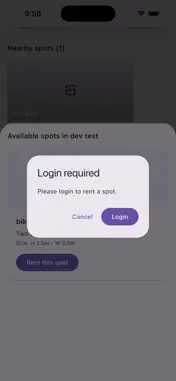
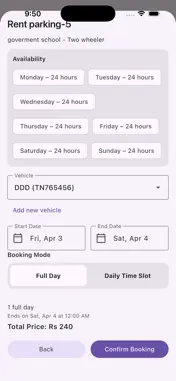
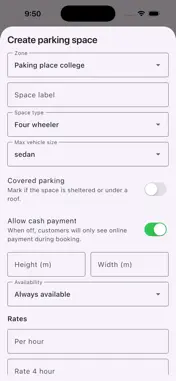
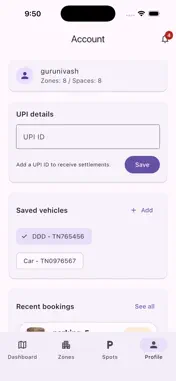
Are you in a big city trying to find a parking space? or Are you looking to rent out a parking space? We are here to help you with that, with our app you can find and rent out parking spots with ease. Here is a list of our app features: 1. Find Near-by Parking Spots.(Available without login) 2. View Parking Zones and Spot Details. (Available without login) 3. Book Parking Spots.(Login required) 4. Create Parking Zone.(Login required) 5. Rent out Parking Space.(Login required) 6. QR-based Check-In and Check-Out.(Login required) 7. Steps to Delete Account. Using the App Without Login (Guest Mode): You can now use some features without creating an account, such as: 1. View your current location on the map 2. View nearby parking zones 3. View available parking spots inside each zone 4. View spot details such as price, type, and size When you try to rent a spot, add a vehicle, or access profile features, the app will show a login popup. Simply follow these steps to book an parking spot: 1. Sign up 2. Once signed up, tap on location icon 3. List of parking zones will appear in nearby spots 4. Tap on view spot in any zones 5. Select one of the spot in zones 6. Add vehicle and select hours or days 7. Make payment or use cash booking and confirm the booking spot. 8. Tap on the Profile icon and go to My Bookings 9. Click Check-In and complete the process 10. After booking end time or when leaving, click Check-Out 11. Complete the check-out process 12. Added in-app notifications for remainder and extention booking 13. Your booking will be completed successfully Follow these steps to create parking zone: 1. Tap on zones 2. Tap on plus (+) icon in upper corner 3. Provide the list of information in those fields 4. Click create button to create a zone 5. Zones can update and delete also in zones page. Follow these steps to create parking spots: 1. Tap on spots 2. Tap on plus (+) icon in upper corner 3. Provide the list of information in those fields 4. Click create button to create a parking spot 5. Spots can update in spots page 6. Spots can filter by clicking those zone and type dropdowns. Follow these steps to delete an account: 1. Log into your account 2. Tap on profile 3. Tap on delete account 4. Tap on delete in alert popup 5. Then the whole user data will we removed.
What's New
Version 2.0.0 2026-04-07
This version introduces QR-based Check-In and Check-Out for a more secure and seamless parking experience. What’s new: • QR code scanning for parking check-in...This version introduces QR-based Check-In and Check-Out for a more secure and seamless parking experience. What’s new: • QR code scanning for parking check-in and check-out • Improved booking and navigation experience • Better management of parking zones and spots • UI enhancements and performance improvements • Minor bug fixes Technical Analysis
Package Overview Basic metadata
Bundle ID
com.parkidam.parkingapp Current Version 2.0.0
Minimum iOS 15
Package Size App Store Size
Package Metadata 0 / 2 version records
Detailed binary, privacy manifest, framework, and Info.plist results have not been indexed for this package yet. The verified App Store and archive metadata above remains available.
Developer Information
Known Version Records
0 version records with stored package metadata • 2 known version records
Stored metadata does not guarantee a package is currently available to download.
| Details | Version / IDs | Version date | Action |
|---|---|---|---|
| Not archived | App Store ID: 884085394 | Unknown | Request Version |
| Not archived | App Store ID: 879769810 | Unknown | Request Version |