Preview



Description
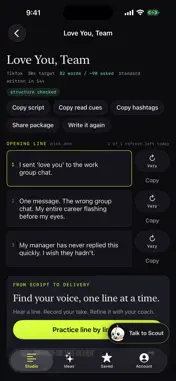
ScriptSeen writes short-form video scripts that are meant to be said out loud, then helps you deliver them. Start with your idea or explore a video format. Choose your audience, platform (TikTok, Instagram Reels or YouTube Shorts), target length, video kind and goal. Claude Sonnet writes takes and product pitches; Claude Opus writes stories, skits and how-tos. Get three opening lines, a spoken script, visual direction, delivery notes and hashtags. Vary an opening, rewrite a section from a note, or try another ending. Talk to Scout to shape a brief or edit a finished script by voice. Ask it to rewrite a section, change named words, read back an edit or undo it. Move into practice or the teleprompter in the same journey, up to 20 minutes. Read cues mark emphasis, breaths and pauses. Hear a reference read while a pointer follows the words. Practise complete lines or natural phrases and hide words gradually. Record a take after a three-second count-in and get feedback on pace, pauses and emphasis. Reopen feedback without using another coached take. The teleprompter follows your chosen reading pace or your voice and keeps recording while you finish the last line. Choose On camera to record a talking-head video while reading. The teleprompter stays on your screen; the video contains only you and stays on your iPhone unless you save or share it. Coach feedback uses only its soundtrack, on request. Optional camera cues help Scout wait through thinking pauses and provide a brief camera-contact note. They are off by default and require camera permission on a supported iPhone. Frames are processed on your iPhone and never saved or uploaded. Aggregate face-visible and camera-contact percentages and a sample count may be shared with OpenAI. Audio-only coaching remains available. Before AI processing, ScriptSeen explains which providers receive your content and asks for permission. Review or withdraw it in Account > Privacy. Try one script, opening variation, reference read and coached take, plus one session on each live voice surface, per day without signing in. Sign in with Google or Apple for a free account and saved scripts. Free daily allowances include 3 scripts, 3 opening variations, 3 reference reads, 10 coached takes and 10 standalone live-coach sessions. ScriptSeen Pro includes 50 scripts, 50 opening variations, 30 reference reads, 100 coached takes and 30 sessions on each live voice surface per day, plus priority when busy. Daily allowances reset at midnight UTC. The same Google account shares your plan and saved scripts between the app and scriptseen.com. Payment is charged to your Apple ID at confirmation. The monthly subscription renews unless cancelled at least 24 hours before the current period ends. Manage or cancel in Settings > Apple ID > Subscriptions. Terms: https://scriptseen.com/terms Privacy: https://scriptseen.com/privacy#truedepth-face-data
What's New
Version 1.0.4 2026-11-02
A new writing team for your next take. • Claude Sonnet writes takes and product pitches; Claude Opus writes stories, skits and how-tos. • Opening variations an... Technical Analysis
Package Overview Basic metadata
Bundle ID
com.scriptseen.app Current Version 1.0.4
Minimum iOS 17.0
Package Size App Store Size
Package Metadata 0 / 0 version records
Detailed binary, privacy manifest, framework, and Info.plist results have not been indexed for this package yet. The verified App Store and archive metadata above remains available.
Developer Information
Known Version Records
0 version records with stored package metadata
Stored metadata does not guarantee a package is currently available to download.
| Details | Version / IDs | Version date | Action |
|---|