
Preview


Description
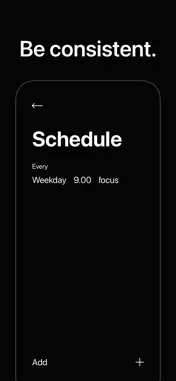
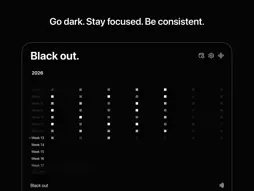
Black Out blocks distracting apps so you can focus on what matters. Create modes for work, exercise, reading, meditation - whatever demands your attention. Pick which apps to block, set a timer or go open-ended, and start your session by tapping an NFC tag. HOW IT WORKS 1. Create a mode and choose which apps to block — or block everything. 2. Assign an NFC tag to your mode. 3. Tap your tag to black out. Distracting apps are gone. 4. Timed sessions end automatically. Toggle sessions end when you tap again. That's it. No onboarding flow. No account. No daily tips. You set it up once and it works. FEATURES Modes Create as many focus modes as you need. One for deep work. One for the gym. One for reading before bed. Each mode remembers which apps to block, how long to run, and which NFC tag to use. NFC Tags Stick a tag on your desk, your bookshelf, your gym bag. Tap to start. The physical action of scanning a tag makes the commitment feel real. App Blocking Choose specific apps and categories to block, or block everything at once. Black Out uses Apple's Screen Time API — blocked apps are actually blocked, not just hidden behind a reminder you can dismiss. Timed & Toggle Sessions Set a duration and let the session end on its own, or use toggle mode to scan in and scan out whenever you're ready. Alerts Choose how you want to be notified when a timed session ends. Loud plays an alarm. Nudge gives a subtle vibration. Or choose none and let it end quietly. End Early Protection You get three early exits per day. After that, you're locked in until the session ends. Designed to keep you honest without being punishing. DESIGN Black and white. No gradients, no illustrations, no color. The interface stays out of your way because the whole point is to stop looking at your phone. PRIVACY Black Out does not collect any data. Your modes, sessions, and app selections stay on your device. There is no server. There is no account. Nothing leaves your phone. SCREEN TIME ACCESS Black Out uses Apple's Screen Time API (Family Controls) to block apps. You'll be asked to grant access on first launch. This is the same system parents use for parental controls — it's built into iOS and managed entirely by Apple. Black Out is free. No ads. No subscriptions. No in-app purchases.
Technical Analysis
Package Overview Basic metadata
Bundle ID
me.valters.black-out Current Version 1.0
Minimum iOS 18.6
Package Size App Store Size
Package Metadata 0 / 1 version records
Detailed binary, privacy manifest, framework, and Info.plist results have not been indexed for this package yet. The verified App Store and archive metadata above remains available.
Developer Information
Known Version Records
0 version records with stored package metadata • 1 known version records
Stored metadata does not guarantee a package is currently available to download.
| Details | Version / IDs | Version date | Action |
|---|---|---|---|
| Not archived | App Store ID: 883452594 | Unknown | Request Version |