
Preview



Description
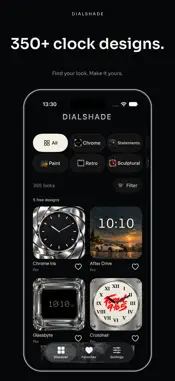
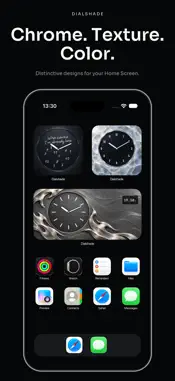
Your time. Your look. Make the clock on your iPhone or iPad a design statement. Dialshade brings together over 350 analog, digital and hybrid clock designs, from liquid chrome and dark metal to painterly textures, sculptural shapes and typographic statements. MADE FOR YOUR HOME SCREEN • Small and Medium widgets for different layouts. • Collections including Chrome, Statements, Paint, Sculptural, Iced and Noir. • Depending on the design, adjust accent colors, material brightness, date, seconds and 12/24-hour time. • Keep your favorites and save your own named looks. • Give each widget a different saved look. • Open an individual clock inside the app. EASY TO SET UP Choose a design, customize it and save your look. Add a Dialshade widget to your Home Screen, then select your saved look. An in-app guide walks you through the steps. START FOR FREE Five designs are free to use. Dialshade Pro unlocks the complete catalog through a monthly or annual subscription, or a one-time purchase. Prices and any available trial offers are shown before purchase. No separate account required. Your favorites and saved looks stay locally on your device. No ads in the app. PLEASE NOTE Available options vary by design. iOS and iPadOS manage widget updates and system appearance; seconds displays may be limited by system and power-saving settings. Requires an iPhone running iOS 18 or later, or an iPad running iPadOS 18 or later. Subscriptions renew automatically unless canceled at least 24 hours before the current period ends. Manage subscriptions in your Apple Account settings. A one-time purchase does not automatically cancel an existing subscription. Privacy: https://dialshade.com/en/privacy/ Terms of Use (Apple EULA): https://www.apple.com/legal/internet-services/itunes/dev/stdeula/ Support: https://dialshade.com/en/support/
What's New
Version 1.1 2026-11-02
Over 350 clock designs are now available. Explore an expanded collection of analog, digital and hybrid styles, from chrome and dark metal to painted textures. S... Technical Analysis
Package Overview Basic metadata
Bundle ID
com.valentinspoth.dialshade.development Current Version 1.1
Minimum iOS 18.0
Package Size App Store Size
Package Metadata 0 / 0 version records
Detailed binary, privacy manifest, framework, and Info.plist results have not been indexed for this package yet. The verified App Store and archive metadata above remains available.
Developer Information
Known Version Records
0 version records with stored package metadata
Stored metadata does not guarantee a package is currently available to download.
| Details | Version / IDs | Version date | Action |
|---|