Preview







Description
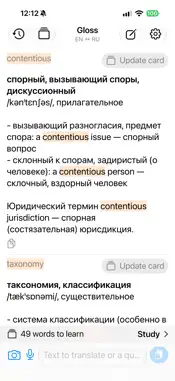
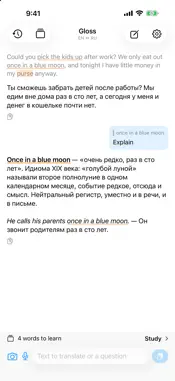
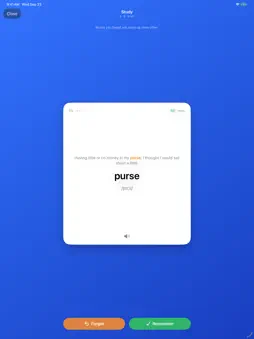
Gloss is a translator built for reading. It becomes your system translation app: select text in Books, Safari, Mail or any other app, tap Translate, and the translation streams in from the AI model you chose — with your own API key. A GLOSS IS A NOTE IN THE MARGIN Translation is only the start. Select a word or a phrase in the original or in the translation and tap Explain: you get the meaning, the nuances, the idiom behind it or the historical reference. Or tap Discuss and ask your own question — why this word and not that one, who the person mentioned is, what the pun means. ONE THREAD, FULL CONTEXT Everything you translate and ask goes into one conversation, so the model remembers the names, the terms and the style of what you are reading. Fragments from the system sheet and from the app share the same thread. DICTIONARY CARDS FOR SINGLE WORDS Translate one word and you get a compact card: the main translations, IPA transcription, meanings by frequency with examples, and the nuances worth knowing. FLASHCARDS FOR THE WORDS YOU MEET Tap “Add to cards” on any word and Gloss builds a card: the dictionary form (singular, infinitive), part of speech, IPA, translations, every verb form, examples and the CEFR level. Words with cards are highlighted in every translation — orange while you learn them, green once you know them. STUDY MODE Swipe through your cards: right if you remember, left if you forgot. Words you forget come back sooner; after enough correct swipes a card graduates to “learned”. Tap to flip, tap the speaker to hear the word. BRING YOUR OWN KEY Gloss works with Anthropic (Claude), OpenAI, Google Gemini, DeepSeek and xAI. Add a key for any of them, pick a model from the live list, and switch at any time. Keys live only in your device's Keychain; text goes straight from your phone to the provider. No accounts, no servers in between, no tracking. ALSO • Photo translation: point the camera at a page or pick a photo. Text is recognized on the device; only the text is sent. • Any language pair: set your language and the foreign one, the direction is detected automatically. • Editable prompt: tune how the model translates and explains. • History and threads stored locally. • Share sheet extension for apps without the system Translate item. Requires an API key from at least one provider. Usage is billed by the provider according to your plan with them.
What's New
Version 1.1.0 2026-10-07
Flashcards and study mode • Add any word, phrase or idiom to cards right from a translation. Cards come in dictionary form with part of speech, IPA, translation... Technical Analysis
Package Overview Basic metadata
Bundle ID
com.vlevitov.translator Current Version 1.1.0
Minimum iOS 18.4
Package Size App Store Size
Package Metadata 0 / 0 version records
Detailed binary, privacy manifest, framework, and Info.plist results have not been indexed for this package yet. The verified App Store and archive metadata above remains available.
Developer Information
Known Version Records
0 version records with stored package metadata
Stored metadata does not guarantee a package is currently available to download.
| Details | Version / IDs | Version date | Action |
|---|