Preview






Description
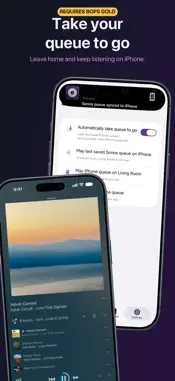
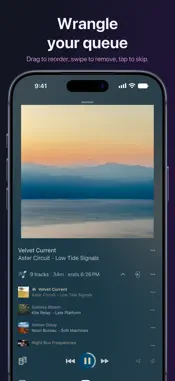
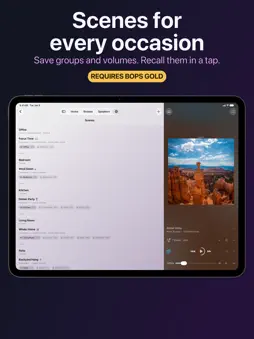
THE BEST WAY TO LISTEN TO APPLE MUSIC ON SONOS Also the most purple. Bops puts your Apple Music library, the catalog, your stations, and your recommendations on your Sonos speakers, in an app built around the music. You don't need Gold to browse and play Apple Music, on Sonos or on your device. Search your library and the catalog, then play albums, playlists, songs, and stations in any room. Like or dislike as you go, see favorites and ratings next to every song, and add albums and playlists to your library. DISCOVER MUSIC IN A NEW WAY Explore your library and recommendations on an infinite feed of album art inspired by crate digging at the record store. Double-tap to like, dislike, or unrate. With Gold: Follow record labels, artists, curators, and genres for a personalized feed of new releases and playlists. FAST AND LIVE ON YOUR SPEAKERS Bops talks to your speakers directly over your home network, so play, skip, volume, and groups respond right away, and changes show up the moment they happen. Apple Music streams straight to your speakers, lossless when possible, so the music keeps going when you leave or close Bops. KEEP THE MUSIC GOING When your queue ends, continue with Suggested Songs, your Personal or Discovery Station, the artist's station, or a Sonos Favorite, or add the rest of the album. EVERY ROOM JUST RIGHT Group rooms, set the volume, and play a line-in in any room. Tap the sliders in Now Playing for each room's Bass, Treble, Loudness, and Volume Limit, plus Night Sound, Speech Enhancement, Sub, Surrounds, and Height on speakers that have them. WHEN YOU LEAVE THE HOUSE Play Apple Music on your iPhone or iPad, on headphones, Bluetooth, AirPlay, or in the car. With Gold: Take your Sonos queue with you. INCLUDED WITH THE APP (NO GOLD REQUIRED) • Search, browse, and play Apple Music on Sonos, your device, or via AirPlay • Sonos controls on the Lock Screen and in Control Center • Manage groups, volume, mute, queues, sound settings, and room settings • Layouts for iPhone Duo, iPhone in landscape, and iPad windows of any size • Performance info for your Wi-Fi network and Sonos system • Native Liquid Glass experience GOLD FEATURES - REQUIRE IN-APP PURCHASE • Queue Sync: keep listening off Wi-Fi by syncing your Sonos queue to device — seamlessly switch between speakers and headphones • Queue tools: save to a playlist, shuffle or spread out the artists in what's next, remove duplicates or an artist, album, or genre, undo, and automatically remove what you've disliked • Recent Queues: restore your last 10 queues • Continue every queue automatically, with a default for each room • Animated album art on the Lock Screen while playing on Sonos (iOS 26 and later) • Colorways: tint Bops from any artwork, or what's playing • Sonos Scenes: Save and recall favorite room/volume presets from the app, Live Activities, or Shortcuts • Home feed following: releases and playlists from labels, artists, curators, and genres • Live Activity: adjust Sonos group volume and resume the last queue from lock screen and Apple Watch • Siri and Shortcuts: "Hey Siri, Bops volume" (iOS 26), playing links, and managing groups • Widgets and Control Center: quick access to volume, play/pause/next/previous/stop, apply Scene, and Sonos/device playback toggles • Advanced playback: custom controls for skipping ahead by album or artist NO ADS, NO PRODUCT RECOMMENDATIONS Designed by a music lover for music lovers. REQUIREMENTS • Active Apple Music subscription • iOS 18.6 or later • For Sonos: speakers on your Wi-Fi network, with Apple Music added in the Sonos app • Gold optional; core listening and Sonos control work without it Bops is developed by ur computering pal, LLC. Sonos is a trademark of Sonos, Inc. Apple Music is a trademark of Apple Inc. Bops is not endorsed by or associated with Apple or Sonos. Privacy Policy: https://www.bopsapp.com/privacy Terms of Service: https://www.apple.com/legal/internet-services/itunes/dev/stdeula/
What's New
Version 2026.11.0 2026-11-15
Bops now follows your Sonos speakers live, gives every room its own sound settings, and keeps the music going when your queue runs out, with new queue tools for...Bops now follows your Sonos speakers live, gives every room its own sound settings, and keeps the music going when your queue runs out, with new queue tools for Gold members. It's also ready for iPhone Duo, and easier on your battery. SONOS, LIVE • Changes from your speakers show up right away, with far fewer requests to them. If Now Playing or volume misbehaves, turn it off in Settings > General > Sonos connection. • Less battery: no polling in the background unless Bops is playing to Sonos. • Bops says why Sonos can't play a song you started. • The Lock Screen's Sonos controls work without Gold, show the right play state, seek when you drag, and come back after another app plays audio. SOUND SETTINGS FOR EVERY ROOM • Tap the sliders by the volume in Now Playing for each room's Bass, Treble, Loudness and Volume Limit, plus Night Sound, Speech Enhancement, Sub, Surrounds, Height, line-in and line-out on speakers that have them. • Rename rooms, and turn status lights and touch controls on or off, in Room Settings. KEEP THE MUSIC GOING When your queue ends, Bops can keep playing Suggested Songs, your Personal or Discovery Station, the artist's station, or a Sonos Favorite. Pick one from Continue in the queue's menu, where you can also add the rest of the album. With Gold, set a default for each room in Settings > Gold > Playback. QUEUE TOOLS FOR GOLD • Save the queue to a playlist, shuffle or spread out the artists in what's next, remove duplicates or an artist, album or genre, undo the last edit, and restore your last 10 queues. Clear Queue doesn't need Gold. • Apple Intelligence names Recent Queues for their music, and suggests a name when you save a playlist. • Auto-remove songs, albums and artists you disliked, plus Play After This Album, the queue's time left, and Shortcuts for these edits. IPHONE DUO, LANDSCAPE AND IPAD Now Playing, Home, albums and artists line up with the iPhone Duo's fold, put the artwork to one side in landscape on iPhone, and fit iPad windows as you resize them. ALSO NEW • Pay once for Gold on the upgrade sheet, instead of subscribing. • Play Now plays an album, playlist or song right away, and the rest of your queue follows. Shuffle Now does the same in random order. With songs queued, Play reads Replace Queue. • A new opening: Bops slides its record out of the sleeve. Hold it to scratch. • Animated album art on the Lock Screen while Bops plays on Sonos (Gold, iOS 26 and later). • Colorways (Gold) tint Bops from any artwork, or from what's playing. • Following on Home (Gold) shows new releases first, only those since you followed, and checks for more when you open Home. • Hold pause and drag to scrub. • Home keeps going as you scroll. • Top Songs on artist and genre pages. • After a break, Bops hides the last song and can switch to the room that's playing. • Favorites and ratings show by each song in albums, playlists and the queue. • The Speakers tab plays, pauses, skips, groups and sets the volume of every room, and plays a line-in, like a turntable, in any of them. BUG FIXES AND IMPROVEMENTS • On iOS 27, Shortcuts, Spotlight and Siri find Bops's shortcuts, and the music widget's play buttons (Gold) work. • When a queue ends, what you play or add next starts a new queue instead of playing after the finished one. • Editing a Sonos queue with radio or another service's songs no longer removes or moves the wrong song. • On Sonos, skipping no longer brings back the previous song's artwork, shuffle keeps repeat on, and play and pause don't flash back. • Playing on your iPhone starts sooner, and moving its queue to Sonos no longer adds a playlist to your library. • A room in another's group shows both names, like Kitchen (Bedroom +1). Swipe its volume row to leave the group. • Bops respects Reduce Motion throughout. • Fixed crashes with a quote or backslash in a room name, and when iOS starts Bops in the background. Technical Analysis
Package Overview Basic metadata
Bundle ID
com.urcomputeringpal.bops Current Version 2026.11.0
Minimum iOS 18.6
Package Size App Store Size
Package Metadata 1 / 4 version records
Detailed binary, privacy manifest, framework, and Info.plist results have not been indexed for this package yet. The verified App Store and archive metadata above remains available.
Developer Information
Known Version Records
1 version record with stored package metadata • 4 known version records
Stored metadata does not guarantee a package is currently available to download.
| Details | Version / IDs | Version date | Action |
|---|---|---|---|
| 66.05 MB | v2026.6.1 App Store ID: 880783428Build: 2026.6.1 | 2026-06-27 18:43:14 | Paid / Arcade |
| Not archived | App Store ID: 878774359 | Unknown | Paid / Arcade |
| Not archived | App Store ID: 878720272 | Unknown | Paid / Arcade |
| Not archived | App Store ID: 878633087 | Unknown | Paid / Arcade |