
Preview




Description
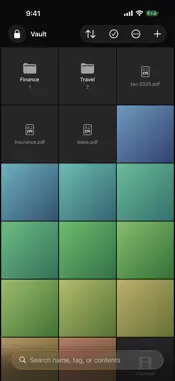
UniAuth Vault keeps private files private: encrypted on your device, and nowhere else. There is no account to create, no cloud to sync with, and no server to trust. Nothing you store ever leaves the device. The only network traffic the app makes is Apple’s own check of your purchase. ENCRYPTION THAT HOLDS • Every file is encrypted with AES-256-GCM before it touches disk • Your passphrase is combined with a key held in the Secure Enclave, so a copy of your vault is inert on any other device • Face ID or Touch ID releases the device key; your passphrase does the rest • Repeated wrong guesses are rate limited, and the counter survives a restart WHAT IT IS FOR • Photos and videos you would rather not leave in your camera roll • Passports, statements, contracts, records • Anything you want to hand over only when you choose to BUILT FOR REAL USE • Import from Files or Photos, and delete the originals if you ask it to • Folders, tags, and a Trash that holds deleted items before they are gone for good • Search by name or tag, and inside documents and images, with text recognition that runs on device • Grid or list, whichever suits what you are storing • Auto-lock after a period you choose, and locking when the app goes to the background NO RECOVERY, AND WE MEAN IT If you forget your passphrase, nobody can recover your files. Not us, not Apple. That is the point of it. Export an encrypted backup if you want a way back. PRIVACY UniAuth Vault collects nothing. No analytics, no advertising, no third-party code, and no server of ours for your files to sit on. FREE, AND PRO Encrypting, unlocking, importing and exporting an encrypted backup are free forever — nothing that protects your files or gets them back is behind a purchase. Pro is a single one-time unlock, covering Mac, iPhone and iPad on one Apple Account, and it adds unlimited items, search inside documents and images, and tags.
What's New
Version 1.0.2 2026-09-05
Fixes the Settings route into UniVault Pro. "View UniVault Pro..." and the switches under Settings > Search set out to open the purchase screen and opened nothi... Technical Analysis
Package Overview Basic metadata
Bundle ID
id.uniauth.vault Current Version 1.0.2
Minimum iOS 17.0
Package Size App Store Size
Package Metadata 0 / 0 version records
Detailed binary, privacy manifest, framework, and Info.plist results have not been indexed for this package yet. The verified App Store and archive metadata above remains available.
Developer Information
Known Version Records
0 version records with stored package metadata
Stored metadata does not guarantee a package is currently available to download.
| Details | Version / IDs | Version date | Action |
|---|