
Preview



Description
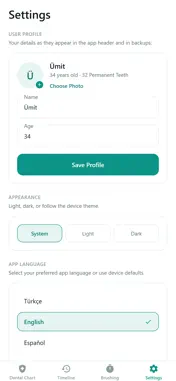
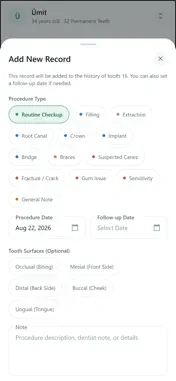
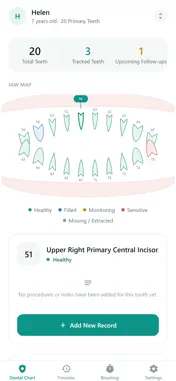
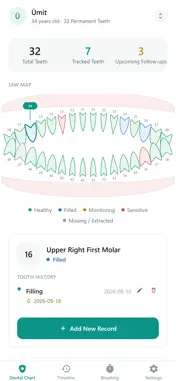
Teeth Timer keeps your oral health history on your own phone. Instead of trying to remember which tooth was treated and when, you see all of it on a single dental chart. DENTAL CHART A complete diagram for 32 permanent or 20 primary teeth. Tap a tooth to see everything recorded for it. Each tooth is coloured by status: healthy, filled, monitored, sensitive, missing. TREATMENT HISTORY Fillings, root canals, extractions, crowns, implants, bridges, braces, suspected cavities, gum problems and free-form notes. Record the date, the tooth surface and your own note. Entries can be edited or deleted later. FOLLOW-UP REMINDERS Attach a follow-up date to any record and your phone reminds you when it is due. No more forgotten check-ups. BRUSHING TIMER The two minutes dentists recommend, split into thirty seconds for each quadrant of your mouth. MULTIPLE PROFILES A separate profile for everyone in the family. For children, the primary-teeth chart is selected automatically by age. TWO NUMBERING SYSTEMS FDI (11–48) or Universal (#1–32). Switch to whichever your dentist uses. YOUR DATA STAYS YOURS No account, no sign-up, no cloud. Every record is stored only on your phone. Export a JSON backup whenever you want and move it to another device. Interface in English, Turkish, Spanish, German and French. Light and dark themes. This app is not a medical diagnostic or treatment tool. Records are for your own tracking only — see your dentist for diagnosis and treatment.
Technical Analysis
Package Overview Basic metadata
Bundle ID
com.umitkavala.teethtimer Current Version 1.0
Minimum iOS 15.1
Package Size App Store Size
Package Metadata 0 / 0 version records
Detailed binary, privacy manifest, framework, and Info.plist results have not been indexed for this package yet. The verified App Store and archive metadata above remains available.
Known Version Records
0 version records with stored package metadata
Stored metadata does not guarantee a package is currently available to download.
| Details | Version / IDs | Version date | Action |
|---|