
Preview



Description
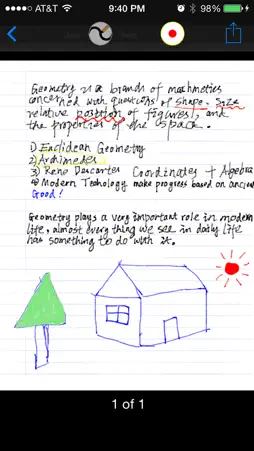
PdfNotes Pro is a notes-taking iOS universal app which provides the capability to make notes on PDF documents. It gives you the ability to take notes by handwriting and make your iOS device a magic notebook. It also enable you to read, annotate, print, manage, and share your notes and PDF files. Using PDF Notes Pro, it is simple to take notes and browse notes, sign a PDF document, annotate PDF documents, add bookmarks, highlight text, search text over all the pages, draw anything with a touch pen or just your finger. PdfNotes Pro has a simple but powerful built-in file management system, so it is very easy to import notes and PDF files into PDF Notes Pro or export them from PDF Notes Pro. Features: 1. Take handwriting notes 1) You can take handwriting notes directly on your iOS device with finger or stylus. 2) You can record audio while you are taking notes by handwriting. 3) The audio recorded is stored together with your handwriting notes so you can review your notes later against the audio. 4) You can zoom in to make more room for your handwriting. 5) You can erase any handwriting notes with the Eraser tool. 6) You can change color or line width of your handwriting. 7) Paper-like smooth and comfortable experience and process of notes-taking. 8) You can add handwriting notes into a PDF document. 9) You can access handwriting notes directly from a PDF document. 10) You can print handwriting notes onto paper via AirPlay-compatible printers. 11) You can turn handwriting notes into a PDF document. 12) Free style drawing 2. Annotate PDF documents 1) Write down notes on your PDF documents and browse them later. 2) Highlight text with different colors, and link text notes with it. 3) Underline text with different colors, and link text notes with it. 4) Squiggly text with different colors, and link text notes with it. 5) Strikeout text with different colors, and link text notes with it. 6) Add sticky notes. 7) Draw anything with a touch pen or just your finger, and link text notes with it. 8) Sign PDF documents. 9) Add bookmarks to remember the important pages. 10) Powerful full text search for your notes on the PDF document. 3. Read PDF Documents 1) Browse a PDF Document using its outlines and bookmarks. 2) Browse a PDF Document using its links. 3) Powerful but simple to use full text search helps you find any text in your PDF document quickly and easily. 4) Browse a PDF Document using the notes you have taken. 5) Open password-protected PDF documents with a valid password. 6) Browse a PDF Document using thumbnail view. 4. PDF document sharing 1) Open PDF files directly from your email. 2) Send out PDF documents by email. 3) Print PDF document with your notes via AirPrint. 4) Print PDF document without your notes via AirPrint. 5) Open PDF files directly from any other apps which provide the ability to open a PDF file in another app. 6) Provide the ability to open a PDF file in another app. 7) Download from Dropbox or upload into Dropbox. 8) Download from GoogleDrive or upload into GoogleDrive. 9) Download from Sky Drive or upload into Sky Drive. 10) Download from Box or upload into Box. 11) Send and receive PDF files via AirDrop from iOS Device nearby made in 2013 or later. 5. File Management 1) Create folder or delete folder. 2) Copy, move, and delete a PDF or notes file. 3) Rename a folder. 4) Rename a notes or PDF file. 5) Display number of files in a folder. 6) Display file size and last modified date for a file. 7) Display statistics of a notes or PDF document, such as last open time, current page, etc. 8) Provide unlimited depth for folders(you can create subfolder of unlimited sub level).
What's New
Version 1.0.10 2024-06-17
Updated for the latest iOS. Technical Analysis
Package Overview Basic metadata
Bundle ID
com.umatey.pdfnotespro Current Version 1.0.10
Minimum iOS 13.0
Package Size App Store Size
Package Metadata 0 / 11 version records
Detailed binary, privacy manifest, framework, and Info.plist results have not been indexed for this package yet. The verified App Store and archive metadata above remains available.
Known Version Records
0 version records with stored package metadata • 11 known version records
Stored metadata does not guarantee a package is currently available to download.
| Details | Version / IDs | Version date | Action |
|---|---|---|---|
| Not archived | App Store ID: 866312468 | Unknown | Paid / Arcade |
| Not archived | App Store ID: 837120695 | Unknown | Paid / Arcade |
| Not archived | App Store ID: 792952673 | Unknown | Paid / Arcade |
| Not archived | App Store ID: 695173282 | Unknown | Paid / Arcade |
| Not archived | App Store ID: 644822645 | Unknown | Paid / Arcade |
| Not archived | App Store ID: 588062651 | Unknown | Paid / Arcade |
| Not archived | App Store ID: 580872667 | Unknown | Paid / Arcade |
| Not archived | App Store ID: 561582813 | Unknown | Paid / Arcade |
| Not archived | App Store ID: 555382631 | Unknown | Paid / Arcade |
| Not archived | App Store ID: 531342636 | Unknown | Paid / Arcade |
| Not archived | App Store ID: 514262632 | Unknown | Paid / Arcade |