
Preview






Description
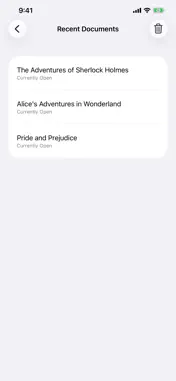
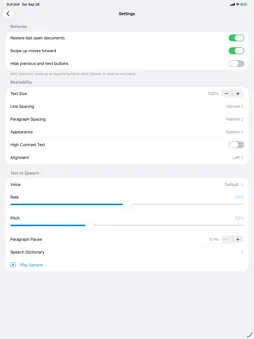
Paperback is a fast, fully accessible reader for ebooks, documents and audio books. It opens over twenty formats and speaks fifteen languages. Paperback has two ways to read a document. In text mode, you read the text with your screen reader. In read aloud mode, Paperback reads the text to you with the voice you pick in Settings, and keeps going in the background and from the lock screen. Switch between them from the More Options menu. Audio books, like DAISY, M4B, and MP3 books, play their own recording instead. The reading bar The bar at the bottom of the screen has, from left to right: • The navigation unit, such as paragraph, heading, page, or link. Swipe up or down on it to change it. • Previous, play, and next buttons. Previous and next move by the navigation unit. • The speech rate. Swipe up or down on it to change how fast Paperback reads. You can also swipe up or down on the play button to move by the navigation unit, without reaching for the previous and next buttons. If that is all you use, the Hide previous and next buttons setting takes them out of your screen reader’s way. The Swipe up moves forward setting picks which way a swipe goes. The More Options menu is where everything else lives. • Switch to TTS Mode or Switch to Text Mode: moves between read aloud mode and text mode, described above. In text mode, a Read Aloud item starts and pauses reading aloud without leaving text mode. • Table of Contents: the book’s chapters, opened at the one you’re reading. Pick one to go straight to it. Entries with chapters under them can be expanded and collapsed with VoiceOver actions. • Elements: a list of the document’s headings or links. Switch between the two with the Type picker, then pick one to go to it. • Find: type what to look for, or pick an earlier search from Search History, and choose whether to match case, match whole words only, or use a regular expression. Find Previous and Find Next jump to a match and say where it landed, and Find stays open so you can keep going. In read aloud mode, Find also shows up as a navigation unit on the reading bar, so you can step through the matches from there too. • Go To: jump to a line, a page, or a percentage through the document. Pick which with the Mode picker. • Recent Documents: every document you’ve opened, each marked as currently open, closed, or file missing. Each one has two VoiceOver actions: Remove takes it off the list, and Locate lets you find a document whose file has moved. Clear Recent Documents empties the list without deleting any documents. • Word Count: the number of words in the document. • Document Info: the title, the author, the file name, and the line and character counts. • Export: saves the document as plain text, HTML, or Markdown. • Sleep Timer: stops reading after 5, 10, 15, 30, 45, or 60 minutes, or a time of your own. Open it again while it’s running to see how long is left, or to cancel it. • Help: opens the readme. • Settings: ◦ Text to speech: the voice, speech rate, and pitch, a Play Sample button to hear them, and the pause between paragraphs. This is also where the speech dictionary is: rules that change how words are spoken, for every voice or just some. ◦ Readability: text size, line spacing, paragraph spacing, alignment, and high contrast text, as well as light and dark appearance. ◦ Behavior: whether to reopen your documents when the app starts, which way a swipe on the play button moves, and whether to hide the previous and next buttons.
What's New
Version 1.1 2026-11-06
Paperback 1.1 rebuilds text mode for VoiceOver and brings a new PDF engine, documents from links, and support for decades of older files. VoiceOver • Text mode ... Technical Analysis
Package Overview Basic metadata
Bundle ID
dev.paperback.ios Current Version 1.1
Minimum iOS 17.0
Package Size App Store Size
Package Metadata 0 / 0 version records
Detailed binary, privacy manifest, framework, and Info.plist results have not been indexed for this package yet. The verified App Store and archive metadata above remains available.
Developer Information
Known Version Records
0 version records with stored package metadata
Stored metadata does not guarantee a package is currently available to download.
| Details | Version / IDs | Version date | Action |
|---|