
Preview




Description
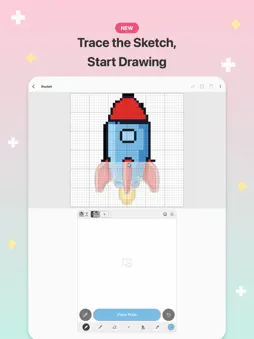
Easy controls. Draw the pixel art and animations you imagine. Picotap is a pixel art app built for easy phone controls. Trace the Swipe Area at the bottom of the screen to move the cursor, then press a button to place color. Your finger never hides your artwork, so precise pixel-by-pixel work stays comfortable. Easy to start, and it does what you need. With step-by-step lessons and a new theme every day. From your first icon to game assets and animations, it handles it all. ◆ Learn Pixel Art, One Lesson at a Time • Practice drawing lines, capturing shapes, and choosing colors through short lessons • Read a short explanation with diagrams, then practice right on the canvas. When you're done, overlay the example to compare • Straight lines, smooth curves, silhouettes, light and shadow, and more. Even if it's your first time, you'll know where to start ◆ A New Daily Theme Every Day • A small new theme arrives every day with a reference image. Start drawing by tracing it • No more wondering what to draw. Keep going a little every day • Get notified when the new theme arrives (if you turn it on) ◆ Bring Your Pixel Art to Life with Animation • Up to 64 frames. Make animations just like a flip book • Onion Skin shows the previous and next frames faintly, so smooth motion is easy to draw • Play back your animation right away to check it • Export as GIF or APNG for social media or your games ◆ Precise Control at Your Fingertip • Trackpad-style cursor: move fast to go far, move slowly to go one cell at a time. Tap the Swipe Area to draw right where the cursor is • Switch to One Cell at a Time or D-Pad controls if you prefer • Pinch to zoom the canvas • The draw and Undo buttons you use most sit within easy reach of your thumb, with haptic feedback so you feel every press • A hands-on tutorial teaches the basics as you draw ◆ Tools for Whatever You Want to Make • Layers: up to 8. Show or hide them and adjust their opacity • Shape tool: line, rectangle, and ellipse. Outline only, filled, or drawn from the center • Tool switching: Pen, Brush, Eraser, Fill, Eyedropper, and Shape. Choose the size and shape of the Brush and Eraser • Selection: move, copy, cut, flip, and rotate. Swap parts or make symmetrical art with ease • References: load multiple reference images, then pinch and drag to fit their position and size for tracing. Show or hide them frame by frame in your animation • Brush patterns: 8 types, including checker and stripes, to cover large areas efficiently • Canvas size: from tiny 8×8 icons to 512×512 masterpieces. Over 50 presets plus custom sizes ◆ Free Colors and Saving • Palette: set any number of colors from 1 to 256. Includes 60 preset palettes that give you a matching color scheme in one tap • Transparent areas are shown as an easy-to-see checkerboard • Choose the background when saving images: transparent, white, black, or a palette color • Export multiple artworks at once ◆ Create with Peace of Mind • Undo up to 50 times: try anything without worrying about mistakes • Auto-save: your work is saved automatically as you go • Backup and restore: switch devices worry-free • Trash: recover artworks you deleted by accident ◆ Perfect For • Anyone who wants to learn pixel art from the basics • Anyone who wants to build a daily drawing habit • Anyone who wanted to try pixel art but struggled because their finger covered the screen • Anyone who wants to make cute retro pixel animations (GIFs) to post on social media • Anyone who wants to make their own social media icon • Anyone who wants to create pixel art or animated character assets for game development • Anyone who wants to casually draw pixel art on their phone while on the go or in spare moments • Anyone who wants to start by tracing a photo or illustration You can also use the app ad-free with the one-time purchase Remove Ads. Anytime, anywhere, right at your fingertip. Create your own pixel art and animations with Picotap.
What's New
Version 2.8.3 2026-11-20
Version 2.8.3 • The Fast Move (▶▶) button is back for the D-Pad and One Cell at a Time. It appears at the top left of the swipe area when your brush or eraser i...Version 2.8.3 • The Fast Move (▶▶) button is back for the D-Pad and One Cell at a Time. It appears at the top left of the swipe area when your brush or eraser is 2 or more cells wide, or while pasting, and moves several cells per step based on the brush size or the size of the pasted image • Minor improvements Technical Analysis
Package Overview Basic metadata
Bundle ID
app.picotap Current Version 2.8.3
Minimum iOS 16.6
Package Size App Store Size
Package Metadata 0 / 5 version records
0.0 / 5.0 (0 ratings)
Detailed binary, privacy manifest, framework, and Info.plist results have not been indexed for this package yet. The verified App Store and archive metadata above remains available.
Developer Information
Known Version Records
0 version records with stored package metadata • 5 known version records
Stored metadata does not guarantee a package is currently available to download.
| Details | Version / IDs | Version date | Action |
|---|---|---|---|
| Not archived | App Store ID: 882035320 | Unknown | Request Version |
| Not archived | App Store ID: 881161914 | Unknown | Request Version |
| Not archived | App Store ID: 880744227 | Unknown | Request Version |
| Not archived | App Store ID: 880648158 | Unknown | Request Version |
| Not archived | App Store ID: 880287388 | Unknown | Request Version |