
Preview




Description
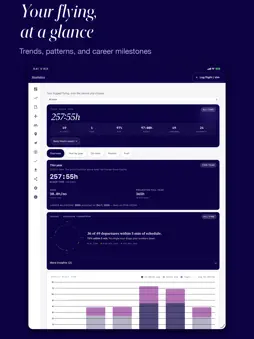
I'm an airline pilot and I built Logbird for pilots. It follows how we work: several sectors in a duty, rosters that change, duty hours and years of flying history. Log your flights, import your roster or your old logbook and keep all your flying in one place. Logbird is made for airline, general aviation and student pilots. The app's interface is currently in English. IMPORT YOUR ROSTER EASILY Import compatible rosters from ICS calendar files, CSV, pasted text, PDF or a photo. You can also pick a calendar on your iPhone. Check the flights before saving, then add the actual OFF-block, take-off, landing and ON-block times. You don't have to enter every sector of a multi-leg duty from scratch. A LOGBOOK THAT ADDS UP Track block, duty and night time, take-offs and landings with their night share, approaches, go-arounds, landing configuration, recent experience, routes, aircraft types and your running totals. Night take-offs and landings are worked out from the sun at each airport and the times you log. Explore trends in your own flying and see your duty day on Apple Watch. The FDP simulator helps you estimate how a delay can affect your plans. TAKE YOUR HISTORY WITH YOU Import compatible CSV, XLS and XLSX exports from other logbook apps, including LogTen Pro, CrewLounge PILOTLOG, ForeFlight and Safelog, and spreadsheet logbooks in the EASA paper layout. Logbird recognises many columns and lets you map the rest before importing. Check the preview and the totals. You can also enter earlier hours as prior experience without recreating every flight. Export won't import properly? Send a copy to [email protected]. We'll convert it for free into a file Logbird can import and send it back. Sending it is voluntary: keep your original and check the imported flights and totals afterwards. AIRLINE, GENERAL AVIATION AND STUDENT Choose your profile and the app adapts. Airline pilots get duty, FDP and recency tools. General aviation pilots get passenger currency, a flight review reminder and licence progress. Student pilots log Lesson, Solo, SPIC and Simulator flights and see their progress towards PPL, LAPL or the FAA private licence. Instructors get teaching statistics. Single-pilot (SE, ME) and multi-pilot (MP) time stay separate through import and the EASA print, and "Check against my old logbook" compares your totals with your old logbook, column by column. Over 500 aircraft types and more than 1,500 airports with runways are built in. YOUR DATA Your flights stay on your iPhone or iPad; optionally they sync through your own iCloud account. Export your logbook as an EASA or FAA format PDF, as Excel or CSV, or as a restorable JSON backup, and save it to Files, Dropbox, Google Drive or OneDrive. No Logbird account, no ads and no tracking. Ordinary imports stay on your device; our support team receives a file only if you choose to email it. Use every feature for 14 days from your first logged or imported flight. After that you can keep using the basic logbook for up to 50 flights for free. Premium offers unlimited flights and extra features, as a yearly subscription that renews automatically or a one-time Lifetime purchase. The 14 days start no subscription and make no automatic charge. The yearly subscription is only charged if you buy it and renews until you cancel. The App Store shows the current price before you buy. Logbird is not an officially approved logbook and does not replace the records you are required to keep. FDP and FTL calculations are for guidance only; your operator's rules and the competent authority's rules take precedence. Terms of Use (EULA): https://www.apple.com/legal/internet-services/itunes/dev/stdeula/ Additional terms: https://logbird.fi/terms.html Privacy Policy: https://logbird.fi/privacy.html
What's New
Version 1.6.6 2026-11-16
One answer to "am I current?" everywhere, a reworked Aircraft page, clearer Duty Hours charts, more roster formats, and fixes to Excel export and the iCloud sta...One answer to "am I current?" everywhere, a reworked Aircraft page, clearer Duty Hours charts, more roster formats, and fixes to Excel export and the iCloud status. CURRENCY • Dashboard, Compliance and the Currency page now agree: a rule is expired when it is not met today or is past its last valid day, and expiring when 14 days or fewer are left. • Change between EASA and FAA rules after onboarding (Currency Rules > Change). The dialog says what moves with it. • Before your first flight, Compliance stays neutral instead of listing every rule as expired. FDP SIMULATOR • With your collective agreement's duty limits set, one short line shows when the duty must end under OM-A and under the agreement, in UTC, the one that limits first in bold. AIRCRAFT AND STATISTICS • The Aircraft page ranks your airframes by block time and shows each one's share. Filter to multi-engine, single-engine or one model to see which registration you have flown most. Grouping by type is one tap away. • Role breakdown for your whole career. • Fuel per nautical mile for the period and by short, medium and long haul. • Landing flap settings grouped by manufacturer; only recorded landings are counted. • The Statistics period is a row of buttons. IMPORT • More roster calendars and duty plans are recognised, including standby and ground duties written as crew codes. • Undo a logbook import that added flights, right under its result. • Totals and empty rows in a spreadsheet are left out and listed apart, not counted as failed rows. • Roster import no longer offers to replace the whole logbook. DUTY HOURS • Year and Trends open several times faster on a large logbook. • Each view leads with its main figure. Trends charts are taller, show hours on the axis, and a tap on a month opens it. • The year table folds months without duties into one row. • A late arrival extends the duty past the rostered end, as a duty report counts it. • Compare to duty report shows the app's totals in minutes, the unit the report prints. EXPORT AND SYNC • Fixed: Excel export wrote hours stored as H:MM as zero. If you keep an Excel copy, export it again. • The iCloud status no longer says "not synced" while your devices sync, and an unchanged logbook is not uploaded again at every launch. • Export & Backup opens with one status line and says when iCloud last confirmed a save. Sync Now tells you why when it cannot run. SETTINGS • Easier to read: longer explanations sit behind an ⓘ, and long groups fold to show what they are set to. • Duty Hours has its own tab. Search opens the section it found. EVERYDAY • A deleted flight leaves the list at once, with Undo for 30 seconds, from the form as well as by swiping. • A calmer look: buttons in plain text instead of capitals, one style for switching views, a shorter Flights header and a summary card on People. • Settings > Plan & terms shows your plan, when the current period ends, Manage subscription, Restore and the terms. • Privacy Policy and Terms of Use open inside the app. • Layover days in the Flights list are no longer tinted; the layover is still named under the duty. Technical Analysis
Package Overview Basic metadata
Bundle ID
com.tuomoo.flightlog Current Version 1.6.6
Minimum iOS 16.0
Package Size App Store Size
Package Metadata 0 / 0 version records
Detailed binary, privacy manifest, framework, and Info.plist results have not been indexed for this package yet. The verified App Store and archive metadata above remains available.
Developer Information
Known Version Records
0 version records with stored package metadata
Stored metadata does not guarantee a package is currently available to download.
| Details | Version / IDs | Version date | Action |
|---|