
Preview






Description
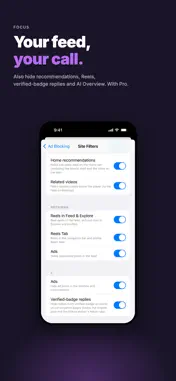
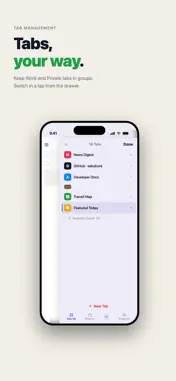
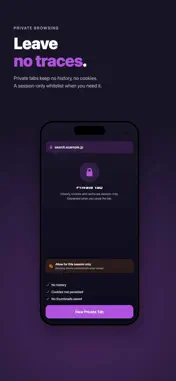
Watch while you browse. Read without the noise. On supported sites, use iOS Picture in Picture to keep a video visible while you browse another page. Organize the pages you want to revisit with Watch Later and lists, including supported video pages. Ads and trackers are blocked automatically, so the articles and pages you actually want load with fewer ad requests. Besides ads, supported sites let you hide short videos too. Free: short-video feeds and tabs on video sites. Pro: also reel feeds and tabs on social sites, and recommended and related videos on video sites (the watch page itself is not hidden). Built on Apple's WKContentRuleList, Sakubura drops ad requests before the page is even assembled — aiming for lighter pages, less data and less battery use. Your browsing history and block stats are stored on your device. Some data does go to outside services: site icons (the host name is sent to Google's favicon service), usage analytics if you agree, crash reports, and purchase checks. See the Privacy Policy for details. · Picture in Picture — keep a video visible while you browse, on supported sites. · Watch Later & lists — organize the pages you want to revisit, including video pages; open them from the Home Screen widget. · Ad & tracker blocking — filtering tuned with Japanese sites in mind. · Tab groups — keep work and personal separate, switch one-handed. · Gesture controls — swipe to go back and forward, easy one-handed. · Private mode — passcode lock for the browsing you'd rather keep private. · See what's blocked — the Privacy Hub shows today's blocks at a glance. Pay once. No subscription.
What's New
Version 1.4 2026-11-18
Ad Blocking • Adding a site to the whitelist now also lifts blocking from external filter lists (EasyList and others). • External filter lists now apply more re...Ad Blocking • Adding a site to the whitelist now also lifts blocking from external filter lists (EasyList and others). • External filter lists now apply more reliably to tabs restored right after launch, and the list conversion is more accurate. • Some pages that went blank when an ad blocker was detected can now be opened. • Fixed false positives in Enhanced Blocking and Focus Mode. Safety • Other apps and the App Store open only when you tap a link or submit a form, not through automatic redirects. • Downloads of configuration profiles and app-install screens (itms-services) are blocked. Other • On first launch, the app now first asks whether you agree to share usage data (you can change this anytime in Settings). • Pages that cannot be opened now show a message. • Improved navigation after tapping a link and scroll position restoring. • "Watch Later" can now appear for videos that load after the page opens. • Settings now show the sources and licenses of the filter lists. • Includes the fix for the launch problem on some devices (1.3.1). Technical Analysis
Package Overview Basic metadata
Bundle ID
jp.tryxia.adblockbrowser Current Version 1.4
Minimum iOS 17.0
Package Size App Store Size
Package Metadata 1 / 2 version records
Detailed binary, privacy manifest, framework, and Info.plist results have not been indexed for this package yet. The verified App Store and archive metadata above remains available.
Known Version Records
1 version record with stored package metadata • 2 known version records
Stored metadata does not guarantee a package is currently available to download.
| Details | Version / IDs | Version date | Action |
|---|---|---|---|
| 24.84 MB | v1.2 App Store ID: 887272309Build: 1.2 | 2026-08-22 00:10:36 | Get Version |
| Not archived | App Store ID: 882425006 | Unknown | Request Version |