Preview




Description
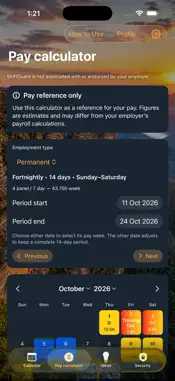
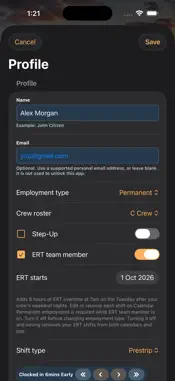
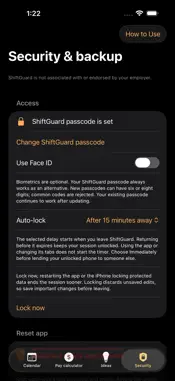
ShiftGuard is a roster planner, fatigue-hours tracker and pay calculator for mining workers, including Permanent, Trainee and Floater/Casual arrangements. Choose 4 Panel or Lifestyle Roster and A, B, C or D Crew. 4 Panel offers Prestrip, Coal and Partings, and CRO for Permanent workers. Lifestyle offers 12-hour Maintenance shifts. Under 4 Panel, Floater/Casual crew lets you enter your own working days. ROSTER AND OVERTIME • Tap a date to select it; double-tap to edit shifts, overtime, training or leave. • Lifestyle Maintenance runs 5:30am–5:30pm or 5:30pm–5:30am. CRO runs 5am–5:30pm or 5pm–5:30am. • Track rolling 28-day fatigue totals, weekly hours and early clock-in time. • Filter Potential Overtime by Day, Night or both. Compare normal-length, eight-hour or mixed groups that fit the app’s planning rules. Normal-length OT is 12.5 hours for 4 Panel and 12 hours for Lifestyle. • Permanent workers can apply Step-Up across their normal roster or on individual working days: start one hour earlier, with 13.5 ordinary paid hours on 4 Panel or 13 on Lifestyle. • Permanent ERT members can generate eight-hour shifts from 7am on Tuesdays after their crew’s weekend nights, then edit or remove individual dates. • Add training on days off with editable times or paid hours. Calendar changes flow through to pay estimates. Switching roster types retains each roster’s saved entries. PAY REFERENCE • Review weekly or fortnightly pay periods with itemised earnings, supported rates and deductions. • Include ERT and training hours, plus an optional manual ERT bonus for the relevant period. • Estimate Australian resident withholding for 2026–27, with tax-free threshold, Medicare, study loan and additional withholding settings. • Explore annual pay and recurring-overtime projections. ALARMS AND CALENDAR • Set multiple alarms for the active roster’s work areas, plus ERT and training. Alarms follow worked dates saved in Calendar. • Choose Show shift details for compact work area, shift start, crew and shift labels. Leave it off for a generic reminder. Details may be visible while the phone is locked. • The displayed start is the shift start; alarms ring at the times you set. • Optionally export generic events to a dedicated Apple Calendar in your selected account. • Opt in to Home Screen widgets with yellow day, blue night and red overtime indicators. SECURITY AND PERSONALISATION • Create a six- or eight-digit ShiftGuard passcode and choose optional Face ID or Touch ID. • Profile, roster and pay records use encrypted local storage. • Choose immediate locking or 1, 5 or 15 minutes away. Private content is hidden in the app switcher. • Create an encrypted backup file and keep its recovery key separately. • Return to setup from Profile to review your choices and liability waiver while retaining saved records. Lock app is a separate control. • Reset and delete app contents requires review and confirmation. External copies require separate management. • Choose light or dark appearance, 12- or 24-hour time and updated How to Use guides. No online account is required. Roster and pay calculations run on your phone. Optional Calendar exports may sync through your provider. Sending Ideas transmits the entered name, email, platform and message through Formspree. Roster and pay records are not attached automatically. Profile and Ideas accept supported personal email providers. Alarms require permission. Open ShiftGuard regularly and check confirmed coverage. iOS controls alarm capacity, background refresh and presentation. Pay figures are estimates and may differ from your employer’s payroll calculations. ShiftGuard is not associated with or endorsed by your employer. It does not replace employer directions, site fatigue procedures or professional advice. Obtain employer approval before working overtime.
What's New
Version 1.9.2 2026-10-24
Choose between 4 Panel and Lifestyle rosters, with A, B, C and D crews. Lifestyle adds 12-hour Maintenance day and night shifts with dedicated alarm settings. ... Technical Analysis
Package Overview Basic metadata
Bundle ID
com.thenderson.shiftguard Current Version 1.9.2
Minimum iOS 26.0
Package Size App Store Size
Package Metadata 0 / 0 version records
Detailed binary, privacy manifest, framework, and Info.plist results have not been indexed for this package yet. The verified App Store and archive metadata above remains available.
Known Version Records
0 version records with stored package metadata
Stored metadata does not guarantee a package is currently available to download.
| Details | Version / IDs | Version date | Action |
|---|