Preview






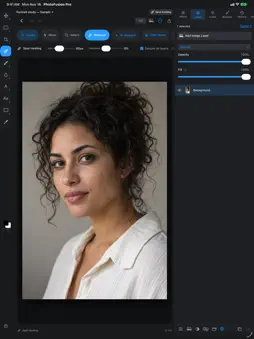
Description
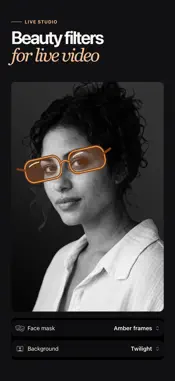
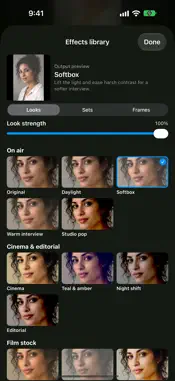
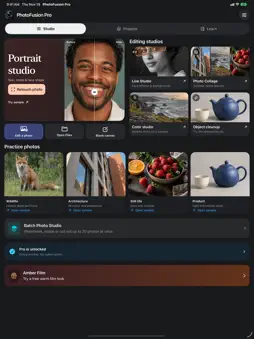
An all-in-one photo editor for portraits, layers and batch exports. Choose a face in a group photo, retouch a distraction or use your iPhone or iPad camera as a webcam in OBS Studio. Keep the editable project and share a finished copy. FACE ADJUSTMENTS AND SKIN DETAIL Choose which faces to edit, then zoom in to compare with the original. Balance skin smoothing with texture, lift under-eye shadows or brighten the whites of open eyes. Teeth whitening targets visible enamel inside the smile. For precise placement, brush the teeth, eye whites or lip tint by hand. Erase from the mask or undo a stroke. Place smile pins at the two mouth corners to change the curve or width while the centre stays anchored. On a front-facing portrait, adjust face width, jaw contour or eye size. In Spot repair, tap a blemish and use nearby texture or choose your own sample. Open Try on eyewear to choose who wears glasses in a group photo. Set the frame and lens colours, adjust the fit and compare with the original. Reopen the beauty filter later to change the edit. BRING YOUR CAMERA INTO A STREAM Open Live Studio and try the practice portrait before enabling your camera. Adjust the beauty effect, try a face mask or a cinematic look, then blur your room, choose a studio backdrop or import a background photo. Choose from 16 camera looks including Original. Pick a studio colour for a solid background or a soft colour wash. Try eight sunglasses and nine optical frames, from a panoramic shield to floating rimless lenses. Choose frame and lens colours, adjust lens density and set the fit and height. Preview the framing full screen. On the same trusted Wi-Fi network, add an OBS Media Source, turn off Local File, paste the private /frames address and use the mpjpeg input format. Choose your microphone in OBS. SET UP YOUR BROADCAST Save scene presets with your preferred look, beauty strength and backdrop, including a photo you import. Switch from an interview to an evening look while the source is running. Add a lower third with your on-air name and title. Your audience sees the composed picture while the studio controls stay on your device. BLEND TWO PHOTOS Open Double Exposure on your canvas and choose a second photo. Try six blend modes, change the strength and reposition the overlay. Compare it with the original before adding the editable layer. FINISH A SET FOR A CLIENT Resize, convert or watermark up to 20 photos in Batch Photo Studio. Save your text watermark’s size, position and opacity for your next set. Export separate PNG or JPEG files, or use the background remover on a compatible device to make transparent product cutouts. SHARPEN, GRADE AND COMPOSE Tune amount, radius and threshold in Detail Studio. Import a compatible sRGB 3D .cube LUT and adjust it on its own layer. Use healing and clone tools, refine a subject mask or blur selected faces for privacy. Build a collage of two to six editable photos. Export a PDF proof sheet with three looks beside your current edit with Pro. LEARN ON A PHOTO Follow guides for changing a background, adding a layer, cleaning up a distraction and exporting. Start with a practice scene or your own photo. The interface is in English. Core editing runs on your device. Optional Generative Fill sends the selected photo area and surrounding context, edit mask and prompt to the provider you configure. You provide the API key and may incur provider charges. TRY PRO Start a seven-day trial of the editing tools through the App Store. The trial ends without an automatic charge. Keep editing with a one-time Pro unlock, or continue viewing, exporting and backing up existing projects. Previous paid-app purchasers keep their access. Restore purchases in Settings. Support https://www.trisphereapps.com/photofusion-pro-help Website https://www.trisphereapps.com Apple Standard End User License Agreement https://www.apple.com/legal/internet-services/itunes/dev/stdeula/
What's New
Version 2.3 2026-11-20
• Try on eyewear in a still portrait or use it on the live camera. Choose from eight sunglasses and nine optical frames. Set separate frame and lens colours, ad...• Try on eyewear in a still portrait or use it on the live camera. Choose from eight sunglasses and nine optical frames. Set separate frame and lens colours, adjust lens density, and move the frame higher or lower. In a group photo, choose who wears the glasses. Compare with the original and reopen your saved project to change the edit. • Place smile pins, paint teeth whitening, brighten eye whites or tint lips. Retouch skin texture, repair a blemish or adjust the width of a face and the contour of a jaw. • Combine one of 16 camera looks with a studio colour or photo backdrop, add your name on screen and recall saved scenes. Send the processed picture to an OBS Media Source on the same trusted Wi-Fi network. • Build in layers with double exposure and imported .cube colour grades. Batch Photo Studio can resize, convert and watermark a set of images. Technical Analysis
Package Overview Basic metadata
Bundle ID
James-Schmidt.PhotoFusion-Pro Current Version 2.3
Minimum iOS 17.0
Package Size App Store Size
Package Metadata 0 / 1 version records
5.0 / 5.0 (1 ratings)
Detailed binary, privacy manifest, framework, and Info.plist results have not been indexed for this package yet. The verified App Store and archive metadata above remains available.
Price History (USA store)
3 recorded price change points. These are historical observations, not a guarantee of the current price.
| Recorded at | Price | Currency |
|---|---|---|
| 9.99 | USD | |
| 0.99 | USD | |
| 9.99 | USD |
Developer Information
Known Version Records
0 version records with stored package metadata • 1 known version records
Stored metadata does not guarantee a package is currently available to download.
| Details | Version / IDs | Version date | Action |
|---|---|---|---|
| Not archived | App Store ID: 867534582 | Unknown | Request Version |