Preview








Description
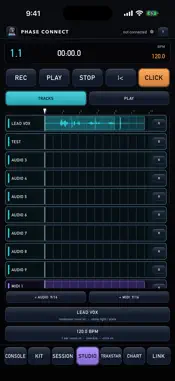
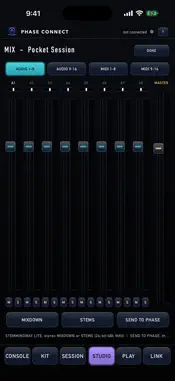
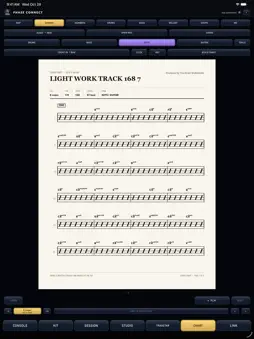
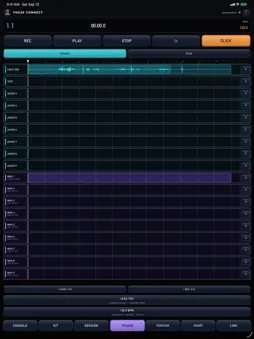
PHASE Connect is the phone companion to PHASE, the TrevBeats Multimedia DAW for Mac - and a full pocket studio on its own. Run your Mac session from across the room, or make a whole beat on the phone and send it to PHASE when you get home. THE STUDIO - ONE SCREEN The recorder and the instruments are the same screen. One counter and one transport across the top - REC, PLAY, STOP, back to the top, and the click - then a single switch: TRACKS for the timeline, PLAY for the instrument. The lane you pick is the lane the keyboard plays, so you pick it once. Everything that isn't "make a sound" or "capture it" sits in two bars along the bottom - TRACK for the instrument, input, FX, quantize and pocket; SESSION for tempo, count-in, record mode and the mix. 8 audio + 8 MIDI tracks, growing to 16 + 16, no Mac required. ARM and REC with a count-in, overdub or replace, quantize with TIGHT or SOFT feel, and the POCKET - push or drag a track off the grid so the beat breathes. THE INSTRUMENTS THUMP bass, FINGAZ keys, TWANG guitars, TRAPS drums and FLIP the sampler, across eight MIDI tracks. Ember-lit pads on a charcoal deck that compress and glow on the hit, with the closed hat choking the open hat like real hardware. Play the pads, the keys, or any Bluetooth / USB-C MIDI controller. THE TREVBEATS KIT The stock kit is the TREVBEATS KIT - 16 signature drum sounds on the pads - plus three more built in: PHASE 808, PHASE LOFI and PHASE ACOUSTIC. Step through kits from the kit bar, trim any pad, save your own. SET TEMPO FROM THIS TAKE Tell PHASE Connect how many bars your take is and it sets the session tempo to the take's own tempo, to the hundredth of a BPM - so the click lands on the groove instead of walking off it a little more every bar. Tempo nudges in hundredths too. MIX - THE DESK IN YOUR POCKET Tap the AUDIO and MIDI bank chips to pull up every strip - faders, pan, mute/solo, three FX slots (comp, reverb, tempo-synced delay), live meters, and a MASTER with a safety limiter. STEMMINGWAY LITE exports a MIXDOWN or full STEMS in 24-bit/48k WAV, and SEND TO PHASE packs the whole session for the Mac. CONSOLE - RUN PHASE FROM YOUR PHONE Pair once with a six-digit code (Wi-Fi, or USB-C hotspot when Wi-Fi is flaky). Tape-style transport, bars/timecode, loop, click, count-in, tap tempo, undo/redo, save - plus banks of mixer strips with faders, pan, mute, solo, arm, and live meters. MIC THE KIT Turn the phone into a drum mic rig - room, overhead, kick - and fly real drums into the session. Everything travels to PHASE untouched. Made by TrevBeats Multimedia. PHASE CHART MAKR The band's charts, on your phone. Eight charts off one arrangement, drawn by the same engraver PHASE uses on the Mac: - ROAD MAP: the form, bar counts and cues. Free. - CHORD CHART: chord symbols over rhythm slashes. - NASHVILLE NUMBERS: the same chart in numbers, so it transposes to any key. - DRUM CHART: the groove written once, then only what changes. - BASS PART: real notation, because an 808 line is composed. - MELODY / HORN: the top line, written for concert, Bb, Eb or F. - SAMPLE CHOP CHART: the sample name sits where a chord symbol would. - MD CHART: every part braced on one page, barlines through the band. Three ways in. AUDIO → MIDI: pick a recording from Files, the song or the song plus its stems, and CHART MAKR hears it on the phone - tempo, bar 1, meter and parts - then writes the charts. Nothing is uploaded. Link to PHASE and GET FROM PHASE hands you the chart for the open session. Or PLAY IN a part against the click and BUILD CHART turns it into the chart. No Mac needed. ▶ PLAY runs the chart with the bar lit and the page turning itself; tap a bar to play from there. TRANSPOSE moves every chart up to 11 half steps. Every song you chart is kept in SONGS. Charts stay on the phone, so they work at rehearsal with the Mac off. The ROAD MAP is free; the seven notated charts and PLAY IN are one in-app purchase, no subscription.
What's New
Version 2.2.0 2026-10-30
CHART MAKR - the page at any size, and off the phone. ZOOM: pinch any chart, or tap - and +, up to 400%. Drag to move around the page. A tap still picks a bar.... Technical Analysis
Package Overview Basic metadata
Bundle ID
com.trevbeatsmultimedia.phaseconnect Current Version 2.2.0
Minimum iOS 15.0
Package Size App Store Size
Package Metadata 0 / 0 version records
Detailed binary, privacy manifest, framework, and Info.plist results have not been indexed for this package yet. The verified App Store and archive metadata above remains available.
Developer Information
Known Version Records
0 version records with stored package metadata
Stored metadata does not guarantee a package is currently available to download.
| Details | Version / IDs | Version date | Action |
|---|