
Preview




Description
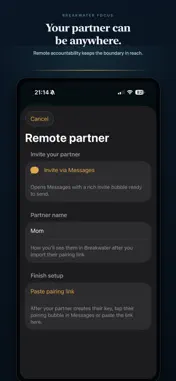
Hold the line on distractions. Willpower is a terrible security system when the urge to scroll arrives. Breakwater Focus is a Screen Time–powered commitment device for anyone tired of opening distracting apps on autopilot. Turn an intention into a boundary: choose what to shield, decide the friction you need, and put the key in an accountability partner's pocket—or on an NFC tag, barcode, or PIN. This is more than a reminder or a timer. When a breaker is raised, Breakwater Focus makes the unlock intentional. It creates a practical pause between an impulse and the feed, so you can choose what you meant to do before the scroll takes over. This is not about perfect willpower, streak guilt, or deleting your whole digital life. It is a boundary you design for yourself, with as much support as you want. Built by one independent developer. No ads. No data mining. No dark patterns. • REAL BLOCKS — Uses Apple's Screen Time APIs to shield apps, categories, and websites you pick • BREAKERS — Turn intentions such as deep work, calmer evenings, and weekday mornings into a real boundary • PARTNER-HELD KEY — Let a trusted person hold the unlock with a nearby partner phone (Bluetooth) or remote approval link • DELIBERATE FRICTION — Use an NFC tag, barcode, or PIN to turn a mindless tap into an intentional choice • TAP TO FOCUS — Scan a tag or barcode to raise and lower a session without opening the app • SCHEDULES — Auto-raise breakers on the days and times you choose • TIME BUDGETS — Full block or a daily allowance (e.g. 30 minutes of scrolling, then shields go up) • STRICT MODE — Lock settings while a session is active so you cannot weaken the block mid-session • LIVE ACTIVITY — See active focus and backup countdown on your Lock Screen • SIRI & SHORTCUTS — Raise, lower, or check focus status with your voice • iCLOUD SYNC — Breakers and keys sync privately across your devices • CALM DESIGN — Dark harbor UI that stays out of your way HOW IT WORKS 1. Grant Screen Time access (Breakwater Focus only blocks what you choose—we never see your app usage data) 2. Design a breaker in the setup wizard 3. Choose your friction: ask an accountability partner, stick an NFC tag on your desk, scan a barcode on an everyday object, or set a PIN 4. Raise the breaker when it is time to focus 5. Lower it only with your key—or wait for a timed session to end BREAKWATER KEY Turn a second device into a key phone: an accountability partner holds the unlock, or a trusted remote partner approves over a secure link. You choose the boundary; Breakwater Focus makes it harder to casually override it in the moment. FREE MONTH, THEN SUBSCRIBE Try everything free for 1 month. Subscribe to keep raising breakers with sessions, partner-held keys, and schedules. Restore purchases anytime in Advanced. Breakwater Focus is not therapy or medical advice—it is a tool for self-directed screen habits. You stay in control of what gets blocked, how much friction you add, and who holds the key. Terms of Use (EULA): https://www.apple.com/legal/internet-services/itunes/dev/stdeula/
Technical Analysis
Package Overview Basic metadata
Bundle ID
com.transoceanic.breakwater Current Version 1.0
Minimum iOS 17.0
Package Size App Store Size
Package Metadata 0 / 0 version records
Detailed binary, privacy manifest, framework, and Info.plist results have not been indexed for this package yet. The verified App Store and archive metadata above remains available.
Developer Information
Known Version Records
0 version records with stored package metadata
Stored metadata does not guarantee a package is currently available to download.
| Details | Version / IDs | Version date | Action |
|---|