
Preview












Description
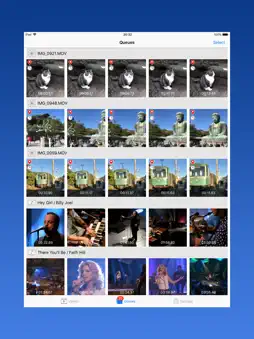
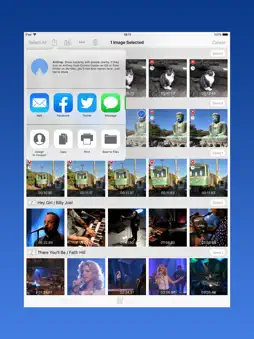
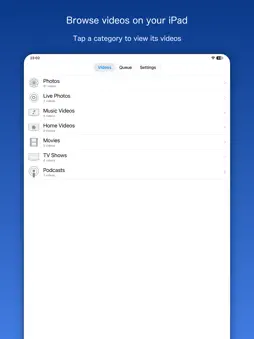
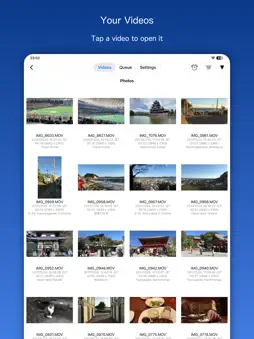
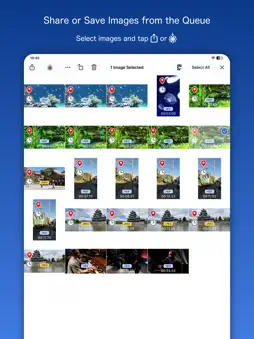
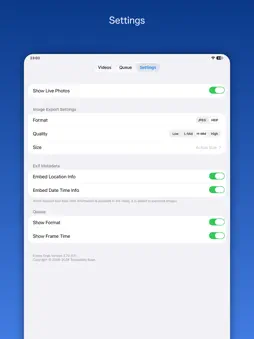
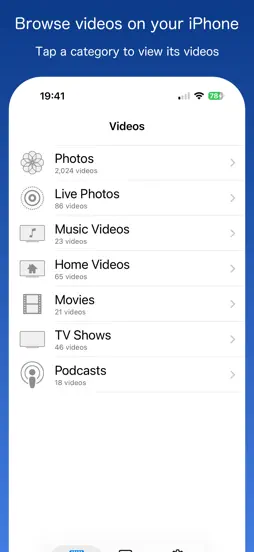
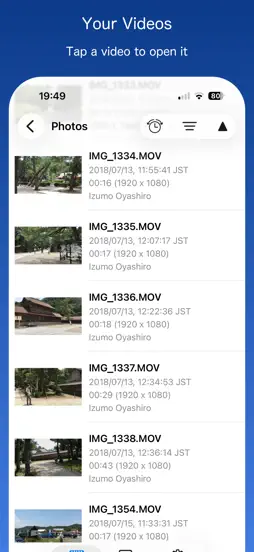
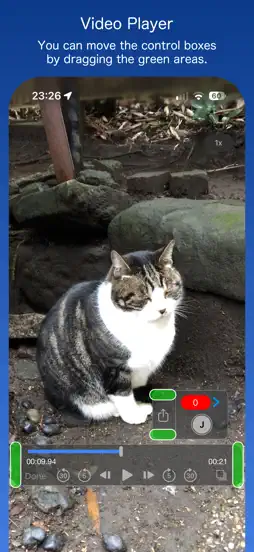
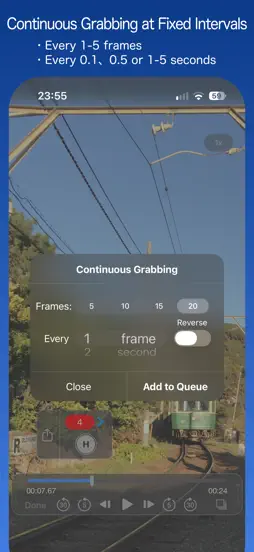
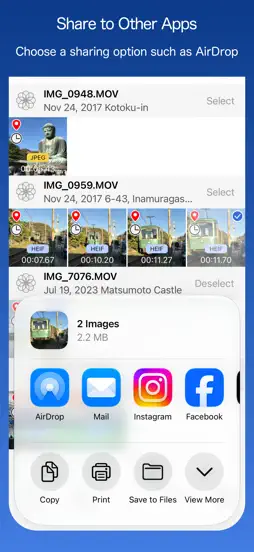
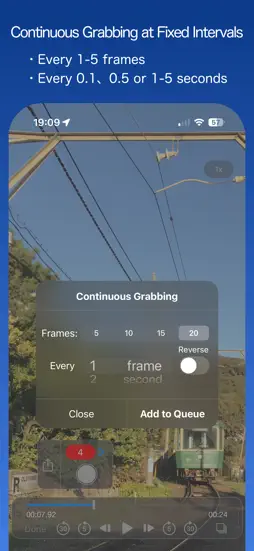
Frame Grab makes it easy to capture and share any moment from videos stored on your device as still images in JPEG or HEIF format. It supports not only videos stored in the Photos app, but also those in the Music, Podcasts, and TV apps, as long as they are downloaded to your device. ◇◇◇ How to Use ◇◇◇ ◆When you launch the app, a list of video categories appears: Photos, Live Photos, Music Videos, Home Videos, Movies, TV Shows, and Podcasts. ◆Tap a category to view its videos, then tap a video to open the player view. ◆Move the playhead to the desired frame. Use the buttons on either side of the play button to step forward or backward one frame at a time. ◆Save Option 1: Tap the Share button to save the displayed frame to the Photos app, or share it with other apps and services. ◆Save Option 2: Tap the gray circle button to temporarily save the displayed frame to the Queue. Repeat this for other frames as needed. When you’re ready, tap the red badge showing the number of queued items to open the Queue and save multiple frames at once to the Photos app, or share them with other apps and services. ◆Choose an image format: Choose JPEG or HEIF in “Settings” > “Image Export Settings” > “Format”. ◇◇◇ Settings ◇◇◇ ◆Live Photos: Choose whether to show Live Photos videos. ◆Format: JPEG or HEIF ◆Quality: Four levels: Low, Low-Mid, Hi-Mid, High ◆Size: Actual size of original video Half size of original video Maximum 1920, 960 or 640 pixels ◆Location Info: Choose whether to embed the location data as Exif metadata in the exported images. Applies only if the video contains location information. ◆Date-Time Info: Choose whether to embed the shooting date-time as Exif metadata in the exported images. Applies only if the video contains date-time information. ◆Show Format: Choose whether to show the format on thumbnails in the Queue. ◆Show Frame Time: Choose whether to show the frame time on thumbnails in the Queue. ◇◇◇ Other Features ◇◇◇ ◆Playback Speed: 0.5x, 1.0x, 1.25x, 1.5x, 2x ◆Continuous Grabbing: Extract multiple frames at user-defined intervals and save them to the Queue. ◇◇◇ Note ◇◇◇ ◆No recording feature included. ◆Protected videos — such as movies downloaded from the Apple TV Store — cannot be displayed. ◆Images in the Queue may be cleared when either the app or the OS is updated. ◆Videos recorded on iPhone or iPad store only the location where the recording started. Images extracted from the same video will contain the same location information.
What's New
Version 2.71 2026-11-03
• Fixed some bugs Version 2.70 2026-10-14
• Added support for exporting images in HEIF format • Fixed some bugs Version 2.69 2026-08-14
• Fixed some bugs Version 2.68 2026-06-02
• Fixed some bugs Version 2.67 2026-05-20
• Fixed some bugs Version 2.66 2026-04-09
• Internal code improvements • User interface tweaks • Fixed some bugs Version 2.65 2025-12-06
• Fixed some bugs Version 2.64 2025-11-27
• Fixed an issue where tapping the action button in the Queue would cause the app to crash. • User interface tweaks • Fixed other some bugs Version 2.63 2025-07-30
・Internal code improvements ・User interface tweaks ・Fixed some bugs Version 2.62 2025-05-30
・Fixed an issue where a crash may occur when opening the Queue tab ・Fixed other some bugs App Store User Reviews
John Goodin 2023-11-09
Great tip to get to just the frame you want
It’s extremely easy to get just the frame you want. Load the video you want and start it playing. Pause the video and simply drag your finger left and right acr...It’s extremely easy to get just the frame you want. Load the video you want and start it playing. Pause the video and simply drag your finger left and right across the paused video. Do it either fast or slow. Lift your finger off of the video. It will be paused on that frame. Even hold your finger down not moving it. The video will be frozen on that frame. Move your finger really slow to move from frame to frame either forward or backward. No need to be using the buttons and make a mistake.
WZDIESEL 2023-11-01
Works great for free
For a free app I think it works better than any other I’ve used. You can set the tool to automatically take frames per second or other intervals to get the best...For a free app I think it works better than any other I’ve used. You can set the tool to automatically take frames per second or other intervals to get the best quality pictures from a video. It has a glitch from time to time with Live Photos but I dont really care about those anyway. There are ads but they’re few and far between.
James Sumners 2026-07-15
Fabulous tool
This tool is super simple, but has plenty of useful features. I particularly like being able to queue up multiple grabs, review them, select the ones to trash a...This tool is super simple, but has plenty of useful features. I particularly like being able to queue up multiple grabs, review them, select the ones to trash and the save the acceptable ones. If I could pay a one time purchase, I would. I have no intention of using Apple’s implementation in iOS 27. This app is my go to and will remain so.
Annoyed2689 2026-01-31
Great App!
Does exactly as you expect and well designed interface that is fast to pick up and use. Really appreciate the ability to turn on or off the date time encoding ...Does exactly as you expect and well designed interface that is fast to pick up and use. Really appreciate the ability to turn on or off the date time encoding as I can ensure the photo line up with my videos or get posted to the end of the library. Thank you to the developers!
chill389cc 2021-10-17
Excellent! Best free app of this kind
There are other apps that do this but this one is totally free and has stellar editing tools, including metadata control and an extremely intuitive and fast int...There are other apps that do this but this one is totally free and has stellar editing tools, including metadata control and an extremely intuitive and fast interface. Even the paid apps i tried were clunky and took a while for me to accomplish the same thing. Thank you!!
Bomgvvjjn b 2019-04-23
Bugs since last month
I love this app but it randomly started freezing and crashing about a month ago so I deleted it. Downloaded it again today and it has the same problem. Can you ...I love this app but it randomly started freezing and crashing about a month ago so I deleted it. Downloaded it again today and it has the same problem. Can you all check it out and fix the bugs? iOS device. I don’t like any other app like this but I need it to work
joetunon 2024-12-21
Best of breed
Elegant interface, can swipe fast or slow, even frame by frame, and the ability to access home movies (not just the photos library) make this a standout app. I ...Elegant interface, can swipe fast or slow, even frame by frame, and the ability to access home movies (not just the photos library) make this a standout app. I wish it had an ad free option. Would be well worth paying for.
Anthony Honciano 2020-12-20
Simple and aweet
This is my first iPhone, coming from a Note 9, and Samsung had a feature to grave a frame of video and turn it into a photo. This app is perfect! When I take a ...This is my first iPhone, coming from a Note 9, and Samsung had a feature to grave a frame of video and turn it into a photo. This app is perfect! When I take a slow mo video, the frame is clean and perfect, and th3 image quality looks great! Please give a paid option to remove ads. Thanks.
McSideburns 2020-01-23
Takes full-resolution images!
This app does NOT compress the images or video, so you actually get images at the expected resolution! I tried it on an iPhone 11’s 4K video and it was perfect....This app does NOT compress the images or video, so you actually get images at the expected resolution! I tried it on an iPhone 11’s 4K video and it was perfect. The interface was intuitive, this is the best capture app I’ve used. Try it, you won’t regret it!
mypaperstuff 2025-03-07
Does the job!
Thanks for making this app available for free. (We all hate subscriptions) I just want something for occasional use, and this works perfectly! 5 stars!
Technical Analysis
Package Overview Basic metadata
Bundle ID
jp.tranquillitybase.iOS.Frame-Grab Current Version 2.71
Minimum iOS 18.6
Package Size App Store Size
Package Metadata 2 / 46 version records
Detailed binary, privacy manifest, framework, and Info.plist results have not been indexed for this package yet. The verified App Store and archive metadata above remains available.
Related Apps


Developer Information
Known Version Records
2 version records with stored package metadata • 46 known version records
Stored metadata does not guarantee a package is currently available to download.
| Details | Version / IDs | Version date | Action |
|---|---|---|---|
 Not archived | App Store ID: 828810475 | Unknown | Request Version |
| Not archived | App Store ID: 827938140 | Unknown | Request Version |
| Not archived | App Store ID: 827363733 | Unknown | Request Version |
| Not archived | App Store ID: 826279602 | Unknown | Request Version |
| Not archived | App Store ID: 825458973 | Unknown | Request Version |
| Not archived | App Store ID: 825127065 | Unknown | Request Version |