
Preview



Description
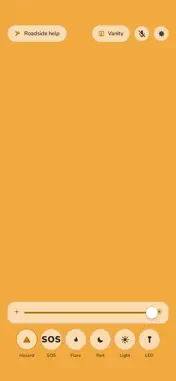
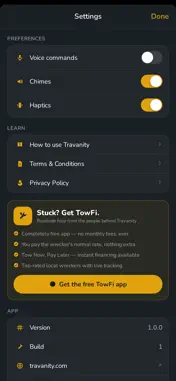
Travanity turns your iPhone into a roadside safety beacon: a whole-screen Hazard blink to mark a stopped car, a true Morse SOS, an amber road flare, and TowFi roadside help one tap away. Then, once you're moving again, the built-in travel vanity gets you ready anywhere. STOPPED ON THE ROAD Pull over and open Travanity. It opens straight into Hazard — set the phone on the dash or rear deck and the entire screen blinks amber, far bigger and brighter than any single LED. Tap SOS if it's serious. Tap Roadside help to reach a local wrecker. That's it. THE SIGNALS Hazard — steady amber blinking to mark your car or yourself SOS — flashes real Morse code (··· ––– ···), the international distress signal Flare — a slow-breathing amber glow, like a road flare on the dash Red — protects your night vision for reading maps or checking a tire Light — the whole screen becomes a work light, with warmth control LED — fires the back LED too, so you're lit from both sides Screen brightness pins to maximum while a signal runs and returns to normal when you close it. Signals need no permissions at all — no camera, no microphone, no location. Light patterns are visual aids only — in a real emergency, call 911. STUCK? GET TOWFI. Travanity is part of the TowFi family. In Hazard and SOS, the Roadside help button stays on screen even when the controls hide. It connects you with top-rated local wreckers through the free TowFi app — you pay the wrecker's normal rate, with Tow Now, Pay Later financing and live tracking while you wait. THE TRAVEL VANITY Built for getting ready in the car, the hotel, or the truck stop. Tap Vanity, prop your phone against anything at head height, and turn around — a soft chime tells you the camera has your back. Turn back, and Travanity automatically replays what it saw. The back of your hair, your outfit, your collar — no buttons, no timers, no asking a stranger. Ring light border with brightness, warmth, and size sliders Freeze the picture, pinch to zoom, and save to Photos Flip Cam uses the rear wide lens for head-to-toe outfit checks True View un-flips the image — see yourself as others do Reach toward the screen and the controls fade back in JUST SAY IT "Hazard." "SOS." "Flare." "More light… when!" "Show me again." Tap the mic to turn voice on; commands are understood by Apple speech recognition, on your device whenever your iPhone supports it. The mic button turns it off anytime. PRIVATE BY DESIGN No accounts. No tracking. No ads. Nothing is asked when the app opens. Vanity video lives only in your phone's memory and is constantly thrown away — never recorded, never uploaded. Photos are saved only when you tap Save. There's a delete-everything button in Settings. Travanity is free. Powered by TowFi. Built by Belmont Labs. travanity.com
Technical Analysis
Package Overview Basic metadata
Bundle ID
com.towfi.travanity Current Version 1.0.3
Minimum iOS 17.6
Package Size App Store Size
Package Metadata 0 / 0 version records
Detailed binary, privacy manifest, framework, and Info.plist results have not been indexed for this package yet. The verified App Store and archive metadata above remains available.
Developer Information
Known Version Records
0 version records with stored package metadata
Stored metadata does not guarantee a package is currently available to download.
| Details | Version / IDs | Version date | Action |
|---|