
Preview




Description
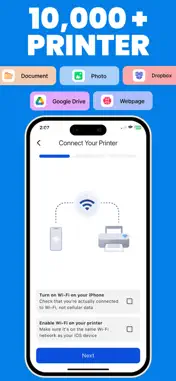
Smart Printer for smart print is a powerful and easy to use printing solution designed to simplify the way you print your files. Whether you want to print documents, photos, or web pages, Printer provides a seamless and efficient printing experience directly. With its clean interface and smart tools, the app allows you to manage and print content from multiple sources quickly and effortlessly. No more complicated printing processes. With just a few clicks, you can upload your files, connect to your printer, and print high-quality results instantly. Simple & Efficient Printing Printer is built to make printing as simple as possible. The intuitive dashboard allows users to quickly access their files, select printing options, and send them directly to a connected printer. Whether you're printing work documents, study materials, or personal files, the app ensures smooth and reliable performance. Print Multiple File Types The app supports printing from various file sources so you can access your content without switching between different tools. Upload and print documents directly or import files from cloud storage platforms. Print Photos in High Quality Easily print your favorite images and photos with optimized print settings. Printer ensures that your images are printed clearly and accurately, maintaining quality and detail. Cloud Integration Printer integrates with popular cloud services, allowing you to access and print files stored online. This makes it convenient for users who store their important files in the cloud and want quick printing access. Print Web Pages Instantly Need to print information from a website? Document Printer lets you load and print web pages directly from the app. This is perfect for saving articles, invoices, forms, and online resources. Smart File Management The app keeps track of your recently printed files so you can easily access and print them again without uploading them multiple times. The Recents section helps improve productivity and saves time. Clean and User-Friendly Interface Designed specifically Printer provides a modern and simple user interface that makes navigation effortless. Even first-time users can easily understand how to upload files, connect printers, and print within seconds. Key Features • Print documents directly • Upload and print photos quickly • Access files from Dropbox • Print documents stored in Google Drive • Print web pages instantly • Simple file upload system • Easy printer connection and management • Recent files history for quick access • Clean and modern macOS interface • Fast and reliable printing experience Subscription Plans Choose a plan that fits your needs: • Weekly Subscription 4.99$ • Monthly Subscription 12.99$ • Yearly Subscription 29.99$ Subscriptions automatically renew unless canceled at least 24 hours before the end of the current period. Designed for Productivity Whether you are a student, office professional, teacher, or home user, Document Printer helps you handle your printing tasks more efficiently. From quick document printing to accessing cloud files, the app provides everything you need in one convenient place. Seamless Printing Experience. Printer combines powerful functionality with simplicity to deliver a smooth printing experience. Upload your files, choose your printer, and print instantly anytime you need. EULA : https://www.apple.com/legal/internet-services/itunes/dev/stdeula/ Terms & Conditions : https://labelmakerandcreator.blogspot.com/p/terms-conditions.html Privacy Policy : https://labelmakerandcreator.blogspot.com/p/privacy-policy.html
What's New
Version 1.5 2026-08-31
Many UI Improvements including printable are added and editor is functionaly Working Performance Improvements Languages are added Also some bug fixes Technical Analysis
Package Overview Basic metadata
Bundle ID
com.printer.smart.air.print.app Current Version 1.5
Minimum iOS 15.0
Package Size App Store Size
Package Metadata 0 / 5 version records
Detailed binary, privacy manifest, framework, and Info.plist results have not been indexed for this package yet. The verified App Store and archive metadata above remains available.
Developer Information
Known Version Records
0 version records with stored package metadata • 5 known version records
Stored metadata does not guarantee a package is currently available to download.
| Details | Version / IDs | Version date | Action |
|---|---|---|---|
| Not archived | App Store ID: 886932129 | Unknown | Request Version |
| Not archived | App Store ID: 886117703 | Unknown | Request Version |
| Not archived | App Store ID: 885827432 | Unknown | Request Version |
| Not archived | App Store ID: 885590563 | Unknown | Request Version |
| Not archived | App Store ID: 883889990 | Unknown | Request Version |