
Preview



Description
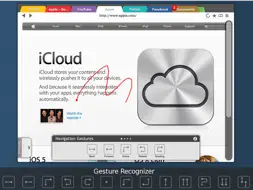
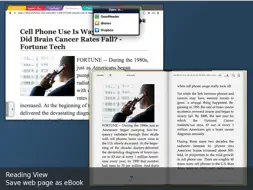
CloudSurfer is a web browser supporting Firefox Sync, bidirectional Dropbox Sync, saving web page as eBook and many other features with a beautiful and clean design. No complex configuration and setting page. Simple, elegant and just works. Web surfing on iPad never like this before. ● Unique Features ● ★ POWERFUL GESTURE RECOGNIZER The unique gesture recognition user interface gives you the closest experience and operation of the mouse gesture of all the popular PC browsers. It is quick, precise and intuitive ★ FIREFOX SYNC CloudSurfer brings all your bookmarks from your Firefox back to iPad. No import and export anymore. Just input your account settings and the bookmarks will be automatically synced ★ SAVE AS EBOOK CloudSurfer is the only browser can save webpages as ebooks and view them in iBooks or other ebook readers. Reading web pages, news site, is just as comfortable as reading ebooks on your iPad. All the saved ebooks can be read anytime with your favourite eBook reader, online or offline and the images of the page are included too. ★ TRUE BI-DIRECTIONAL DROPBOX SYNC Unlike other browsers just give you 1-way uploading to Dropbox. CloudSurfer provides true Dropbox sync. All the downloaded files can be synced to Dropbox. The built-in file manager can even view documents, images and play media files on your Dropbox. ★ DOWNLOAD ALL IMAGES CloudSurfer can download all the images and automatically save in a new folder. The newly downloaded images can be viewed as thumbnails and slide show too. ● Even more Features ● - Top Sites - History in calendar view - Reading view - Share page on Facebook - Full screen - Explorer like file manager - iOS 4.2 AirPrint - URL and search suggestions - Unique kinetic scrollbar - Guided tours
What's New
Version 1.2.1 2011-10-20
1.2.1 - Fixed the problem that non-ASCII characters cannot be input in the URL box 1.2.0 - iOS5 compatiblity - Can email article in reading view Technical Analysis
Package Overview Basic metadata
Bundle ID
com.touchutility.BrowserFree Current Version 1.2.1
Minimum iOS 3.2
Package Size App Store Size
Package Metadata 1 / 3 version records
Detailed binary, privacy-manifest, framework, and Info.plist results have not been indexed for this package yet. The verified App Store and archive metadata above remains available.
Developer Information
Known Version Records
1 version record with stored package metadata • 3 known version records
Stored metadata does not guarantee a package is currently available to download.
| Details | Version / IDs | Version date | Action |
|---|---|---|---|
 5.02 MB | v1.2.1 App Store ID: 4585799Build: 1.2.1 | 2011-10-20 15:16:30 | Get Version |
| Not archived | App Store ID: 4504776 | Unknown | Request Version |
| Not archived | App Store ID: 3868371 | Unknown | Request Version |