
Preview



Description
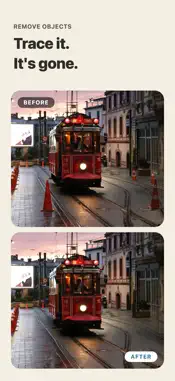
Fix the travel and zoo photos you almost got right. Remove rain streaks, cage fences, power lines across the sky and people who wandered into the frame, and keep just the view you wanted. Everything runs on your iPhone. Your photos are never sent anywhere. Every tool keeps your original photo and saves the result as a new photo. WHAT YOU CAN DO - Remove Rain: clear away rain streaks - Remove Fences & Cages: turn a shot through zoo netting into a clean photo - Remove Objects: trace over anything and fill it in naturally with the surroundings - Remove Power Lines: find lines across the sky and rejoin the scenery - Clean Product Shots: make items shot at home look like they were taken in a light box - Blur Background: focus on your subject with DSLR-like bokeh - Painting Style: turn travel photos into something that looks hand-painted - Upscale Small Photos: make old or saved-from-social photos sharp and readable - Blur Faces: blur only the faces of people in the background - Privacy Check Before Posting: find and hide faces, license plates, nameplates, phone numbers, email addresses and location data - Collage: combine several travel photos into one - Shrink & Send: resize photos in bulk and share them right away TRY IT WITH SAMPLES Every tool comes with a sample photo, so you can see the result before choosing your own. FREE AND PRO Every tool is free to use. The free version shows a banner ad at the bottom of the screen and an ad with a wait of at least 10 seconds each time you process a photo. It saves photos at up to 1080px on the long side, dated the day you save (samples have no processing ad or wait). PRO is a one-time purchase with no subscription. It removes ads and the wait, saves photos at their original size, lets you keep the original photo's date, and lets you reorder the tools on the home screen.
What's New
Version 26.10.27 2026-10-27
Every feature's "Try a Sample" now comes with a step-by-step tutorial. You can now zoom into the photo in every feature. Use the button at the top right or pinc...Every feature's "Try a Sample" now comes with a step-by-step tutorial. You can now zoom into the photo in every feature. Use the button at the top right or pinch, and move around with the mini map at the bottom left. Comparing is now the same everywhere: hold the button at the bottom right of the photo to see the original. Clean Product Shots now keeps your photo at its original size instead of cropping it to a square. Fixed an issue where Privacy Check Before Posting and text reading couldn't read text on iPhone, so nothing was hidden. Fixed tracing sometimes going back to the previous screen, and small objects not being erased when traced while zoomed in. Technical Analysis
Package Overview Basic metadata
Bundle ID
com.apppppp.photothatsit Current Version 26.10.27
Minimum iOS 17.0
Package Size App Store Size
Package Metadata 0 / 0 version records
Detailed binary, privacy manifest, framework, and Info.plist results have not been indexed for this package yet. The verified App Store and archive metadata above remains available.
Developer Information
Known Version Records
0 version records with stored package metadata
Stored metadata does not guarantee a package is currently available to download.
| Details | Version / IDs | Version date | Action |
|---|