ClassNotes is a handwriting-first notebook for iPad, built so what you write is exactly what stays on the page. WRITE, DON'T FIGHT YOUR APP Your Apple Pencil ink is recorded exactly as you draw it — no smoothing, no reshaping, nothing "cleaned up" behind your back. Turn on live beautification only if you want your handwriting typeset as you go. SMART TOOLS, ON YOUR TERMS • Hold a shape steady and watch it snap into a clean line, circle, rectangle, or triangle — still adjustable until you lift the pencil • A real two-finger ruler for straight edges • Paint bucket fill that flows under your ink, not over it • Scribble to erase • Sticky tape, text boxes, and photo/file drops • Full undo/redo history, per page NOVA, YOUR AI STUDY PARTNER Circle anything — a diagram, an equation, a paragraph — and ask NOVA about it. It sees exactly what you circled, not just the text, so it can actually explain a graph or work through the diagram you drew. MADE FOR NOTEBOOKS 28 cover designs, 14 paper templates, custom paper and line colors, multiple page sizes and orientations, and a dedicated whiteboard page for freeform sketching. FIND ANYTHING Search across typed text and your own handwriting — even pages you never touched with a keyboard. STAYS IN SYNC Sign in with a free ClassNotes account (optional) and your notebooks, pages, and attachments sync automatically, or keep everything on your device without one. READ ANYWHERE The iPhone companion app is a fast, read-only viewer for your whole library — perfect for a quick look between classes. NOVA PLUS AND NOVA PRO (OPTIONAL) NOVA is free. NOVA Plus ($3.99 a month or $34.99 a year) gives you 30 answers a day from Anthropic's Claude, and NOVA Pro ($5.99 a month or $54.99 a year) gives you 50. After the day's Claude answers, NOVA carries on with the free model. Subscriptions renew automatically unless cancelled at least 24 hours before the end of the period, and you can manage or cancel them in your App Store account settings. Free to use. No paywall on the notebook: every tool is free. Terms of Use: https://www.apple.com/legal/internet-services/itunes/dev/stdeula/ Privacy Policy: https://tony11-dot.github.io/classmate-legal/privacy.html
What's New
Version 1.11 2026-11-03
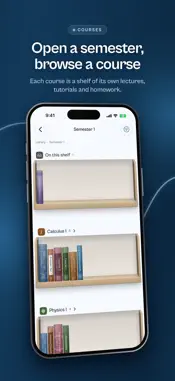
Sticky notes, dashed and dotted lines, covers made like real notebooks, and writing, zooming and scrolling that never skip a beat. - Sticky notes: Insert › Sti...Sticky notes, dashed and dotted lines, covers made like real notebooks, and writing, zooming and scrolling that never skip a beat. - Sticky notes: Insert › Sticky note. Choose its colour, its lines (any page template, with line colour, spacing and a side line) and its edge: a sticky strip, a spiral, a flip pad, punched holes, a torn top, tape or a pin. Write on it with any pen, then move or resize it like a photo. Your writing moves with it, even onto another page. Hold a note to change its look. - Dashed and dotted lines: every pen has a Line setting (solid, dashed, long dash, dotted, dash dot, dash dot dot). It works for shapes you snap and lines you rule too, and a dashed line stays one stroke you can erase, move or undo. - Covers look made, not typed: titles are printed in the cover's own ink, stamped in gold foil on bound designs, or set on a paper label, and the artwork is pressed into a grained board under the same light. Spines are lettered the same way. - Opening a notebook is more like the real thing: the book turns out of the shelf, its cover swings open on its hinge in 3D, and you land on your page. On iPhone too. - Hold to snap: hold the pencil at the end of a shape and it becomes a clean circle, square, triangle or line under your pencil. Keep holding and move to size it, then let go. It stays exactly as you left it, and Undo takes it back in one step. - Scrolling: pages arrive with all their writing, never blank or filling in piece by piece. - Zooming: the page and its grid stay drawn the whole way in and out, nothing flickers when you let go, and the zoom gives a little past its limits instead of stopping dead. - Pages stay where you leave them after a zoom, and the extra space beside them closes up once you scroll back, so you can't wander off into empty space. - The lasso's action bar always stays in sight, above every page and below the tool bar. - iCloud sync is now on from the start: your notebooks travel between your iPad and iPhone in your own iCloud. NOVA Plus and Pro also keep a copy on ClassNotes' server, so your notebooks open on any device you sign in to. - NOVA's button is now a glowing orb: tap it to ask, or flick it to either side of the screen. It remembers where you leave it. - Shelves can dress their notebooks: choose a frame, a colour or what's inside for a shelf and every notebook on it follows. Anything the shelf leaves alone stays each notebook's own. Folders are now simply shelves inside shelves. - The same pen more than once in the tool bar, each in its own colour: hold a pen and choose Duplicate. - Pull past the last page for a new one: the ring now sits above the zoom readout. Pulling down at the top no longer adds a page in front of your PDF or notes; add one there from Pages. - Handwriting beautification is marked Beta: it can still misread words. - Fixes: a page link you pasted and deleted could stay floating over the pages; pinching out from a deep zoom no longer blanks the page for a moment; after snapping a shape, the page's writing could stay faded until you scrolled away; a finger pulling or pinching could be read as a held line and draw a stray vertical stroke; the page no longer moves under the pencil when you write straight after a zoom.
Technical Analysis
Package Overview Basic metadata
Bundle IDcom.classmate.notes
Current Version1.11
Minimum iOS26.0
Package SizeApp Store Size
Package Metadata0 / 0 version records
Detailed binary, privacy manifest, framework, and Info.plist results have not been indexed for this package yet. The verified App Store and archive metadata above remains available.