
Preview






Description
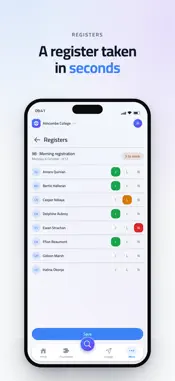
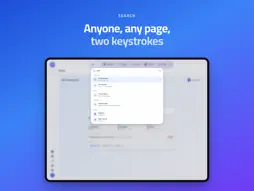
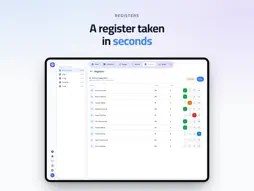
Panoptic is the app your School runs on. It needs a School account: enter your School code, sign in, and the School day is in one place. If your School does not use Panoptic, there is nothing in here you can open. WHAT YOU SEE DEPENDS ON WHO YOU ARE One app, three experiences. Pupils, parents and staff sign in to the same app and each land on what matters to them. Your School decides what your account can reach, so there is nothing to set up and no wrong version to download. FOR PUPILS AND PARENTS - The week's timetable: every lesson, room, set and teacher, with the day you are in marked. - School reports and assessments as the School published them. - Attendance, day by day and session by session, with the rate alongside it. - Exam candidate numbers when the School has issued them. - Messages from the School, by email and as a notification on your phone. - For parents, the same view of each of your children. FOR STAFF - Registers taken in a few taps, for your own lessons or for a colleague you are covering. - School reports written in the shape your School designed, with the grade scales, the field lengths and the deadlines it set. - The full pupil, staff and contact lists, with each person's record behind them: form, house, sets, teachers, attendance, relations and notes. - Lesson cover, free periods and absence summaries. - Messages to a year group, a house, a set or one family, from your School's own sending address. SEARCH IS THE FRONT DOOR One field finds any pupil, member of staff, contact or page in the app. It is on the home screen, it is a keystroke away everywhere else, and it is how most people use Panoptic. IT IS YOUR SCHOOL'S APP Panoptic wears your School's name, crest and colour, and your School's data lives in your School's own database. Sign in to more than one School on the same device, which staff who work at two and parents with children at two can both do, and switch between them without signing out. MADE TO LIVE IN - Light and dark, following your device or set here. - More contrast, for when frosted panels are hard to read. - Reduced motion, which also follows your device's own setting. - English, French, Spanish and German. - Built for VoiceOver and for a large text size. Panoptic does not take payments and shows no advertising. SUPPORT Ask your School first: your account, your permissions and your data are theirs to manage. For anything else, the support link on this page reaches us.
What's New
Version 2026.11.1 2026-11-02
Panoptic now hands pages between your iPhone, iPad and Mac, so you can pick up where you left off on whichever device is nearest. Video has had a major upgrade... Technical Analysis
Package Overview Basic metadata
Bundle ID
school.panoptic.app Current Version 2026.11.1
Minimum iOS 15.0
Package Size App Store Size
Package Metadata 0 / 0 version records
Detailed binary, privacy manifest, framework, and Info.plist results have not been indexed for this package yet. The verified App Store and archive metadata above remains available.
Known Version Records
0 version records with stored package metadata
Stored metadata does not guarantee a package is currently available to download.
| Details | Version / IDs | Version date | Action |
|---|