Preview




Description
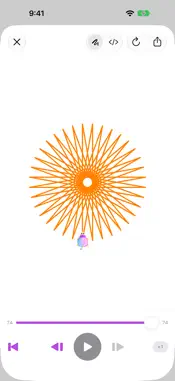
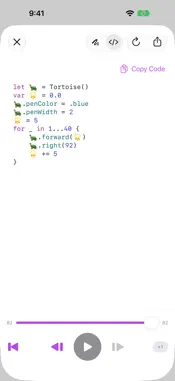
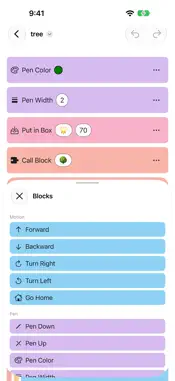
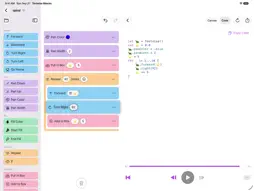
Tortoise Blocks is a visual programming app for children. Snap a few blocks together, press play, and a tortoise draws the picture on the canvas — one line at a time, with the block it is drawing lit up in the program. BLOCKS THAT SNAP TOGETHER Move and turn. Put the pen down, pick a color, fill a shape. Drag a block into place or tap to add it, change a number where it sits, and undo anything you like. One tap on the trash can clears the whole program when you want to start over. REPEAT, IF, AND BOXES Run a group of blocks again and again. Ask a question and take one path or the other. Keep a number in a box and add to it as the program runs. These are the ideas real programs are made of, in words a child already knows. BLOCKS YOU MAKE YOURSELF Give a block a name, put whatever you like inside it, and call it by that name from anywhere in the program. A block can call itself, too — and one that calls itself twice, a little smaller each time, draws a tree. There is a ready-made tree to look at before you build your own. ROLL THE DICE Any number — and any color — can be a dice roll instead. The same program then draws a different picture every time it runs, which turns "do it again" into a game of its own. WATCH IT DRAW Play, pause, step forward one command at a time, scrub back and forth, change the speed while it runs. The block being drawn stays highlighted, so it is never a mystery which block made which line. BLOCKS BECOME SWIFT A second pane shows the very same program as real Swift code, colored like an editor and ready to copy. It is waiting there for the day blocks stop being enough. KEEP IT AND SHARE IT Drawings are ordinary documents in Files and Finder, and each one shows its own picture as its icon — so a folder of them reads as a gallery rather than a row of identical squares. Export a drawing as SVG or PNG, or send it through the share sheet. FOR PARENTS AND TEACHERS There is no sign-in and no account. There is nothing to type but numbers. There is no advertising, no analytics, no third-party SDK, and no network connection of any kind — the app contains no networking code at all. Drawings stay on the device and in whatever location you choose to save them. Tortoise Blocks runs on iPad, Mac and Apple Vision Pro — blocks are built on iPad and Mac, and on Vision Pro a finished drawing goes on the table in front of you. It speaks English and Japanese, and is free and open source under the MIT license.
What's New
Version 1.5.1 2026-10-14
CLEARER FOLDERS FOR YOUR DOCUMENTS Browsing for documents in the app no longer shows a Tortoise Blocks folder inside another Tortoise Blocks folder. • Documen... Technical Analysis
Package Overview Basic metadata
Bundle ID
space.hiraku.tortoiseblocks Current Version 1.5.1
Minimum iOS 26.0
Package Size App Store Size
Package Metadata 0 / 0 version records
Detailed binary, privacy manifest, framework, and Info.plist results have not been indexed for this package yet. The verified App Store and archive metadata above remains available.
Developer Information
Known Version Records
0 version records with stored package metadata
Stored metadata does not guarantee a package is currently available to download.
| Details | Version / IDs | Version date | Action |
|---|