
Preview







Description
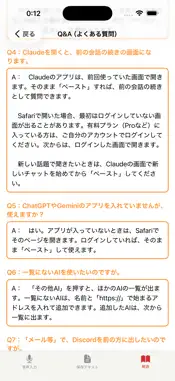
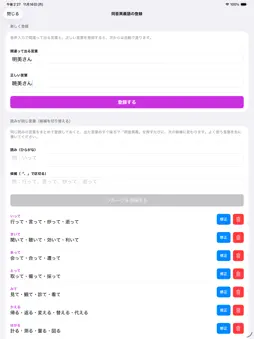
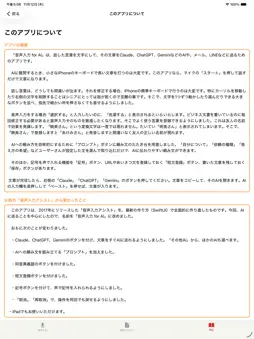
"Voice Input for AI" was developed by a 91-year-old app developer for seniors, and younger users enjoy it too. It turns your speech into text and helps you send it to AI services such as Claude, ChatGPT, and Gemini, or to mail and LINE. Typing long questions on a small iPhone keyboard is hard. With this app, just tap the microphone "Start" button and speak. Even when you speak at length, the text scrolls automatically so the last line is never hidden behind the buttons. Speech recognition always makes some mistakes, and fixing them with the standard keyboard is difficult. Moving the cursor or deleting characters is especially hard for seniors with dry fingertips. So the app provides large buttons to move the cursor and select text one character at a time, so you can edit without tapping tiny spots. What's more, the microphone keeps listening while you tap the arrow, selection, delete, paste, or undo buttons, or touch the text to move the cursor. Move the cursor to where you want to fix something, and keep on speaking. The biggest problem with voice input is getting the wrong kanji for a word with the same reading. The "同音異義" (Homophone) feature solves this in two ways. First, it automatically corrects words that are always misrecognized in the same way. Register a word once, and from then on the correct word appears whenever you say it. This is especially useful for friends' names. Second, it helps with readings that have several possible words. For example, "itte" can be written 行って (go), 言って (say), 炒って (roast), or 逝って (pass away), and the right one depends on what you mean. Register such words as a group. Then, each time you tap the purple "同音異義" button right after the word, it changes to the next candidate. If you select the word first, all candidates appear as large buttons, and you just tap the right one. Common examples such as "kiite," "mite," "kaeru," "hakaru," and "kouen" are included from the start. There are many more words with the same reading, but including them all would make the lists too long and hard to use. Instead, you can add words one by one, at your own pace, whenever you come across them. The more you use the app, the more it becomes your own personal word book. To help you ask AI clearly, the "Prompt" button offers ready-made request templates. Choose sentences from groups such as "About me," "Type of request," and "How I'd like the answer," either the app's examples or your own, and you will have a clear request in no time. The app also has a "Symbol" button for entering symbols by voice, a "Short phrases" button for saving URLs and greetings, and a "Save" button for keeping your text. When your text is ready, tap the "Claude," "ChatGPT," or "Gemini" button on the right. The app copies your text and opens that AI. Just press and hold the AI's input field and tap "Paste." Your speech and text are processed and stored only on your iPhone and are never sent to the developer. All features are free. Ads are shown, and an optional one-time purchase removes them. Note: The app's screens and voice input are in Japanese.
What's New
Version 4.1 2026-11-18
- Added homophone candidates. Register words with the same reading as a group (for example, 行って / 言って / 炒って / 逝って), then tap the "同音異義" button to switch to the ...- Added homophone candidates. Register words with the same reading as a group (for example, 行って / 言って / 炒って / 逝って), then tap the "同音異義" button to switch to the next candidate. If you select a word first, all candidates appear as large buttons. Common examples are included. - The microphone now keeps listening when you tap the arrow, selection, delete, paste, undo, and similar buttons during voice input. You can continue speaking from the new cursor position. - You can now move the cursor by touching the text during voice input and continue speaking from there. - Long text now scrolls automatically so the last line is never hidden behind the buttons. Technical Analysis
Package Overview Basic metadata
Bundle ID
tomzy05.VoiceAsisst01Free Current Version 4.1
Minimum iOS 17.6
Package Size App Store Size
Package Metadata 0 / 7 version records
0.0 / 5.0 (0 ratings)
Detailed binary, privacy manifest, framework, and Info.plist results have not been indexed for this package yet. The verified App Store and archive metadata above remains available.
Developer Information
Known Version Records
0 version records with stored package metadata • 7 known version records
Stored metadata does not guarantee a package is currently available to download.
| Details | Version / IDs | Version date | Action |
|---|---|---|---|
| Not archived | App Store ID: 831636684 | Unknown | Request Version |
| Not archived | App Store ID: 829271599 | Unknown | Request Version |
| Not archived | App Store ID: 827684235 | Unknown | Request Version |
| Not archived | App Store ID: 827153814 | Unknown | Request Version |
| Not archived | App Store ID: 826829417 | Unknown | Request Version |
| Not archived | App Store ID: 825485661 | Unknown | Request Version |
| Not archived | App Store ID: 825300716 | Unknown | Request Version |