
Preview




Description
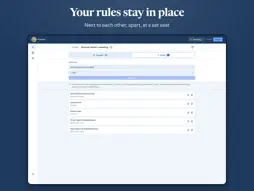
Tell Pulpetti who must not sit together and who belongs side by side. It draws a seating chart that follows your rules. Then fine-tune it by hand, or seat everyone yourself. For classrooms, restaurants, weddings and events. HOW IT WORKS 1. Add people: type the names, or paste a whole list from a spreadsheet. 2. Lay out the room: start from a template or drag tables into place, to scale. 3. Set the rules and draw: Pulpetti seats everyone to fit them. 4. Print or share: floor plan, name lists, table signs and place cards. RULES THAT STAY PUT • Not side by side, side by side, separate tables, same table, a set seat, a table of their own. • Rules belong to the people, not to one chart, so next term's chart or the next event follows them too. • Someone cancels? Lock the seats already agreed and redraw only the rest. • A plain-language note names anyone whose rule is not met. ONE APP, FOUR SETTINGS • Classroom: rows of desks or group tables, a fresh chart every term, an exam layout in one tap. • Restaurant: the dining room to scale, table numbering and the evening's table plan printed for staff. • Wedding: round and banquet tables, a head table, couples together and feuding relatives apart. • Event: seminars and gala dinners, cabaret seating, tags by organization and a list for the door. Pick a setting and the wording, furniture and templates change to match. LAY OUT THE ROOM Round, rectangular and cabaret tables, plus more than fifty objects: walls, doors, a stage, a dance floor, a buffet, a bar. Metric or imperial units. PRINT AND SHARE Eight printouts from one chart: the floor plan with names, name lists alphabetically or by table, a door list, table signs and folded place cards. Print with AirPrint or share a PDF. MADE FOR IPAD • Door mode: leave the iPad at the entrance, and guests look up their own seat. • Presentation mode: show the chart full screen to the class or the guests. • Works offline, at a venue with no Wi-Fi too. • Scan a paper name list with the camera using Live Text. • Save to Files, or share with AirDrop, Mail and Messages. • Keyboard shortcuts with a hardware keyboard. TRY IT FREE Start without an account. In each setting the free version covers one group of up to 15 people, one room and one seating chart. Pulpetti Pro removes the limits and adds printing, PDF export and cloud sync. Sign in with Apple or Google, and the same account works in the browser at pulpetti.com. Pulpetti Pro is an auto-renewing subscription, billed monthly or yearly. Payment is charged to your Apple Account at confirmation of purchase. The subscription renews automatically unless it is canceled at least 24 hours before the end of the current period. Manage or cancel it in your Apple Account settings. Terms of Use: https://www.apple.com/legal/internet-services/itunes/dev/stdeula/ Privacy Policy: https://pulpetti.com/en/privacy
Technical Analysis
Package Overview Basic metadata
Bundle ID
com.pulpetti.app Current Version 1.0
Minimum iOS 17.0
Package Size App Store Size
Package Metadata 0 / 0 version records
Detailed binary, privacy manifest, framework, and Info.plist results have not been indexed for this package yet. The verified App Store and archive metadata above remains available.
Developer Information
Known Version Records
0 version records with stored package metadata
Stored metadata does not guarantee a package is currently available to download.
| Details | Version / IDs | Version date | Action |
|---|