Preview



Description
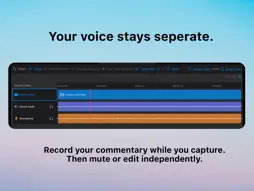
Screen recording shouldn’t bake everything together. FrameStem records your iPad screen, app audio and voice at the same time — while keeping each source separate, synchronized and ready to work with afterwards. Record a tutorial, app demo, lesson, walkthrough or creative session. When you finish, your screen video, app audio and voiceover remain independent instead of being flattened into a single recording. Record together. Edit separately. With FrameStem you can: - Record your iPad screen with app audio and microphone voiceover - Keep video, app audio and voice as separate synchronized tracks - Capture supported external USB audio sources when available - Review every track together on one timeline - Mute sections of individual tracks without changing the original recordings - Generate timestamped on-device transcription of your voice track when supported - Use the transcript to find spoken moments quickly - Export your screen video, audio tracks and transcript as separate files - Create a rendered video when you just want something ready to share - Save complete FrameStem projects so your original media and edit decisions stay together Your voice stays separate Narrate while you record without permanently mixing your commentary into the app audio. If you want to change the voiceover later, mute a mistake, re-record a section or mix the narration differently in another editor, you still have the original components to work with. Keep the app audio too FrameStem preserves available app audio independently from your microphone recording. That makes it useful for software tutorials, demonstrations, education, games, music apps and any workflow where the original sound matters just as much as the commentary. Everything stays in sync Every captured source shares the same recording timeline. Play the screen, app audio and voice together inside FrameStem, inspect individual tracks, and make non-destructive changes without losing alignment. Transcription for your voiceover When supported by your device and language, FrameStem creates a timestamped on-device transcript of your microphone track. Use it to navigate longer recordings, find the part you want to review and keep a written reference alongside your audio. Export the parts, not just the result Export your recording as separate media files for use in your favourite editing workflow. Keep the screen video, available audio tracks and transcript individually, or render a finished video directly from FrameStem. Built for capture, not clutter FrameStem is not trying to replace a full video editor. It is designed to give you better material before you get there: clean, separate, synchronized source files that remain useful after the recording has finished. Your screen. Your app audio. Your voice.
What's New
Version 1.0.1 2026-11-07
- Clearer recording setup: Audio choices now have descriptions, and the app explains how to start sharing and switch to the app being recorded. Microphone users...- Clearer recording setup: Audio choices now have descriptions, and the app explains how to start sharing and switch to the app being recorded. Microphone users see a reminder to check Apple’s recording panel. - Recording controller: An in-app panel shows recording time and provides stop and reversible audio edit-mute controls. It can collapse or dock at either side. - Reversible audio edits while recording: Mark microphone or device audio to be muted in edited playback and exports. The original audio remains recorded. - More reliable recording cleanup: Screen and audio resources are handled independently if stopping fails, with partial recordings retained for recovery where possible. - Clearer recording results: The app can identify a requested audio source that did not arrive and distinguish that from an intentional screen-only recording. - More responsive welcome screen: Recent-project discovery runs in the background, addressing a known path that could make the welcome screen unresponsive. Interrupted recordings can be reviewed later. - Easier editing: Numeric start and end times can be used to mute or restore a range. Timeline scrolling and selection behaviour have also been improved. - Accessibility and keyboard support: Larger playback and solo controls, VoiceOver timeline seeking, and shortcuts for playback, undo, redo, save, and export. - Transcription improvements: Transcription can be cancelled, stalled recognition reports a problem, and completed transcripts are included when the project is saved. Technical Analysis
Package Overview Basic metadata
Bundle ID
uk.co.tocolabs.framestem Current Version 1.0.1
Minimum iOS 26.0
Package Size App Store Size
Package Metadata 0 / 0 version records
Detailed binary, privacy manifest, framework, and Info.plist results have not been indexed for this package yet. The verified App Store and archive metadata above remains available.
Developer Information
Known Version Records
0 version records with stored package metadata
Stored metadata does not guarantee a package is currently available to download.
| Details | Version / IDs | Version date | Action |
|---|