
Preview






Description
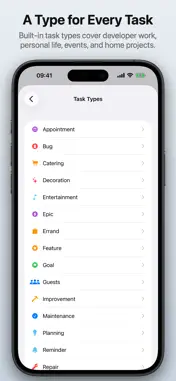
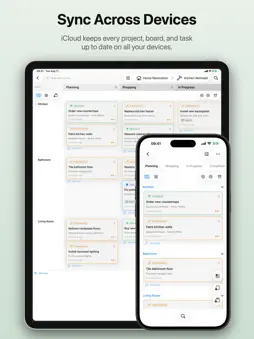
Organize projects visually with Karavan – a native Kanban board app with automatic sync. Key Features • Flexible Kanban boards with customizable columns, swimlanes and lane notes – switch to compact cards when you need to see more at once • Board Backgrounds – give each board its own look with a gradient, a symbol or your own photo, in the board's color • Task IDs & Links – every task has a short ID; copy it, or share a link that opens the task straight away • Eisenhower Matrix – not sure what to tackle first? Switch any board to a 2×2 priority grid, drag tasks by effort and impact, and preview every change before it's applied – priorities you've set by hand are never silently overwritten • Subtasks – break any task into a checklist, track progress right on the card, and let Karavan suggest moving a task to Finished once everything's checked off • Attachments – attach photos and files to any task, and preview them with Quick Look • Up Next – see your most urgent and high-priority tasks across every project in one place, and jump straight to the board • Undo & Redo, plus a full Change Log of every change with one-tap revert • Powerful search – find any task instantly; it scrolls into view and highlights itself so you never lose track • Custom notification time per task, independent of its due date • Task priorities, due dates, auto-archive, and overdue/due-soon warnings • Configurable Finished Columns – decide exactly which columns count as done, not just the last one • Board templates – use the built-ins, customize them to fit your workflow, or build your own from scratch • Custom Project Icons – drag your own photo onto a project, or pick one from Photos or Files, and it replaces the icon everywhere the project shows up • Pin your favorite projects and give each one its own color for quick recognition • Customizable task types – 19 built-in types or create your own with custom colors and icons from the full SF Symbols library (6,900+ icons) • Built-in Pomodoro timer – start a Focus Session with a tap; the timer appears on your Lock Screen and in the Dynamic Island • Markdown support in task descriptions with live preview • Per-board filters and sorting that persist across sessions • Drag and drop, swipe between columns, and reorder with a tap – navigate your board however feels natural • Automatic sync across all your devices – works offline, syncs when you're back online Perfect For: Software developers, event planners, homeowners, students, and anyone who wants visual project management without the complexity. Questions, feedback, or suggestions? Feel free to email us at [email protected] – we'd love to hear from you!
What's New
Version 1.11.0 2026-11-04
What's New in Karavan 1.11.0 Task IDs & Links • Task IDs: Want a way to point at one exact task? Every task now has a short ID, shown on its card and in its d...What's New in Karavan 1.11.0 Task IDs & Links • Task IDs: Want a way to point at one exact task? Every task now has a short ID, shown on its card and in its details. Tap it to copy, or use Copy Link for a Karavan link that opens the task straight away. • Your Board, Your Way: Each board decides whether its cards show their IDs. Boards • Board Backgrounds: Give each board its own look: a gradient, a symbol or your own photo, in the board's own color. Templates and the New Board wizard offer them from the start. • Move Tasks Between Boards: Filed a task in the wrong place? Pick another project or board right in its details, and it moves there when you save. • Lane Notes: Add a short note to a lane, like its purpose or a reminder. It shows right in the lane header. On iPhone, touch and hold a lane and choose Edit Note… to write one. • Sensible Defaults: Choose where new tasks land: a default lane, a default column and a default task type for each lane. • Filter by Quadrant: Narrow a board down to the tasks in one quadrant of the Matrix View, or to tasks you haven't placed yet. • Compact Cards: Need to see more at once? On iPad, switch a lane or a column to compact single-line cards. Your iPhone shows them too. • Tidier Lanes on iPad: When a cell overflows, it shows the first few cards and folds the rest into one summary card. A collapsed lane still shows how many tasks are in each column. • Faster Boards: Boards open noticeably faster, and large boards no longer slow down each time a change syncs in from iCloud. General • Board Order: Boards in the project list follow the project's sort mode. In Manual order, tap Edit and drag them wherever you like. • Default Priority: Do most of your tasks start out at the same priority? Set it once in Settings › General, and new tasks begin there. • Appearance: Pick light, dark, or follow the system, right in Settings. • iCloud Storage Full: When iCloud sync stops because your iCloud storage is full, Karavan now tells you, instead of failing silently. Fixed • Fixed: Picking another project or board from the menus at the top of a board now opens it, instead of leaving you on the current board. • Fixed: Menus show their icons again on iOS 27. • Fixed: Cards with the same position no longer swap places after a sync. • Fixed: A task without a lane can now get one from its details. • Fixed: The quick-action icons at the end of each Up Next row now line up from row to row. Questions, feedback, or suggestions? Feel free to email us at [email protected] – we'd love to hear from you! Technical Analysis
Package Overview Basic metadata
Bundle ID
tech.heckel.Karavan Current Version 1.11.0
Minimum iOS 18.6
Package Size App Store Size
Package Metadata 0 / 11 version records
Detailed binary, privacy manifest, framework, and Info.plist results have not been indexed for this package yet. The verified App Store and archive metadata above remains available.
Known Version Records
0 version records with stored package metadata • 11 known version records
Stored metadata does not guarantee a package is currently available to download.
| Details | Version / IDs | Version date | Action |
|---|---|---|---|
| Not archived | App Store ID: 889573721 | Unknown | Request Version |
| Not archived | App Store ID: 889489394 | Unknown | Request Version |
| Not archived | App Store ID: 888687262 | Unknown | Request Version |
| Not archived | App Store ID: 885925056 | Unknown | Request Version |
| Not archived | App Store ID: 885073184 | Unknown | Request Version |
| Not archived | App Store ID: 885026700 | Unknown | Request Version |
| Not archived | App Store ID: 882185955 | Unknown | Request Version |
| Not archived | App Store ID: 881610119 | Unknown | Request Version |
| Not archived | App Store ID: 881486383 | Unknown | Request Version |
| Not archived | App Store ID: 880043613 | Unknown | Request Version |
| Not archived | App Store ID: 879279205 | Unknown | Request Version |