Preview



Description
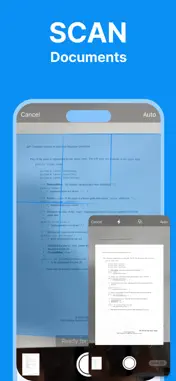
Smart Printer App lets you print from your iPhone or iPad in seconds. Connect to your WiFi printer and start printing photos, documents, and PDFs right away. PRINT PHOTOS Select photos from your camera roll and print them instantly. Print one photo or multiple photos at once. Choose from different paper sizes and layouts to get the perfect print. PRINT DOCUMENTS & PDFs Open files from your device, iCloud, or any cloud storage. Print PDFs, Word documents, spreadsheets, and more. Adjust print settings like copies, color or black & white, paper size, and orientation. SCAN DOCUMENTS Use your iPhone camera to scan documents, receipts, and notes. The built-in scanner automatically detects edges and adjusts perspective. Save scans as PDF or print them directly. PDF EDITOR Annotate and mark up PDFs before printing. Add text, signatures, highlights, and drawings. Save edited PDFs or send them straight to your printer. PRINT NOTES Type or paste any text and print it. Great for quick notes, lists, or emails you need on paper. WORKS WITH YOUR PRINTER Smart Printer App supports most WiFi printers from all major brands: - HP (DeskJet, OfficeJet, LaserJet, Envy, Smart Tank) - Canon (PIXMA, imageCLASS, SELPHY) - Epson (EcoTank, WorkForce, Expression) - Brother (MFC, HL, DCP) - Samsung, Lexmark, Ricoh, Xerox, Dell, Toshiba - And many more AirPrint compatible printers EASY SETUP No complicated configuration needed. Connect your iPhone and printer to the same WiFi network, open the app, and start printing. Your printer is detected automatically. PRINT SETTINGS Customize every print job with advanced options: - Number of copies - Color or black & white - Paper size (Letter, A4, 4x6, and more) - Orientation (portrait or landscape) - Print quality - Double-sided printing (if supported) DISCLAIMER: This app is not affiliated with HP, Canon, Epson, Brother, Samsung, or any other printer manufacturer mentioned. All trademarks belong to their respective owners. Subscription Details: Payment will be charged to your Apple ID account at confirmation of purchase. Subscriptions automatically renew unless auto-renew is turned off at least 24 hours before the end of the current period. Your account will be charged for renewal within 24 hours prior to the end of the current period. You can manage and cancel your subscriptions by going to your Account Settings on the App Store after purchase. Any unused portion of a free trial period will be forfeited when you purchase a subscription. Privacy Policy: https://bony-cent-272.notion.site/Privacy-Policy-365098c6415780ddb336dca5200b953b Terms of Use: https://bony-cent-272.notion.site/Terms-of-Use-365098c64157809e9899e20ba0e07807
What's New
Version 1.0.1 2026-06-15
Bug fixes and performance improvements. Technical Analysis
Package Overview Basic metadata
Bundle ID
com.toinfinity.smartPrinter Current Version 1.0.1
Minimum iOS 15.5
Package Size App Store Size
Package Metadata 0 / 2 version records
Detailed binary, privacy manifest, framework, and Info.plist results have not been indexed for this package yet. The verified App Store and archive metadata above remains available.
Developer Information
Known Version Records
0 version records with stored package metadata • 2 known version records
Stored metadata does not guarantee a package is currently available to download.
| Details | Version / IDs | Version date | Action |
|---|---|---|---|
| Not archived | App Store ID: 886978656 | Unknown | Request Version |
| Not archived | App Store ID: 885989838 | Unknown | Request Version |