
Preview






Description
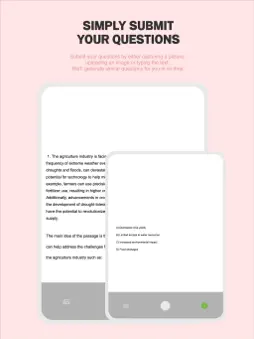
Introducing creAItest, your ultimate test bank for effortlessly generating multiple-choice questions based on existing images. Unleash the power of personalized problems with our user-friendly features. * Beta Service for User Opinions Experience the app's potential before its official release by participating in our Beta service. We value and welcome your feedback to enhance your user experience. * Camera Functionality 1. Click the camera icon on the main page. 2. Capture your Stimulus, then tap ">" after completing the Stimulus. 3. Capture the question item and tap ">". 4. Choose the difficulty level and set the number of problems. Click "Create." 5. Your personalized question will be ready in 3 to 5 minutes, stored in the designated folder. * Gallery Feature 1. Click the camera icon. 2. Access the gallery icon at the bottom left. 3. Select Stimulus photos, press 'Add,' edit if necessary, and click 'Done.' 4. After editing all photos, press '>'. 5. Choose a Question item, click 'Done.' 6. Set difficulty and quantity, then click 'Create.' In 3 to 5 minutes, find your created problems in the designated folder. * Text Input 1. Click the keyboard icon. 2. Type your Stimulus and click “Submit.” 3. Enter the Question item and click “Submit.” 4. Set difficulty and quantity, then click 'Create.' 5. Wait 3 to 5 minutes for your questions to be created and saved in the designated folder. * PDF Storage Capability Full Folder (Full Problem): 1. Click the bottom folders icon. 2. Select the folder for PDF export. 3. Click on the PDF icon. 4. Choose an SNS platform for exporting PDFs, creating a workbook-like experience. Part of the Problem: 1. Click the bottom folders icon. 2. Navigate to the folder and review questions. 3. Press the upper home button right. 4. Select questions for export by clicking "Select." 5. Tap the PDF icon after choosing questions. 6. Export the PDF to your preferred SNS platform, mirroring a workbook layout. * Your Valuable Feedback Your opinions are crucial in refining the app. If you have any concerns or suggestions, feel free to reach out to us at [email protected]. Thank you for being a part of creAItest's evolution!
What's New
Version 1.0.4 2024-02-13
beta release of our new service 'creAItest' Technical Analysis
Package Overview Basic metadata
Bundle ID
com.toinfinity.aiProblemSolver Current Version 1.0.4
Minimum iOS 12.0
Package Size App Store Size
Package Metadata 0 / 5 version records
Detailed binary, privacy manifest, framework, and Info.plist results have not been indexed for this package yet. The verified App Store and archive metadata above remains available.
Known Version Records
0 version records with stored package metadata • 5 known version records
Stored metadata does not guarantee a package is currently available to download.
| Details | Version / IDs | Version date | Action |
|---|---|---|---|
| Not archived | App Store ID: 862827277 | Unknown | Request Version |
| Not archived | App Store ID: 859024728 | Unknown | Request Version |
| Not archived | App Store ID: 858946816 | Unknown | Request Version |
| Not archived | App Store ID: 858916946 | Unknown | Request Version |
| Not archived | App Store ID: 857519525 | Unknown | Request Version |