
Preview






Description
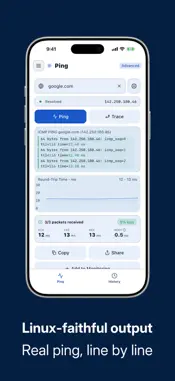
Ping Network Tool is the network diagnostic companion that works for everyone — from the non-technical user who just wants to know whether the internet is down, to the developer or sysadmin who needs raw ICMP data and route tracing on the go. SIMPLE MODE — ONE TAP IS ALL IT TAKES Open the app and you are greeted by a single, friendly screen: "Is my internet working?" Tap the button. Within seconds, Ping Network Tool sends a probe to a reliable server, interprets the result, and answers in plain language — "Internet is available. Your connection is working normally." or an equally clear explanation of what went wrong and what you might try. No jargon, no numbers to decode. If you are curious about the underlying data, tap "See technical details" to reveal the raw ping output, or tap "Switch to Advanced" to unlock the full toolkit. ADVANCED MODE — LINUX-FAITHFUL PING OUTPUT IN YOUR POCKET Power users and professionals get a streamlined terminal-style interface with three tabs: Ping, History, and Network. The Ping tab lets you enter any hostname or IP address, choose your packet size, interval, and count, then press Ping to watch results stream in line by line — exactly as you would see them in a Linux terminal. A live RTT graph plots each round-trip time as responses arrive, giving you an instant visual of jitter and packet loss. When you are done, tap Trace to run a full traceroute to the same host and see every hop between your device and the destination, with per-hop latency. Copy the entire session output to the clipboard with one tap for sharing or logging. The History tab preserves every ping and traceroute session automatically. Browse past runs, review RTT statistics — min, avg, max, and mdev — and compare connectivity over time. Sessions persist across restarts so you always have a record. The Network tab shows a live snapshot of this device: your Wi-Fi IP address, external IP (via ipify.org), DNS server, and detected country. Tap Refresh at any time to update the external IP or country information. It is ideal for quickly verifying VPN connectivity, confirming your external address, or checking which DNS resolver your device is using. HOST BOOK — SAVE AND REUSE YOUR TARGETS The Host book stores up to five hosts in the free plan so you can jump straight to the targets you care about without retyping them. Each saved host can also be enrolled in background monitoring, which silently pings it at regular intervals and alerts you when it becomes unreachable. PREMIUM — ONE-TIME PURCHASE, NO SUBSCRIPTION Ping Network Tool is free to use with no time limit. A single optional in-app purchase of $1.99 unlocks the full feature set permanently: • TCP Ping: probe a specific port number instead of relying on ICMP alone. Useful for checking whether a web server, mail server, or game server is actually accepting connections on the relevant port. • Unlimited hosts and monitoring: remove the 5-host limit in the host book and enable background monitoring for as many targets as you need. • No upsell banners: permanently removes the promotional banner and weekly reminder that appear in the free plan. • Family Sharing: the purchase is shared automatically with everyone in your Family Sharing group on iOS at no extra cost. There is no subscription, no auto-renewal, and no hidden fees. Pay once and the unlock is yours forever, even after reinstalls. PRIVACY AND PERMISSIONS Ping Network Tool does not collect personal information. Network requests are limited to the hosts you explicitly choose to probe and a single call to ipify.org to retrieve your external IP address when you open the Network tab. No account is required. No data is uploaded to any server. Whether you are a home user troubleshooting a slow connection, a network engineer checking infrastructure from your phone, or a developer verifying that a deployment is reachable — Ping Network Tool is the fast, clean tool you have been looking for.
What's New
Version 1.2.0 2026-08-13
Ping NetTool now runs full screen on iPad instead of in a letterboxed, iPhone-sized window. It fills the display and rotates with the device, so you can run a p...Ping NetTool now runs full screen on iPad instead of in a letterboxed, iPhone-sized window. It fills the display and rotates with the device, so you can run a ping or a traceroute from the whole screen. In case you missed the previous update: • Ping, traceroute and DNS lookups now make real network calls. • Traceroute explains its * rows — a legend appears whenever a hop doesn't answer. • A mistyped IP address is caught before the run starts, instead of coming back as a DNS error. • The rating prompt now offers to email us if something isn't right. Technical Analysis
Package Overview Basic metadata
Bundle ID
com.swtlm.pingnetworktool Current Version 1.2.0
Minimum iOS 16.0
Package Size App Store Size
Package Metadata 0 / 0 version records
Detailed binary, privacy manifest, framework, and Info.plist results have not been indexed for this package yet. The verified App Store and archive metadata above remains available.
Developer Information
Known Version Records
0 version records with stored package metadata
Stored metadata does not guarantee a package is currently available to download.
| Details | Version / IDs | Version date | Action |
|---|