
Preview




Description
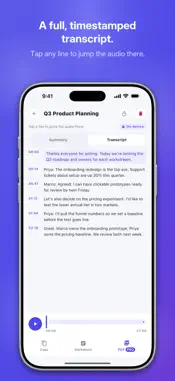
Meeting Transcriber records a meeting, lecture or interview on your iPhone, writes out what was said, and turns that transcript into a summary with key points and action items. All three steps run on the phone itself, so neither the audio nor the text is ever uploaded. Before the first recording you pick the language your meetings are in: English, German, French, Spanish, Italian, Portuguese, Dutch, Russian, Japanese, Korean or Chinese. Tap Record and the microphone captures the room; you can pause and resume, and recording carries on with the screen locked. When you stop, Apple's on-device speech recognition writes the transcript, so there is no speech model to download. Each line of the transcript carries its time, and tapping a line plays the audio from that moment. On iPhone the microphone is the only source: the app cannot capture other apps' sound or record phone calls. The summary opens with a short overview, then the key points and the action items, at the detail you choose: Concise, Balanced or Detailed. On an iPhone with Apple Intelligence (iOS 26), Apple's built-in model writes it in every app language except Russian (Dutch from iOS 26.1). Other iPhones, and Russian on any iPhone, can download a summary model once, about 380 MB to 2.4 GB depending on the iPhone, which then works offline. Where no model can run, the app builds a Quick summary from the transcript's key sentences, and Settings shows which engine wrote your last summary. Smaller models write shorter, plainer summaries, and Russian ones are weaker than English, so the full transcript always sits next to the summary. Recordings are kept in a library you can search by what was said. From any recording you can draft a follow-up message based on its summary, share the summary as plain text or Markdown, or export a PDF that also carries the full transcript with timestamps. If a meeting was recorded in the wrong language, or you want more or less detail, Redo processes the same audio again with your current settings. Recording, transcription, summaries, search, Redo and text or Markdown sharing are free with no limit. Follow-up drafts and PDF exports share a free allowance of three a day; Meeting Transcriber Pro removes that cap. Meeting Transcriber shows no ads and has no sign-up. Audio, transcripts and summaries stay on your iPhone unless you share them. The app goes online only to download the summary model from Hugging Face, to send anonymous usage statistics and crash reports to Firebase, which never include what was said, and to handle subscriptions through RevenueCat. The screens are translated into the same eleven languages. It needs iOS 16.4 or later, and transcribing Dutch needs iOS 26. Pro is sold as two auto-renewable subscriptions: Pro Monthly, billed every month, and Pro Yearly, billed every year. The App Store shows the price in your local currency before you confirm the purchase. Payment is charged to your Apple Account when you confirm the purchase. A subscription renews automatically unless auto-renew is turned off at least 24 hours before the end of the current period, and you can manage or cancel it in your Apple Account settings. Terms of Use (EULA): https://www.apple.com/legal/internet-services/itunes/dev/stdeula/ Privacy Policy: https://apps.swtlm.com/meeting-transcriber/privacy/
What's New
Version 1.3.1 2026-11-04
The Pro screen now lists exactly what Pro adds: no daily cap on follow-up drafts and PDF export. Summaries and action items stay free for everyone. Technical Analysis
Package Overview Basic metadata
Bundle ID
com.swtlm.meetingtranscriber Current Version 1.3.1
Minimum iOS 16.4
Package Size App Store Size
Package Metadata 0 / 0 version records
Detailed binary, privacy manifest, framework, and Info.plist results have not been indexed for this package yet. The verified App Store and archive metadata above remains available.
Developer Information
Known Version Records
0 version records with stored package metadata
Stored metadata does not guarantee a package is currently available to download.
| Details | Version / IDs | Version date | Action |
|---|