
Preview




Description
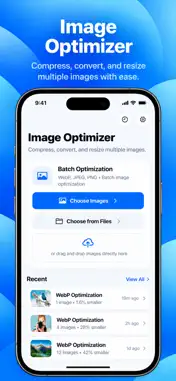
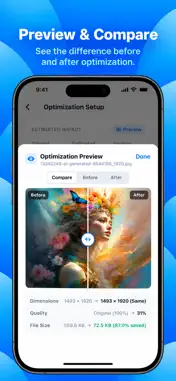
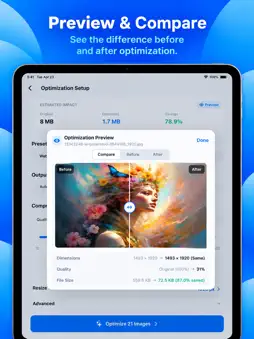
Bulk Image Optimizer: WebP makes it fast and simple to compress, convert, resize, and optimize large batches of images. Optimize hundreds of photos in one workflow — locally on your device, with no uploads and no account required. KEY FEATURES • BULK IMAGE OPTIMIZATION Process large batches of images at once instead of optimizing them one by one. • WEBP, JPEG, PNG, HEIC & AVIF Convert images between supported formats or use Auto to keep each image’s original format. • QUALITY COMPRESSION Choose your quality level and balance image fidelity with file size. • TARGET FILE SIZE Set a target size such as 100 KB, 500 KB, 1 MB, or a custom limit and let the app find an appropriate compression level. • RESIZE IMAGES Resize by maximum dimensions while preserving aspect ratio. • PREVIEW BEFORE EXPORT Compare original and optimized images with an interactive before-and-after preview. • SMART PRESETS Use presets for common workflows such as Web, Shopify, WordPress, and smallest file size. • CUSTOM PRESETS Save your own optimization settings and reuse them for future batches. • METADATA CONTROLS Keep metadata or remove GPS and EXIF information before export. • IMAGE SEO METADATA Add optional title, description, keywords, creator, and copyright metadata to images. Apply the same metadata to an entire batch. • SAFE FILE HANDLING Original images are never overwritten by default. Optimized copies are created separately. • EXPORT YOUR WAY Save optimized images to Photos or Files, share them, or export the entire batch as a ZIP archive. • LOCAL & PRIVATE Image processing happens on your device whenever supported. Your images are not uploaded to a server. BUILT FOR LARGE BATCHES Designed to stay responsive while processing large image collections with efficient memory usage, background processing, progress tracking, and per-image error handling. Whether you are preparing website assets, e-commerce images, blog photos, app resources, or images for sharing, Bulk Image Optimizer gives you the controls to optimize everything in one place.
Technical Analysis
Package Overview Basic metadata
Bundle ID
com.tkmit.bulk Current Version 1.0
Minimum iOS 15.0
Package Size App Store Size
Package Metadata 0 / 0 version records
Detailed binary, privacy manifest, framework, and Info.plist results have not been indexed for this package yet. The verified App Store and archive metadata above remains available.
Developer Information
Known Version Records
0 version records with stored package metadata
Stored metadata does not guarantee a package is currently available to download.
| Details | Version / IDs | Version date | Action |
|---|