
Preview









Description
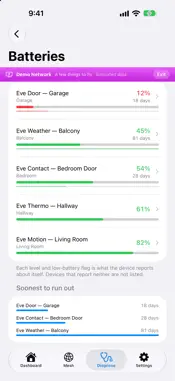
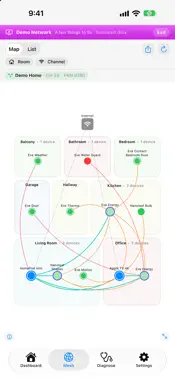
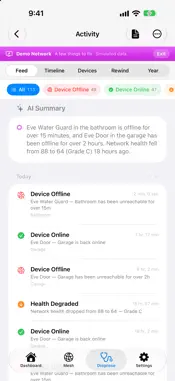
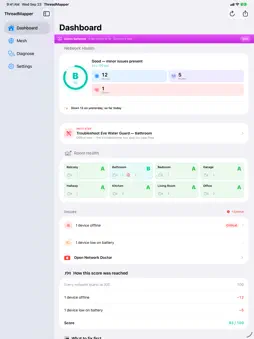
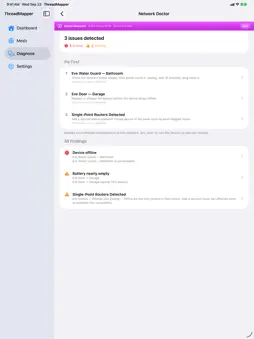
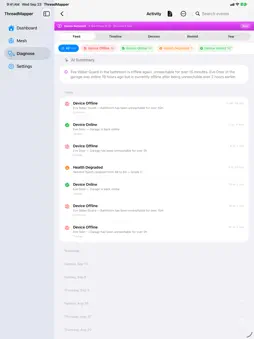
ThreadMapper shows what your Thread smart home says about itself. Most Thread devices are invisible. They just work, until they don't, and there's no way to tell which one dropped, which border routers you really have, or whether a quiet sensor is asleep or gone. WHAT YOU GET • Network health at a glance: an A–F grade with a clear score, and the specific issues pulling it down • Better than yesterday? A line under the grade saying whether today is up or down on yesterday, and which rule moved it • Every battery in one list, emptiest first, with the room • Your Thread devices, apart from the rest: the ones that say they are on Thread, and every other accessory labelled for what it is, behind a bridge or not yet known • Mesh map: your Thread devices by room, and the links they report • Offline alerts that respect quiet: a sleepy sensor gets two hours before it is called offline, and devices that go quiet together are one event • Device history: uptime, reboots and firmware changes • Apple Watch app: your grade on your wrist • Home-screen widget and Live Activity for at-a-glance status HONEST ABOUT ITS DATA ThreadMapper shows only what a device or the network states. A device is Thread when it says so. A border router is one the network proves. A line on the map is a link a device reported. iOS doesn't expose radio signal strength for Thread accessories, so there is no signal figure: a device's page shows how quickly it answered, in milliseconds. The battery level is what each accessory reports about itself. PRIVATE BY DESIGN No account. No analytics. No tracking. Everything stays on your iPhone, and the AI features run on device. Your network data is never uploaded. THREADMAPPER PRO: a one-time purchase, not a subscription • AI Insights on any iPhone, and with Apple Intelligence a Network Assistant and a troubleshooter that reads this device's history, all on device • What the radios say: why a device rebooted, how often it changed parent router, how often a battery device wakes, and how many apps and households can still control it • AR room mapping and X-Ray: scan rooms into a floor plan, place each device where it really is, and see the links your devices report drawn through your real home • Your year on one card, your mesh as a film, and as an A2 poster a print shop will take • A year of daily grades on one calendar, no Apple Intelligence needed, a month of history, weekly reports, and when your home is at its worst • Export every health sample, daily grade and battery reading as CSV or JSON, and import them on a new iPhone • Jobs and evidence sheets: a page for a client showing what a visit changed, and a page per device for a warranty claim • Device groups, multiple homes, scheduled reports and a pinned-devices widget REQUIREMENTS ThreadMapper reads your network through HomeKit, so you'll need a home with at least one Thread border router, such as a HomePod mini or an Apple TV 4K. Border routers are found through Local Network access. The Network Assistant and the troubleshooter need iOS 26 and an Apple Intelligence-capable device; AI Insights works on any iPhone. Room scanning needs a Pro-model iPhone with a LiDAR scanner. Want to look around first? Turn on Demo Mode to explore the whole app with a simulated network, no hardware needed.
What's New
Version 2.5 2026-10-13
YOUR WHOLE HOME ON ONE MAP The Mesh tab's map now draws every accessory in your home, each as a mark of its own. The icon says what it is. The shape and colour... Technical Analysis
Package Overview Basic metadata
Bundle ID
com.tintronixlab.ThreadMapper Current Version 2.5
Minimum iOS 17.0
Package Size App Store Size
Package Metadata 0 / 0 version records
Detailed binary, privacy manifest, framework, and Info.plist results have not been indexed for this package yet. The verified App Store and archive metadata above remains available.
Developer Information
Known Version Records
0 version records with stored package metadata
Stored metadata does not guarantee a package is currently available to download.
| Details | Version / IDs | Version date | Action |
|---|