
Preview

Description
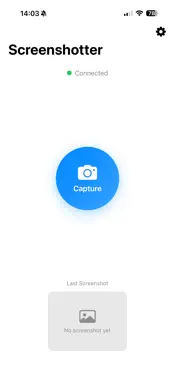
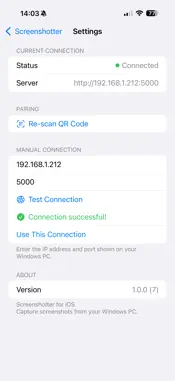
**Remote screenshot capture and management for Windows PCs.** PC Screenshotter turns your iPhone into a remote capture controller and screenshot viewer for your Windows computer. Capture your screen from across the room, preview results instantly on your phone, and save or share screenshots without touching your PC. Designed as a companion to the PC Screenshotter Windows app, this iOS app provides a focused, lightweight workflow for capturing and managing desktop screenshots directly from your iPhone. **How It Works** 1. Run the PC Screenshotter companion app on your Windows PC 2. Scan the pairing QR code using your iPhone 3. Trigger screen captures remotely 4. Instantly preview, save, or share screenshots on iOS **What You Can Do on iPhone** - Remote Capture Control – Trigger screenshots on your PC with a single tap - Instant Preview – View captured screenshots immediately on your iPhone - Screenshot History – Browse recent captures in one place - Save to Photos – Store screenshots directly in your iOS Photos library - Share Anywhere – Use the iOS Share Sheet to send images to Messages, Mail, AirDrop, and more - Private & Local – No accounts, no cloud services, no external servers **Ideal For** - Presenters capturing slides or live demos - Educators and trainers recording tutorials - Streamers and creators grabbing moments on demand - Anyone who wants fast, wireless screenshot control without interrupting their workflow **Privacy & Security** All communication stays on your local network. Screenshots are transferred directly between your PC and iPhone—nothing is uploaded, tracked, or stored externally. **Requirements** - A Windows PC running the free PC Screenshotter companion app - iPhone and PC connected to the same local Wi-Fi network
Technical Analysis
Package Overview Basic metadata
Bundle ID
com.timheuer.screenshotter Current Version 1.0.0
Minimum iOS 17.0
Package Size App Store Size
Package Metadata 0 / 1 version records
Detailed binary, privacy manifest, framework, and Info.plist results have not been indexed for this package yet. The verified App Store and archive metadata above remains available.
Known Version Records
0 version records with stored package metadata • 1 known version records
Stored metadata does not guarantee a package is currently available to download.
| Details | Version / IDs | Version date | Action |
|---|---|---|---|
| Not archived | App Store ID: 881329725 | Unknown | Request Version |