
Preview




Description
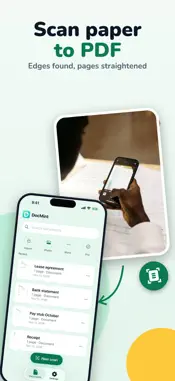
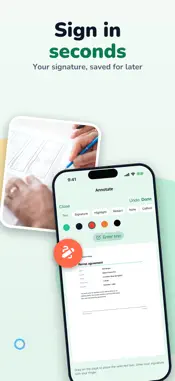
A black box drawn over a name in a PDF hides nothing: the text is still underneath, and anyone can copy it out. DocMint removes it. REDACT FOR REAL • Mark names, account numbers, addresses or prices on a PDF • DocMint rebuilds the page and saves a new PDF: the covered text, the old text layer and the metadata are left out • On scans, black boxes are burned into the page and the recognized text under them is deleted SCAN PAPER TO PDF • The document camera finds the edges and straightens each page • Crop, rotate, reorder, duplicate and delete pages; clean them up with color, grayscale or black-and-white filters • Import photos, image files and PDFs, or send them to DocMint from other apps • On-device text recognition makes your PDFs searchable SIGN AND FILL OUT FORMS • Draw your signature once and place it on any page • Type names and dates, and tick checkboxes right on the form • Highlight, add notes, arrows, shapes and stamps SHARE IT YOUR WAY • PDF in Letter, A4 or the original size, in three quality levels • Merge documents, split them or pull out a single page • Add page numbers, or share JPEG pages or plain text • Start a scan from a Home Screen widget, Control Center or Siri PRIVATE BY DESIGN No account, no sign-up. Your documents stay on your iPhone or iPad. DocMint never uploads your documents, their text or their file names. FREE AND PRO Free: scan, import, edit pages, text recognition, sign, fill out forms, black out parts of a scan, merge and split, up to 20 pages per document, and 3 exports without the DocMint mark. After that, exports carry a small DocMint mark. DocMint Pro: exports without the mark, redacted copies of existing PDFs, no 20-page limit, password-protected PDFs, watermarks, archive bundles, and Album and Book modes for printed photos and books. DocMint Pro is available as a one-time Lifetime purchase or as a monthly subscription. The App Store shows the price before you buy, and payment is charged to your Apple Account. The monthly subscription renews automatically unless you turn it off at least 24 hours before the end of the current period. Manage or cancel it anytime in your Apple Account settings. Terms of Use: https://www.apple.com/legal/internet-services/itunes/dev/stdeula/ Privacy Policy: https://docmintscan.com/privacy/
What's New
Version 1.3.2 2026-11-14
Maintenance update: DocMint works the same as in version 1.3.1. Technical Analysis
Package Overview Basic metadata
Bundle ID
com.bumblly.docmint Current Version 1.3.2
Minimum iOS 18.0
Package Size App Store Size
Package Metadata 0 / 0 version records
Detailed binary, privacy manifest, framework, and Info.plist results have not been indexed for this package yet. The verified App Store and archive metadata above remains available.
Developer Information
Known Version Records
0 version records with stored package metadata
Stored metadata does not guarantee a package is currently available to download.
| Details | Version / IDs | Version date | Action |
|---|