Preview




Description
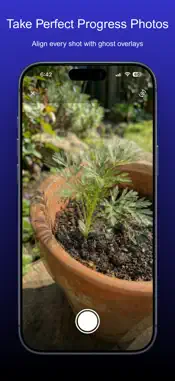
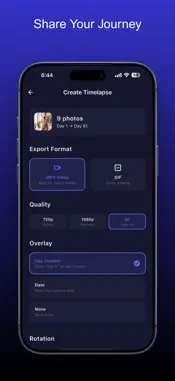
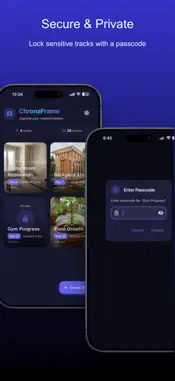
Stop cluttering your camera roll with random progress photos. ChronaFrame is a dedicated workspace for tracking change over time, helping you turn daily photos into perfectly aligned, shareable timelapses. Whether you’re tracking a fitness transformation, a home renovation, a growing plant, or a pregnancy, ChronaFrame ensures every shot lines up consistently from day one. WHY CHRONAFRAME? Your normal camera app wasn’t built for progress tracking. It’s messy, hard to organize, and impossible to align consistently. ChronaFrame solves this with "Folder-First" organization and ghost overlay technology. KEY FEATURES: Perfect Alignment (Ghost Mode) Never take a shaky progress photo again. ChronaFrame overlays your previous photo on the camera viewfinder, allowing you to align your eyes, walls, or objects perfectly. • Adjustable transparency slider for precise alignment • Designed for consistent framing across days, weeks, or months Organized Tracks Create dedicated tracks for every project and keep everything neatly separated. • Folder-first workflow with individual tracks for each journey • Looping thumbnail previews on the dashboard to visualize progress at a glance • Smart reminders with daily, weekly, or custom schedules • Mark tracks as complete to pause reminders and freeze the day counter without losing data Studio-Quality Export Turn your photos into high-quality, shareable videos in seconds. • Export resolutions: 720p, 1080p, or full 4K • Export formats: MP4 video or looping GIF • Speed control with adjustable frame timing • Optional hold on the first and/or last frame to highlight before-and-after results • Optional overlays showing day count, date stamps, or no overlay at all • Rotation controls for perfect orientation Secure & Private Some progress is personal. Keep sensitive tracks protected. • Lock tracks behind a passcode • Locked tracks display a lock icon instead of a preview on the dashboard • Content is only visible after passcode entry Make It Yours Customize ChronaFrame to match your style and workflow. • Multiple color themes including Indigo, Teal, Violet, and more • Full light mode and dark mode support • 24-hour time format option • GIF preview thumbnails for quick visual scanning • Built-in feature requests and bug reporting via email PERFECT FOR: • Fitness transformations, bulking, cutting, and weight loss • Pregnancy progress tracking • Plant growth and gardening logs • DIY projects and home renovations • Face & skin progress, including beard growth or skincare routines Start your timeline today. Download ChronaFrame and capture change with clarity. Terms of Use (EULA): https://www.apple.com/legal/internet-services/itunes/dev/stdeula/
What's New
Version 1.0.2 2026-02-18
- Fixed an error when creating weekly reminders set to Sunday - App now properly displays all supported languages in the App Store Technical Analysis
Package Overview Basic metadata
Bundle ID
com.chronaframe.app Current Version 1.0.2
Minimum iOS 15.6
Package Size App Store Size
Package Metadata 0 / 2 version records
Detailed binary, privacy manifest, framework, and Info.plist results have not been indexed for this package yet. The verified App Store and archive metadata above remains available.
Developer Information
Known Version Records
0 version records with stored package metadata • 2 known version records
Stored metadata does not guarantee a package is currently available to download.
| Details | Version / IDs | Version date | Action |
|---|---|---|---|
| Not archived | App Store ID: 882527316 | Unknown | Request Version |
| Not archived | App Store ID: 881831762 | Unknown | Request Version |