Preview





Description
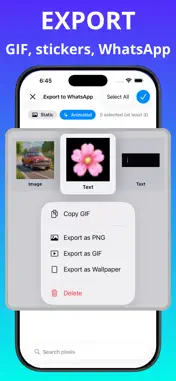
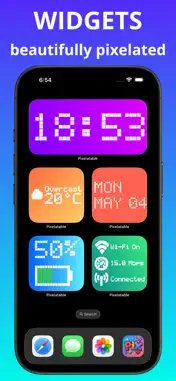
Pixelatable transforms your text, emojis, symbols, drawings, and photos into stunning animated pixel art GIFs, stickers, widgets, and wallpapers. Whether you're a retro design lover or just want to send something unforgettable, Pixelatable puts a pixel studio in your pocket. PIXEL EDITOR Create pixel art from anything: • Type text, drop in an emoji, pick an SF symbol, sketch a drawing, or import a photo — and watch it become pixel art instantly • Fine-tune every detail: cell color, cell size, spacing, shape, gradient presets, and background style • Choose from 7 iconic cell styles: Retro Mono, Rainbow, Neon, Voxel 3D, Sunset, Ocean, Fire • Keep original emoji or image colors, or apply a custom solid/gradient cell color • Animate your pixels: bounce, sparkle, shimmer, jitter, slide in, reveal, fade, and more • Edit photos with filters and background removal before pixelating • Combine multiple pixels into composite layouts — horizontal, vertical, grid, or free-form SHARE & EXPORT Get your pixel art out into the world: • Export as high-quality PNG or animated GIF • Send directly to WhatsApp as stickers in one tap • Share your full pixel collection as a ZIP via the built-in Import/Export tool WALLPAPER EDITOR Make your home screen uniquely yours: • Build wallpapers from your own pixel art • Choose from Center, Pattern, and Spotlight layout styles • Customize canvas size and background color to fit any device LIBRARY Get inspired and get started fast: • Browse a curated collection of ready-made animated pixels across categories: Love, Party, Mood, Nature, Sport, Food, Travel, Tech, and more • Copy and paste GIFs straight into Messages, WhatsApp, email — anywhere • Use any library item as a template and make it your own WIDGET EDITOR Bring pixel art to your home screen and lock screen: • Create pixel-style widgets: Clock, Day, Timer, Battery, Calendar, and more • Supports small, medium, large, Live Activity, and Lock Screen sizes • Fully customizable styles, colors, and update frequency KEYBOARD EXTENSION Send pixel stickers from any app: • Access your pixel art directly from the keyboard • Copy and paste your favorite GIFs and stickers without ever leaving your conversation Pixelatable is made for creators, nostalgia lovers, and anyone who wants to express themselves in a way that stands out. Start pixelating today. Terms of Use (EULA) https://www.apple.com/legal/internet-services/itunes/dev/stdeula/
Technical Analysis
Package Overview Basic metadata
Bundle ID
com.tigernghk.ios.PixelFormat Current Version 1.0
Minimum iOS 18.6
Package Size App Store Size
Package Metadata 1 / 1 version records
Detailed binary, privacy manifest, framework, and Info.plist results have not been indexed for this package yet. The verified App Store and archive metadata above remains available.
Developer Information
Known Version Records
1 version record with stored package metadata
Stored metadata does not guarantee a package is currently available to download.
| Details | Version / IDs | Version date | Action |
|---|---|---|---|
| 30.87 MB | v1.0 App Store ID: 884976366Build: 1.0 | 2026-05-06 18:37:08 | Get Version |