Preview



Description
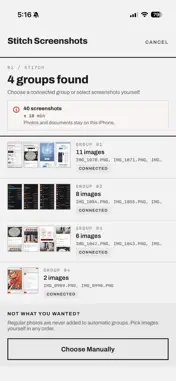
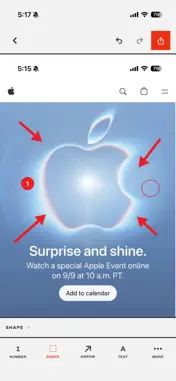
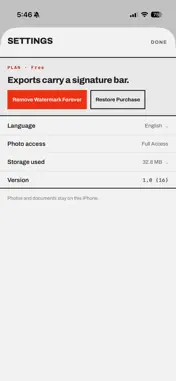
Annotateshot turns photos, documents, and screenshots into clear, editable work you can finish on your iPhone. Import one or multiple photos, scan a document, or stitch a long screenshot. Then add numbers, shapes, arrows, text, highlights, mosaic, freehand marks, stickers, crop, and custom watermarks. Your projects stay editable in the local library. Export a clean image or multi-page PDF, save to Photos, or share the result. Every core editing tool is available. The optional one-time Annotateshot Pro: Full Export upgrade omits only the signature bar that Annotateshot adds below each image or PDF. It does not detect, remove, hide, or alter watermarks, logos, or other marks in imported content. Features: • Import photos in the order you choose • Scan multi-page documents with perspective correction • Automatically find and stitch recent screenshots, or choose screenshots manually • Annotate with numbers, shapes, arrows, text, pen, highlights, mosaic, stickers, crop, and watermarks • Edit and reorder multiple pages • Undo and redo changes, with automatic project saving • Export images or multi-page PDFs • Save to Photos, Files, or share • Use Full Export on another device after restoring your purchase Annotateshot does not require an account or subscriptions. Photos and documents are processed on your iPhone and are not sent to a server. The app does not use advertising or behavioral analytics. Crash and error reports help improve stability and do not include photo, document, or screenshot content.
What's New
Version 1.2.0 2026-11-18
Stitching is smarter and quicker to reach. - Pick Annotateshot in the share menu of Photos or the screenshot preview to edit or stitch right away. - Screenshots...Stitching is smarter and quicker to reach. - Pick Annotateshot in the share menu of Photos or the screenshot preview to edit or stitch right away. - Screenshots you choose are always stitched as well as possible, and seams that need a look are marked on the preview. Drag the lower image to line up an overlap yourself. - Run "Stitch Latest Screenshots" from Shortcuts or Control Center to open straight on your newest screenshots. Technical Analysis
Package Overview Basic metadata
Bundle ID
com.tigerdreams.annotateshot.ios Current Version 1.2.0
Minimum iOS 18.0
Package Size App Store Size
Package Metadata 0 / 0 version records
Detailed binary, privacy manifest, framework, and Info.plist results have not been indexed for this package yet. The verified App Store and archive metadata above remains available.
Developer Information
Known Version Records
0 version records with stored package metadata
Stored metadata does not guarantee a package is currently available to download.
| Details | Version / IDs | Version date | Action |
|---|