
Preview




Description
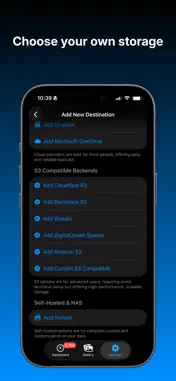
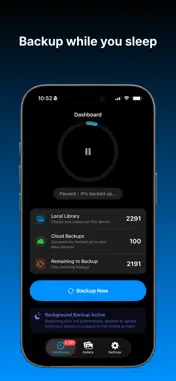
Whoosh: One-Way Media Backup Whoosh is a one-way backup utility for iOS. It transfers your photos and videos directly to your personal cloud storage. Unlike standard synchronization services, files uploaded via Whoosh remain safely in your cloud storage even if you delete the originals from your device to free up space. Key Features Broad Storage Support: Connect your existing cloud accounts—including Google Drive, Dropbox, Microsoft OneDrive, and Immich—or link directly to any S3-compatible storage (such as Amazon S3, Cloudflare R2, Backblaze B2, Wasabi, or DigitalOcean Spaces). Background Uploading: Files are uploaded directly from your device to your storage provider via HTTPS. Uploads continue reliably in the background, so you don't need to keep the app open. Live Activities: Monitor your active backup progress in real-time directly from your Lock Screen or the Dynamic Island. Original Quality & Metadata: Media is backed up exactly as captured. Files retain their original resolution, formats (including RAW and 4K video), and full EXIF metadata without added compression. You can also view EXIF details directly within the app prior to upload. Local Security: Your API credentials and authentication tokens are stored securely on-device in the iOS Keychain. The application does not include analytics tracking or perform background content scanning. Data Ownership: You maintain full administrative control over your storage bucket and folder structure. Files are stored in standard formats and can be accessed or downloaded anytime using compatible desktop clients. How It Works Connect your preferred cloud storage provider or S3 bucket. Select the photos and videos you wish to back up. Start the backup and track its progress via Live Activities.
What's New
Version 2.1.0 2026-09-30
What's New in This Version This update significantly expands your storage options and introduces new ways to monitor your backups in the background. Expanded ...What's New in This Version This update significantly expands your storage options and introduces new ways to monitor your backups in the background. Expanded Storage Provider Support Whoosh now connects to a much wider range of personal and enterprise storage platforms: Universal S3 Support: We've added comprehensive support for all S3-compatible storage. You can now connect directly to Amazon S3, Backblaze B2, Wasabi, DigitalOcean Spaces, or any custom S3 backend. New Cloud Integrations: You can now connect and back up your media to Dropbox and Microsoft OneDrive. Immich Integration: Added support for backing up directly to your self-hosted Immich instance, alongside performance improvements for large library pagination. New Features & Improvements Technical Analysis
Package Overview Basic metadata
Bundle ID
com.tickethawk.whoosh Current Version 2.1.0
Minimum iOS 18.0
Package Size App Store Size
Package Metadata 0 / 0 version records
Detailed binary, privacy manifest, framework, and Info.plist results have not been indexed for this package yet. The verified App Store and archive metadata above remains available.
Known Version Records
0 version records with stored package metadata
Stored metadata does not guarantee a package is currently available to download.
| Details | Version / IDs | Version date | Action |
|---|