Preview





Description
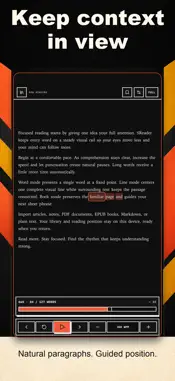
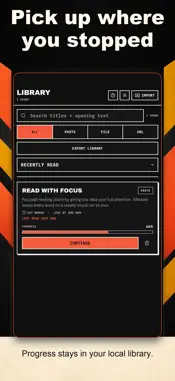
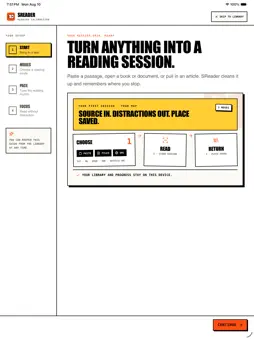
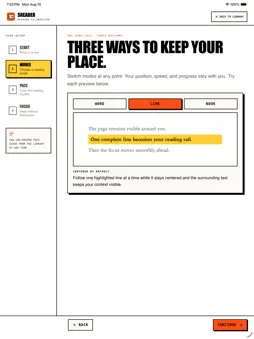
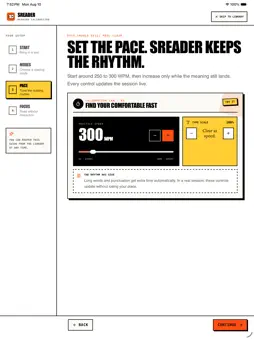
SReader turns passages, books, documents, and articles into focused reading sessions. Bring in text, choose how you want to read, and return later with your place saved. KEY FEATURES • RSVP word focus keeps each word on a consistent visual rail. • Book and Line modes keep surrounding text visible when you want more context. • Import from paste, TXT, Markdown, EPUB, PDF, or an article URL. • Adjust reading speed, chunk size, font scale, and focus controls while you read. • Save a local library and resume from your last position. • Use keyboard shortcuts on supported desktop hosts. HOW IT WORKS 1. Paste text, choose a supported file, or enter an article URL. 2. Pick RSVP word focus, Book mode, or Line mode and set a comfortable pace. 3. Read, pause, seek, and return to the same place later. PRIVACY SReader stores your library, settings, and reading progress locally on the device. File and pasted-text imports are processed locally. When you choose an article URL, SReader requests that URL to retrieve its content. SUPPORT SReader does not require an account and contains no ads. Contact [email protected] for questions or issue reports.
What's New
Version 0.1.20 2026-09-23
This update adds a device setting to exclude anonymous analytics from customer reports and improves analytics classification. Technical Analysis
Package Overview Basic metadata
Bundle ID
com.thoughtbubble.sreader Current Version 0.1.20
Minimum iOS 15.0
Package Size App Store Size
Package Metadata 0 / 0 version records
Detailed binary, privacy manifest, framework, and Info.plist results have not been indexed for this package yet. The verified App Store and archive metadata above remains available.
Developer Information
Known Version Records
0 version records with stored package metadata
Stored metadata does not guarantee a package is currently available to download.
| Details | Version / IDs | Version date | Action |
|---|