
Clew: Highlights and Notes App Icon

Clew: Highlights and Notes

Productivity • Thomas Twardzik
4+ v1.7.2 Recorded price: Free App Store →
★★★★★
★★★★★
(2 App Store ratings)
IPA Analysis
Technical Specs
Bundle ID com.tommytwardzik.Clew
Version 1.7.2
App Store Size 36.67 MB
Minimum iOS 18.0
Devices iPhone, iPad, iPod touch
Catalog release date 2025-04-06
Latest recorded version date 2026-11-09
Features & Support
Advisory 4+
Languages (1)
EN
Top In App Purchases
No In App Purchases Listed

Preview

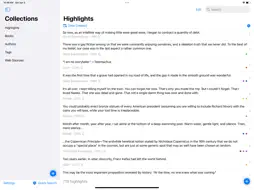
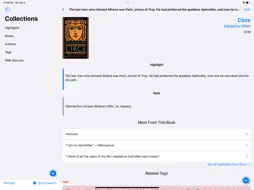
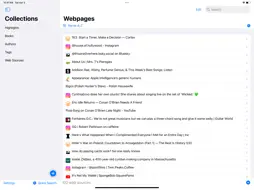
Clew: Highlights and Notes screenshot 1 Clew: Highlights and Notes screenshot 2 Clew: Highlights and Notes screenshot 3 Clew: Highlights and Notes screenshot 4 Clew: Highlights and Notes screenshot 5 Clew: Highlights and Notes screenshot 6 Clew: Highlights and Notes screenshot 7 Clew: Highlights and Notes screenshot 8 Clew: Highlights and Notes screenshot 9 Clew: Highlights and Notes screenshot 10 Clew: Highlights and Notes screenshot 11 Clew: Highlights and Notes screenshot 12 Clew: Highlights and Notes screenshot 13 Clew: Highlights and Notes screenshot 14

Description

Clew is the fastest, easiest way to save passages, quotes, and notes from the things you read, watch, and listen to, so you can start discovering connections between everything you save. Remember the last time you wrote in the margin of a novel, only to finish the book and never see that thought again? How many times have you clipped parts of articles, songs, and podcasts and saved them to a note somewhere, hidden and forgotten? Clew is a single place for all your highlights, clips, and favorite lines—stored, organized, and searchable in one place. It's a commonplace book that you'll always have with you, easily searchable and synced between all your devices. Clew helps you connect thoughts across sources, centuries, and media types through powerful tagging and intelligent recommendations. Start discovering connections between everything you've saved from: - Books and poems you read - Movies and TV shows you watch - Podcasts and audiobooks you listen to - Songs you love - Articles you read online or on paper Simply copy-and-paste text into the app, use the Share extension, or scan book pages and documents with your device's camera to save a new highlight. Clew makes it easy to sort and search your highlights by source (author, website, etc.), date saved, publication year, genre, keywords, and more. Build your collection, and watch as you start finding connections and patterns across books, artists, decades, genres, languages, and more. This is your new favorite place to store, sort, and share clippings from all your favorite media, whether it's a mind-blowing plot twist in a novel, a hilarious quote in a movie or play, a devastating song lyric, a grand discovery in an article, or simply a quirky adjective you can't wait to use in your own writing. This is Clew. Terms of Use (EULA): https://www.apple.com/legal/internet-services/itunes/dev/stdeula/

What's New

Version 1.7.2 2026-11-09
- A "What's New" screen highlights what's new in Clew after major updates (also available in Settings) - Undo and redo with three-finger swipe gestures on iPhon...- A "What's New" screen highlights what's new in Clew after major updates (also available in Settings) - Undo and redo with three-finger swipe gestures on iPhone and iPad - The season picker shows each season's real name along with its year and number of episodes. When a show has been split into two listings (such as a show that switched networks), Clew shows each listing's network and range of years to help you tell them apart - Tip: When adding a new show or episode, you can search for a specific episode by typing "S2E5" or similar into the search bar - A rebuilt share sheet and improved Safari extension make it faster and more convenient to save highlights from the web - Apple Intelligence can suggest tags in the share sheet and the Safari extension (on supported devices) (turn this on and off in Settings) - The Safari extension shows how many highlights you've already saved from a page, lets you edit the highlight before saving, and makes picking tags easier - Clew tries to find a web page's authors and fill them in for you, both when you share a page and when you paste a link into a new web page - Passages shared from Apple Books come in with the book and author already filled in - Marking a TV show as watched also marks its saved episodes as watched. Marking an episode as watching only affects that episode - Filter TV shows and movies by watched status - A new "No Sources" filter in the People list shows people who are no longer linked to any sources in your library, so you can discard more easily - Movie, TV, and podcast pages now show their links when available - You can edit or delete episodes right from a show's page by long-pressing - Searching for books, music, and podcasts uses your country's local store - The duplicate data finder in Clew settings properly checks for duplicate films, TV shows, podcasts, and episodes - Clew no longer automatically visits websites you've saved to look for sharper icons; it only contacts a site when you save a link from it Backups - Automatic backups are now much smaller. They keep full versions of only the cover photos you added yourself. Any other cover art is downloaded again from the source URL when you restore - Manually tapping Create Backup Now makes a full backup with every cover image, and your backup list shows which backups contain full image data - After restoring a backup, Clew downloads any missing cover art right away instead of gradually in batches - Faster, more reliable selective restore from a backup Fixes - Fixed an iCloud sync issue that could stop a new device partway through downloading your library - When editing longer highlights, the text and note fields open at the right size - On iPad with a keyboard, pressing Return in a highlight or note now starts a new line - Tapping Save twice on a stuck sheet no longer creates a duplicate highlight - Clew no longer lets you add the same episode twice - The suggested sources and tag suggestion settings now work as expected - After you delete all data, your lists empty right away instead of after relaunching Clew - With two iPad windows open, the shake-to-undo prompt appears only once - The Apple Intelligence setting is now hidden on devices that don't support it

Technical Analysis

Package Overview Basic metadata
Bundle ID com.tommytwardzik.Clew
Current Version 1.7.2
Minimum iOS 18.0
Package Size App Store Size
Package Metadata 0 / 20 version records
Detailed binary, privacy manifest, framework, and Info.plist results have not been indexed for this package yet. The verified App Store and archive metadata above remains available.

Known Version Records

0 version records with stored package metadata • 20 known version records

Stored metadata does not guarantee a package is currently available to download.

Details Version / IDs Version date Action
Clew: Highlights and Notes icon
Not archived
App Store ID: 889076107 Unknown Request Version
Clew: Highlights and Notes icon
Not archived
App Store ID: 886387712 Unknown Request Version
Clew: Highlights and Notes icon
Not archived
App Store ID: 885304573 Unknown Request Version
Clew: Highlights and Notes icon
Not archived
App Store ID: 883359483 Unknown Request Version
Clew: Highlights and Notes icon
Not archived
App Store ID: 882689612 Unknown Request Version
Clew: Highlights and Notes icon
Not archived
App Store ID: 882452882 Unknown Request Version
Clew: Highlights and Notes icon
Not archived
App Store ID: 882128818 Unknown Request Version
Clew: Highlights and Notes icon
Not archived
App Store ID: 881983536 Unknown Request Version
Clew: Highlights and Notes icon
Not archived
App Store ID: 880822415 Unknown Request Version
Clew: Highlights and Notes icon
Not archived
App Store ID: 880775697 Unknown Request Version
Clew: Highlights and Notes icon
Not archived
App Store ID: 880498199 Unknown Request Version
Clew: Highlights and Notes icon
Not archived
App Store ID: 879750976 Unknown Request Version
Clew: Highlights and Notes icon
Not archived
App Store ID: 879561920 Unknown Request Version
Clew: Highlights and Notes icon
Not archived
App Store ID: 878666322 Unknown Request Version
Clew: Highlights and Notes icon
Not archived
App Store ID: 877311458 Unknown Request Version
Clew: Highlights and Notes icon
Not archived
App Store ID: 877112367 Unknown Request Version
Clew: Highlights and Notes icon
Not archived
App Store ID: 874812935 Unknown Request Version
Clew: Highlights and Notes icon
Not archived
App Store ID: 874324957 Unknown Request Version
Clew: Highlights and Notes icon
Not archived
App Store ID: 874068057 Unknown Request Version
Clew: Highlights and Notes icon
Not archived
App Store ID: 863768867 Unknown Request Version