
Preview


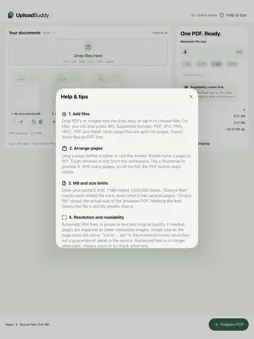
Description
Prepare documents for upload portals. Combine PDFs and images, arrange pages and adjust the file size to your limit. 1. Add files 2. Reorder and rotate pages 3. Set a size limit in MB 4. Check the result and resolution 5. Save one PDF Automatic mode first tries to preserve text and quality. If needed, it reduces resolution. Images keep their size on the page. See the source file size, actual output size and raster resolution. Warnings explain strong compression or an exceeded limit. UploadBuddy processes your documents directly on your Mac or iPad. Original files stay unchanged. No account, no ads, no subscription. Supports PDF, JPG, PNG, HEIC, TIFF and WebP. Up to 150 pages and 60 MB per source file. Export Word documents as PDF first. Check small text in the preview. Workspaces are not saved when you quit.
What's New
Version 1.0.1 2026-10-03
Updated localized App Store information. Local processing and all existing features remain unchanged. Technical Analysis
Package Overview Basic metadata
Bundle ID
com.thomaspentzek.UploadBuddy Current Version 1.0.1
Minimum iOS 17.0
Package Size App Store Size
Package Metadata 0 / 0 version records
Detailed binary, privacy manifest, framework, and Info.plist results have not been indexed for this package yet. The verified App Store and archive metadata above remains available.
Known Version Records
0 version records with stored package metadata
Stored metadata does not guarantee a package is currently available to download.
| Details | Version / IDs | Version date | Action |
|---|