
Preview





Description
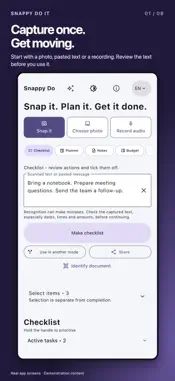
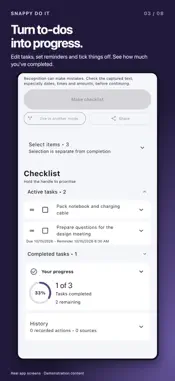
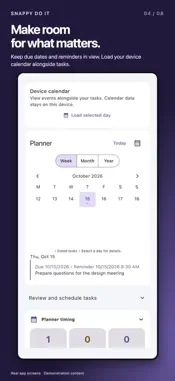
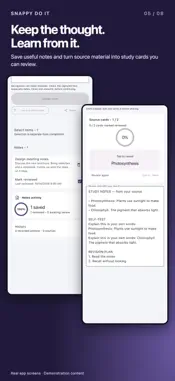
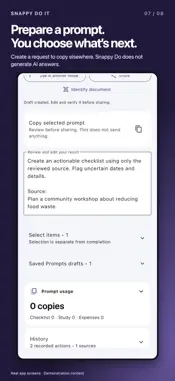
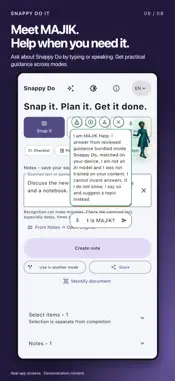
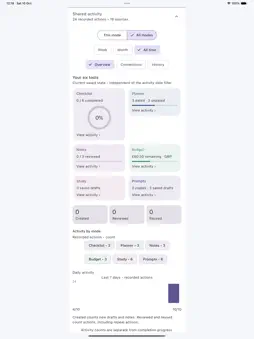
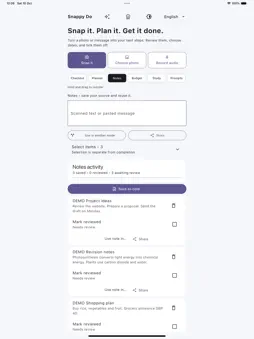
Snap it. Plan it. Get it done. Turn a photo, pasted text or a voice recording into something useful. Keep your tasks, plans, notes, spending and study material together in one app. Pay once for permanent access to the included local tools. No subscription is required for those tools. Six ways to use your content Checklist helps you turn text into tasks. Review the suggestions, edit them and tick them off when finished. Planner keeps dated tasks and reminders together. You can also view events from your phone calendar alongside your tasks. Loaded days are kept on your device and refreshed when you return. Review detected dates from photos, existing images, transcribed audio or text, then save to Snappy Do Planner, your phone calendar or both in one step. Check duplicates and clashes before saving. Adding to your phone calendar requires your confirmation and calendar permission. Saved copies are independent; later edits do not sync between calendars. Notes keeps information you want to save and use again. Budget lets you check captured expenses and save them once to an existing budget, a new budget, or Unassigned. Create and rename budgets with optional spending limits. Edit, assign, move, delete and restore expenses without retyping. Deleting a budget keeps its expenses unassigned. Budget overview shows current saved spending across budgets and Unassigned, with separate currency totals and warnings when a limit is exceeded. You check the amounts yourself. It does not connect to your bank. Study turns your material into cards you can review. See how many cards you have reviewed and how many are left. Prompts helps you prepare a request to copy into another tool. It does not generate AI answers or send your text automatically. Use the same content in different ways Select one or more saved items and choose Use selected in. Send them to one, several or all other modes. Review the content in its new place while keeping a link to its original source. Share selected items through your phone's share menu. Each mode has a clear Create or Make button and a short hint. Your result or approval step comes into view after creation. Source and Review keeps a local source image for comparison; retained images are included in your readable backups. You can reuse your text in another mode. Help when you need it Ask MAJIK how to use the app by typing or speaking. It provides guidance about Snappy Do's features across all six modes. You can choose Listen to reply to hear its answer using an available system voice on your phone. It does not copy your voice. Recording and spoken replies Record and replay audio. Transcribe recordings locally when supported by your device and language. Listen to reply uses an available system voice on your phone. It does not copy your voice. Stay in control Check recognised text, dates, times and amounts before using them. Clear photos give better results. Recognition can make mistakes. See your progress in each mode and look back through History. These summaries show your recorded activity, not a measure of learning ability. Restore supported deleted items from Trash, or confirm permanent deletion when you are ready. Use backup and restore to keep a copy of your app data. Camera, microphone, calendar and notification permissions are requested for the features that need them. Support: [email protected] Privacy enquiries: [email protected] Website: https://snappydoit.com Privacy policy: https://snappydoit.com/privacy/ Edit reused items independently in their destination mode. The original and other copies stay unchanged. Follow each item through the Mind map and Open original. Duplicate warnings let you open an existing item or create an intentional copy. Choose a built-in or custom document type, or confirm Unclassified and update it later.
What's New
Version 1.0.10 2026-10-27
A clearer journey from capture to result: • Add → Review → Make → Result shows your next step across all six modes. • Try a fictional example when starting. • R... Technical Analysis
Package Overview Basic metadata
Bundle ID
com.onetechadmin.pocketPlanner Current Version 1.0.10
Minimum iOS 15.5
Package Size App Store Size
Package Metadata 0 / 0 version records
Detailed binary, privacy-manifest, framework, and Info.plist results have not been indexed for this package yet. The verified App Store and archive metadata above remains available.
Developer Information
Known Version Records
0 version records with stored package metadata
Stored metadata does not guarantee a package is currently available to download.
| Details | Version / IDs | Version date | Action |
|---|