
Preview







Description
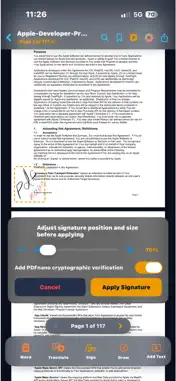
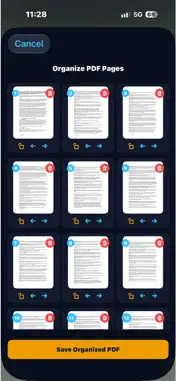
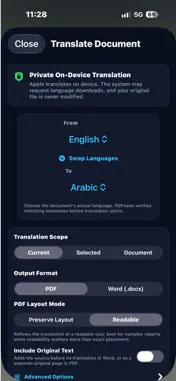
PDF nano is a comprehensive, professional PDF reader, editor, translator, and manager engineered for speed and privacy. Combining powerful on-device tools with Apple Intelligence, PDF nano delivers a unified workflow tailored for iPhone, foldable iPhone Duo, and iPad—handling your contracts, reports, and paperwork with top-tier security. Key Features: 1. Foldable iPhone Duo & iPad Experience: • Seven Postures Adaptation: Automatic layout across foldable and dual-display devices. • Dual-Screen Book Mode: Side-by-side reading with automatic hinge isolation to prevent content clipping. • Tabletop Mode: Bottom screen transforms into a control deck for drawing, signing, and scrubbing without covering the document. • Dynamic iPad Sidebar: Instant browsing of thumbnails, outlines, and bookmarks beside your canvas. • High-Contrast Navigation Pill: Prominent back button for effortless touch accessibility and zero status-bar overlap. 2. AI Document Assistant (Beta): • Instant executive summaries of lengthy reports, extracting decisions and action items. • Precision risk analysis and contractual obligation detection. • Verifiable Q&A with answers grounded in direct textual citations from your document. • Encrypted Cloud Privacy: Powered by Apple Intelligence and Private Cloud Compute (PCC) to process documents securely without logging or storing data. *Note: AI features require Apple Intelligence-compatible devices. 3. Offline Document Translation (Beta): • Full-document PDF translation entirely offline while preserving layouts, fonts, and tables. • Batch approval to accelerate processing for files up to 100 pages. • Granular paragraph review with selective editing for each translated block. *Note: Translation operates fully on-device. Machine translations may contain errors. 4. Advanced Reading & Viewing: • Dual-Page Continuous View: True book-like reading with native RTL Arabic and LTR layout. • Distraction-Free Guard: Locks editing overlays during reading mode to prevent accidental markups. • Fast-Scrub Vertical Scroll: High-velocity thumb scrubber for jumping through hundreds of pages. • Full Interface Adaptation: Precision safe-area integration around the Dynamic Island and status bar. • Smart Double-Tap Zoom: Rapid focus scaling with an intuitive floating navigation capsule. • OCR Visual Search: Direct in-document search across scanned PDFs with fuzzy and multi-word query support. 5. Conversion & Smart Scanning: • High-Fidelity PDF to Word (.docx) conversion preserving tables and formatting. • Accurate Table Extraction to Excel (.xlsx) with automatic data type inference. • Camera Document Scanner to digitize receipts and paperwork into clean PDFs. • High-quality PDF-to-Image and multi-image-to-PDF conversion pipelines. 6. Editing, Signing & Organization: • Digital signatures: Create, position, and cryptographically sign contracts and forms. • Complete markup suite: Freehand drawing, highlighters, custom text boxes, and annotations. • Page management: Reorder, rotate, extract, or delete pages with fluid drag-and-drop. • Merge & Split: Combine multiple PDFs into one or split large documents into individual files. • Smart PDF Compression: Reduce file size for rapid sharing via email and messaging apps. 7. Industry-Leading Privacy & Security: • 100% On-Device Processing: Reading, editing, translation, OCR, and conversion run locally without uploading files to external servers. • Cryptographic Apple Privacy: AI Assistant requests are strictly restricted to Apple Private Cloud Compute (PCC). • Visual face and sensitive data blurring with hidden metadata sanitization. • Password encryption, native AirPrint support, and Home Screen widgets. Free tier includes daily tool quotas. Unlock unlimited access via in-app purchase. Standard Terms of Use (EULA): https://www.apple.com/legal/sla/
What's New
Version 3.1 2026-10-27
Version 3.1 brings full support across the entire Apple ecosystem, along with an ultra smooth and reliable reading experience on every screen: • Full Apple Eco...Version 3.1 brings full support across the entire Apple ecosystem, along with an ultra smooth and reliable reading experience on every screen: • Full Apple Ecosystem Support: Flawlessly optimized for standard iPhones, Pro models, foldable devices like iPhone Duo, and all iPad sizes, delivering a seamless experience across all orientations. • Rock Solid Stability and Fast Document Opening: Deep engine improvements ensure every PDF opens instantly and navigates smoothly without unexpected freezing or app closures, even with large or complex files. • Authentic Book Reading Experience: Enjoy an automatic dual page view on iPads or when folding your device like an open book, complete with native right to left reading support for Arabic documents. • Advanced Apple Pencil and Touch Precision: Instantly switch between pen and eraser with a double tap on Apple Pencil. Smoothly pan and zoom with two fingers while sketching, with enlarged buttons designed for comfortable tapping. • Clean and Centered Visual Design: Search bars, floating navigation docks, and tool grids are perfectly centered for effortless one hand use on phones and elegant layout balance on large tablet displays. Technical Analysis
Package Overview Basic metadata
Bundle ID
PDFnano.PDFnano-ios Current Version 3.1
Minimum iOS 18.6
Package Size App Store Size
Package Metadata 0 / 0 version records
Detailed binary, privacy manifest, framework, and Info.plist results have not been indexed for this package yet. The verified App Store and archive metadata above remains available.
Developer Information
Known Version Records
0 version records with stored package metadata
Stored metadata does not guarantee a package is currently available to download.
| Details | Version / IDs | Version date | Action |
|---|