Preview



Description
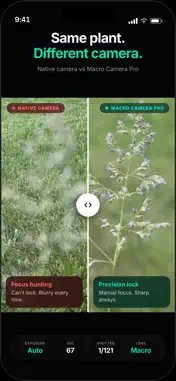
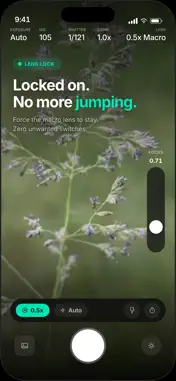
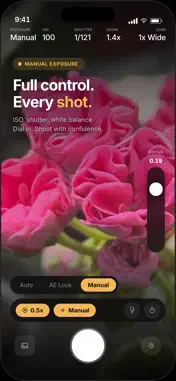
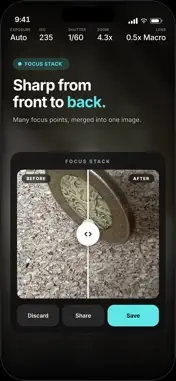
The native camera decides where to focus. This one lets you decide. Macro Camera Pro gives you manual control over focus, lens and exposure — on every iPhone. —— WHY THE NATIVE CAMERA FAILS AT MACRO Get close to a tiny subject and the native camera hunts focus back and forth, jumps between lenses without warning, and resets the moment you move. You fight the automation instead of shooting. Macro Camera Pro eliminates all three problems. —— MANUAL FOCUS SLIDER A large vertical slider lets you dial in focus with millimeter precision. Haptic feedback gives you a physical tick for every adjustment — it feels like turning a real lens ring. No more tap-to-focus guessing. LENS LOCK Lock the lens you want and the app stays on it. No automatic switching, ever. Your composition stays intact. FOCUS PEAKING Real-time edge highlights show you exactly what is in focus before you shoot. See the sharp plane at a glance. Adjust. Shoot with confidence. MANUAL EXPOSURE Full control over ISO and shutter speed. Lock exposure independently from focus. Switch between Auto, AE Lock, and Manual in one tap. VARIABLE TORCH A dimmable LED fill light illuminates your subject without the harshness of flash. Reveal textures and details invisible in ambient light. HARDWARE SHUTTER Use your iPhone volume button to trigger the shutter — less hand movement means sharper macro shots. FOCUS STACK Capture several frames at different focus points and merge them into one image with more of your subject sharp. Works best on still subjects with a steady hand — the more depth your subject has, the bigger the difference. —— WILL IT WORK ON MY IPHONE? Yes. Manual focus, lens lock, focus peaking, focus stacking, the torch and GPS tagging work on every iPhone that runs iOS 18. Focusing all the way down to 2 cm needs an Ultra Wide camera with autofocus. Every Pro model since iPhone 13 Pro has one, and so does every standard model from iPhone 16 onward. The e-series and iPhone Air have a single camera and no Ultra Wide at all. On every other iPhone the main camera focuses to roughly 20 cm — and clip-on macro lenses work beautifully, because a clip-on lens defeats autofocus entirely and manual focus is the only way to use one properly. Not sure which one you have? The app measures your iPhone's closest focus distance and shows it on first launch, and the 5-day trial costs nothing. CAPTURE Full-resolution JPEG or HEIF, multiple aspect ratios, and adjustable focus peaking strength (Light, Medium, Bold). —— HONEST PRICING 5-day free trial — full Pro access, no credit card required. One-time unlock — pay once, own it forever. No subscription. No hidden fees. —— PRIVACY FIRST No account. No tracking. No analytics. Photos stay on your device. Works fully offline.
What's New
Version 1.9 2026-09-11
A calmer first launch. Macro Camera Pro no longer asks for your location when you open it. Nothing interrupts the camera before you have taken a shot — the geo... Technical Analysis
Package Overview Basic metadata
Bundle ID
com.deeptap.Macro-Camera-Pro Current Version 1.9
Minimum iOS 18.0
Package Size App Store Size
Package Metadata 0 / 5 version records
Detailed binary, privacy manifest, framework, and Info.plist results have not been indexed for this package yet. The verified App Store and archive metadata above remains available.
Known Version Records
0 version records with stored package metadata • 5 known version records
Stored metadata does not guarantee a package is currently available to download.
| Details | Version / IDs | Version date | Action |
|---|---|---|---|
| Not archived | App Store ID: 887547365 | Unknown | Request Version |
| Not archived | App Store ID: 886300741 | Unknown | Request Version |
| Not archived | App Store ID: 886013035 | Unknown | Request Version |
| Not archived | App Store ID: 885930259 | Unknown | Request Version |
| Not archived | App Store ID: 881608469 | Unknown | Request Version |